Unity
MK Manga – Ink & Stylized Shader
$59.90
Rated 0.0/5 from 1 ratings on Unity.
About MK Manga – Ink & Stylized Shader
- Theme > Stylized
- Art & Visuals > VFX
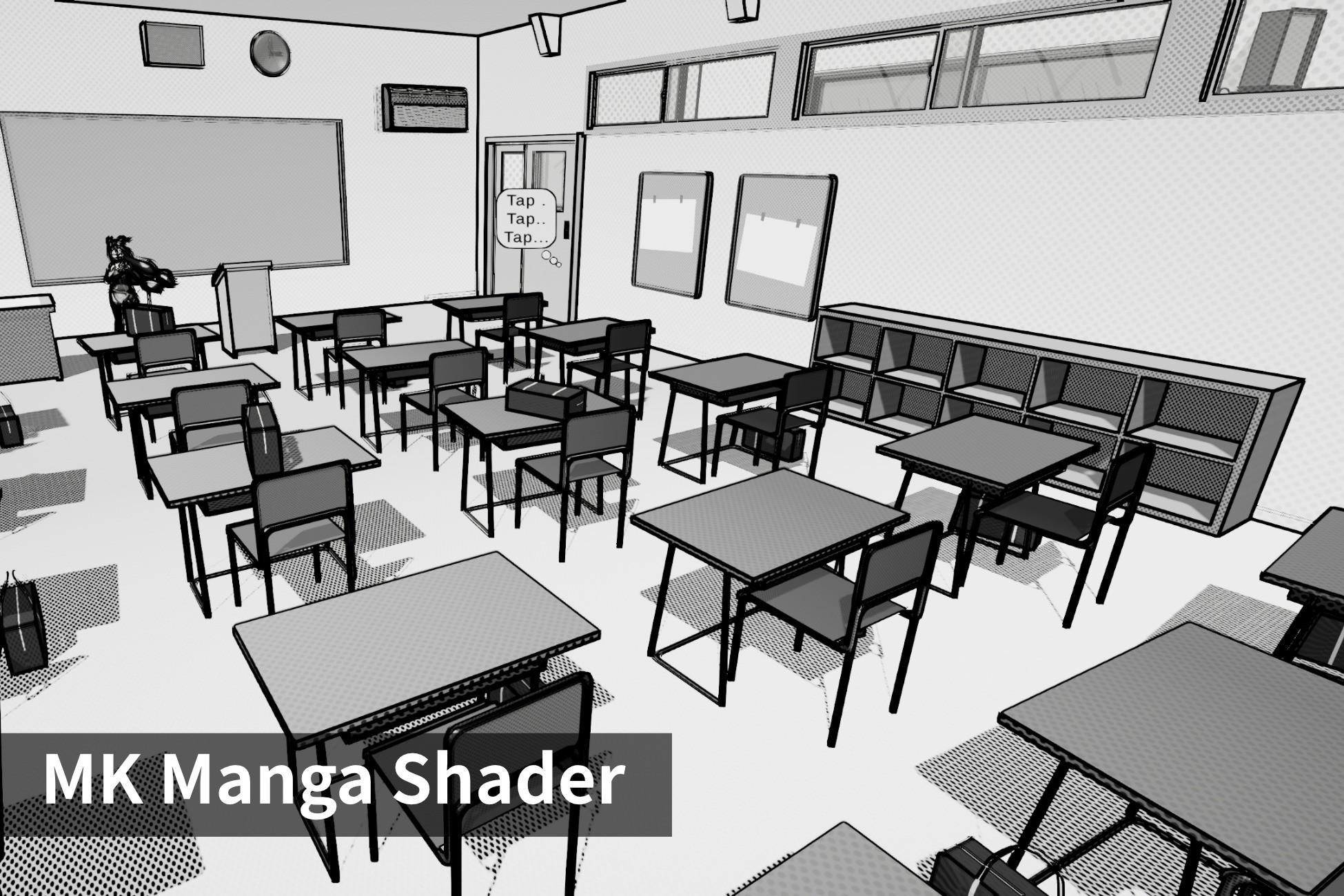
MK Manga is an ink-based, stylized shader that transforms 3D models into authentic manga-style artwork. It supports both grayscale and full-color shading, making it ideal for manga, comics, and toon-style visuals.
6 Core shaders for unlit, simple lighting and physically based lighting. Those shaders are very flexible and can turn any input into a manga style shading. Per-object outline variants are also available.
UI Shaders. Create speech bubbles using outlines and stencil.
Extra shaders for hair and skin to come even closer to a manga-like style.
Gradient skybox shader. Lets you create simple greyscale gradient skyboxes.
Gooch Lighting and Color Control. Interpolate shadows and highlights into specific colors, and adjust contrast, saturation, and brightness with pre- and post-composite modes. You can even choose from three styles of how the grayscale conversion is created. However this shader is not limited to grayscale color only.
Physically-Based and Customizable. Supports albedo, emission, normal, height, and occlusion maps with detail enhancements. You can follow a common physically based workflow and all properties are converted into a manga style.
Dynamic Cel Shading. Define the base lighting style of your scene with crisp cel shading. Easily tweak smoothness, thresholds, and layers to capture a wide range of manga-inspired lighting effects.
An optional second cel layer can further refine your lighting.
Stylized Shadows. Achieve sharp, bold shadows or smooth gradients, fully customizable to match manga's iconic high-contrast style. Shadows are stylized with fine control over smoothness and thresholds.
Gradient Overlay. Add subtle gradients to your objects with two customizable colors and a 3D direction, enhancing the albedo and overall look of your scene.
Texture Projections. For many features you can choose from multiple projection modes to apply patterns seamlessly:
- Regular UV.
- Screen Space.
- Stabilized Screen Space (minimizes scrolling effects).
- Triplanar (Object or World Space).
Per-object Outlines. Outlines are customizable per object and fading with distance for a polished look. Additional parameters will help you to create a good-looking per-object outline even on objects with difficult geometry.
Pen Styles for Shading. Replicate classic manga shading with three unique pen styles:
- Cross Hatching: Add depth with six-step hatch patterns.
- Pattern Overlay: Overlay dots or textures on lit or shadowed areas.
- Sketch: Use custom textures for pencil-like scribbles or sketches.
Silhouette Shading. Create rim lighting effects with two modes:
- Single Color for consistent highlights.
- Split Lit/Shadow Colors for more dynamic effects.
Projective Overlays. Overlay scalable patterns onto your meshes, such as grids or textures. Includes all projection modes for seamless integration.
Ink and Strokes. Overlay textures or procedurally generate strokes to simulate inner lines and brushwork, adding depth and authenticity to your models.
Texture Mode: Overlay user-provided textures for inner lines or blotches.
Brush Mode: Detect edges procedurally based on an input texture (for example your albedo map) and generate strokes automatically.
Stutter/Redrawn Effects. Simulate a hand-drawn or animated feel with subtle stuttering or redrawing patterns for dynamic, lively shading.
6 Core shaders for unlit, simple lighting and physically based lighting. Those shaders are very flexible and can turn any input into a manga style shading. Per-object outline variants are also available.
UI Shaders. Create speech bubbles using outlines and stencil.
Extra shaders for hair and skin to come even closer to a manga-like style.
Gradient skybox shader. Lets you create simple greyscale gradient skyboxes.
Gooch Lighting and Color Control. Interpolate shadows and highlights into specific colors, and adjust contrast, saturation, and brightness with pre- and post-composite modes. You can even choose from three styles of how the grayscale conversion is created. However this shader is not limited to grayscale color only.
Physically-Based and Customizable. Supports albedo, emission, normal, height, and occlusion maps with detail enhancements. You can follow a common physically based workflow and all properties are converted into a manga style.
Dynamic Cel Shading. Define the base lighting style of your scene with crisp cel shading. Easily tweak smoothness, thresholds, and layers to capture a wide range of manga-inspired lighting effects.
An optional second cel layer can further refine your lighting.
Stylized Shadows. Achieve sharp, bold shadows or smooth gradients, fully customizable to match manga's iconic high-contrast style. Shadows are stylized with fine control over smoothness and thresholds.
Gradient Overlay. Add subtle gradients to your objects with two customizable colors and a 3D direction, enhancing the albedo and overall look of your scene.
Texture Projections. For many features you can choose from multiple projection modes to apply patterns seamlessly:
- Regular UV.
- Screen Space.
- Stabilized Screen Space (minimizes scrolling effects).
- Triplanar (Object or World Space).
Per-object Outlines. Outlines are customizable per object and fading with distance for a polished look. Additional parameters will help you to create a good-looking per-object outline even on objects with difficult geometry.
Pen Styles for Shading. Replicate classic manga shading with three unique pen styles:
- Cross Hatching: Add depth with six-step hatch patterns.
- Pattern Overlay: Overlay dots or textures on lit or shadowed areas.
- Sketch: Use custom textures for pencil-like scribbles or sketches.
Silhouette Shading. Create rim lighting effects with two modes:
- Single Color for consistent highlights.
- Split Lit/Shadow Colors for more dynamic effects.
Projective Overlays. Overlay scalable patterns onto your meshes, such as grids or textures. Includes all projection modes for seamless integration.
Ink and Strokes. Overlay textures or procedurally generate strokes to simulate inner lines and brushwork, adding depth and authenticity to your models.
Texture Mode: Overlay user-provided textures for inner lines or blotches.
Brush Mode: Detect edges procedurally based on an input texture (for example your albedo map) and generate strokes automatically.
Stutter/Redrawn Effects. Simulate a hand-drawn or animated feel with subtle stuttering or redrawing patterns for dynamic, lively shading.