About Weather FX - 34 Rain, Snow & Fog VFX
- Theme > Retro & Arcade
- Theme > Nature & Countryside
- Art & Visuals > VFX
12 animated 2D weather effects for Unity, one line of C# each. Every effect is a single shader on a single quad: no textures, no particle systems, sharp at any size.
var rain = WeatherFX.Add("rain").Set("density", 0.8f);
WeatherFX.Add("fog").Set("color", new Color(0.9f, 0.9f, 1f)).FadeIn(3f);
WeatherFX.Add("water").Place(new Vector2(-6.4f, -1.4f), new Vector2(12.8f, 2.2f));
var storm = WeatherFX.Add("lightning");
storm.Strike();
rain.Stop(2f);
What's inside
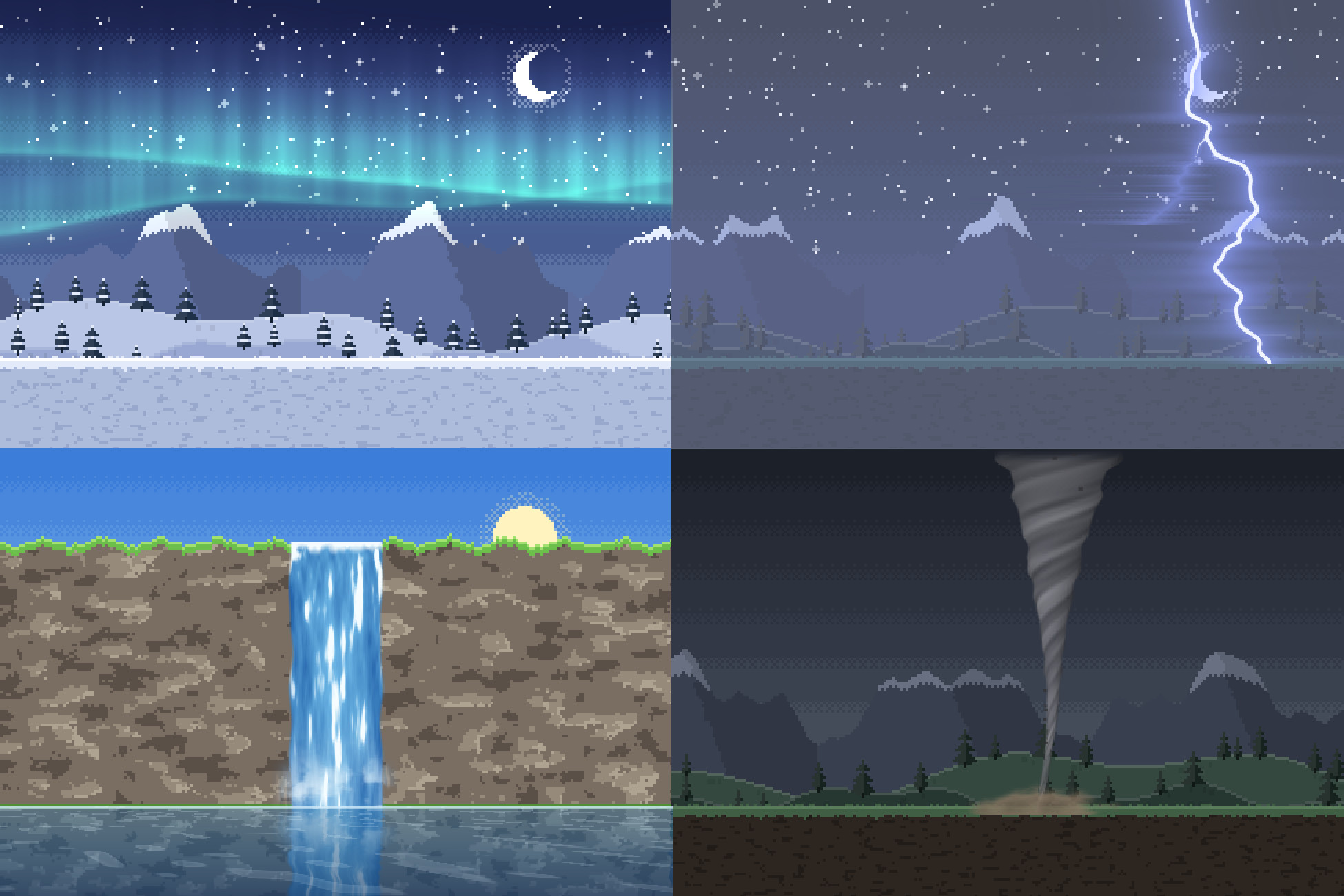
Weather that covers the camera's view and follows it: rain (with splashes), snow, fog, lightning, falling leaves or petals, cloud shadows, god rays, heat haze.
Water: a lake that reflects your scene with waves and glints, a waterfall with foam and mist, underwater caustics.
Time of day: day_night tints the whole scene from dawn through noon and dusk to night, held or cycling.
- Colour, strength, speed and wind on every effect, plus settings of its own: density, drop length, fog height, ray count, wave height, strike frequency...
- Pixel-art mode: set PixelSize on one effect, or WeatherFX.DefaultPixelSize once for the whole game, and the effects draw in crisp, world-aligned pixels that match your art.
- Layer them: rain over water with lightning, snow at night, fog under god rays.
- Patterns stay put in the world while the camera moves, orthographic or perspective.
- FadeIn() and Stop() for weather that comes and goes; Strike() for lightning on cue.
- Add a WeatherFX component to an object and it shows in the editor too.
- Demo scene: a pixel-art landscape in 11 moods, toggle and stack every effect.
Compatibility
Unity 6.3 or later, in any render pipeline: Built-in, URP (2D or Universal Renderer) and HDRP.
Either input handler for the demo: the Input Manager or the Input System.
var rain = WeatherFX.Add("rain").Set("density", 0.8f);
WeatherFX.Add("fog").Set("color", new Color(0.9f, 0.9f, 1f)).FadeIn(3f);
WeatherFX.Add("water").Place(new Vector2(-6.4f, -1.4f), new Vector2(12.8f, 2.2f));
var storm = WeatherFX.Add("lightning");
storm.Strike();
rain.Stop(2f);
What's inside
Weather that covers the camera's view and follows it: rain (with splashes), snow, fog, lightning, falling leaves or petals, cloud shadows, god rays, heat haze.
Water: a lake that reflects your scene with waves and glints, a waterfall with foam and mist, underwater caustics.
Time of day: day_night tints the whole scene from dawn through noon and dusk to night, held or cycling.
- Colour, strength, speed and wind on every effect, plus settings of its own: density, drop length, fog height, ray count, wave height, strike frequency...
- Pixel-art mode: set PixelSize on one effect, or WeatherFX.DefaultPixelSize once for the whole game, and the effects draw in crisp, world-aligned pixels that match your art.
- Layer them: rain over water with lightning, snow at night, fog under god rays.
- Patterns stay put in the world while the camera moves, orthographic or perspective.
- FadeIn() and Stop() for weather that comes and goes; Strike() for lightning on cue.
- Add a WeatherFX component to an object and it shows in the editor too.
- Demo scene: a pixel-art landscape in 11 moods, toggle and stack every effect.
Compatibility
Unity 6.3 or later, in any render pipeline: Built-in, URP (2D or Universal Renderer) and HDRP.
Either input handler for the demo: the Input Manager or the Input System.