Unity
Visual Shortcuts Deck: Editor Productivity Tool
$15
Rated 0.0/5 from 2 ratings on Unity.
Price history
Recorded standalone sale prices and the latest available store price, in USD. Historical dots use the sale start date and its recorded offer price. Prices can change during a sale; this is not a daily price log. Bundle prices and upcoming offers are excluded. History covers up to the 100 most recent recorded offers.
Lowest recorded standalone price in this history: $15. The latest store price is $15, matching the lowest recorded price shown here.
View 1 recorded price
| Sale start / price check | Price | Observation |
|---|---|---|
| $15 | Latest store price |
About Visual Shortcuts Deck: Editor Productivity Tool
- Tools, Systems & Learning > Development Tools & Automation
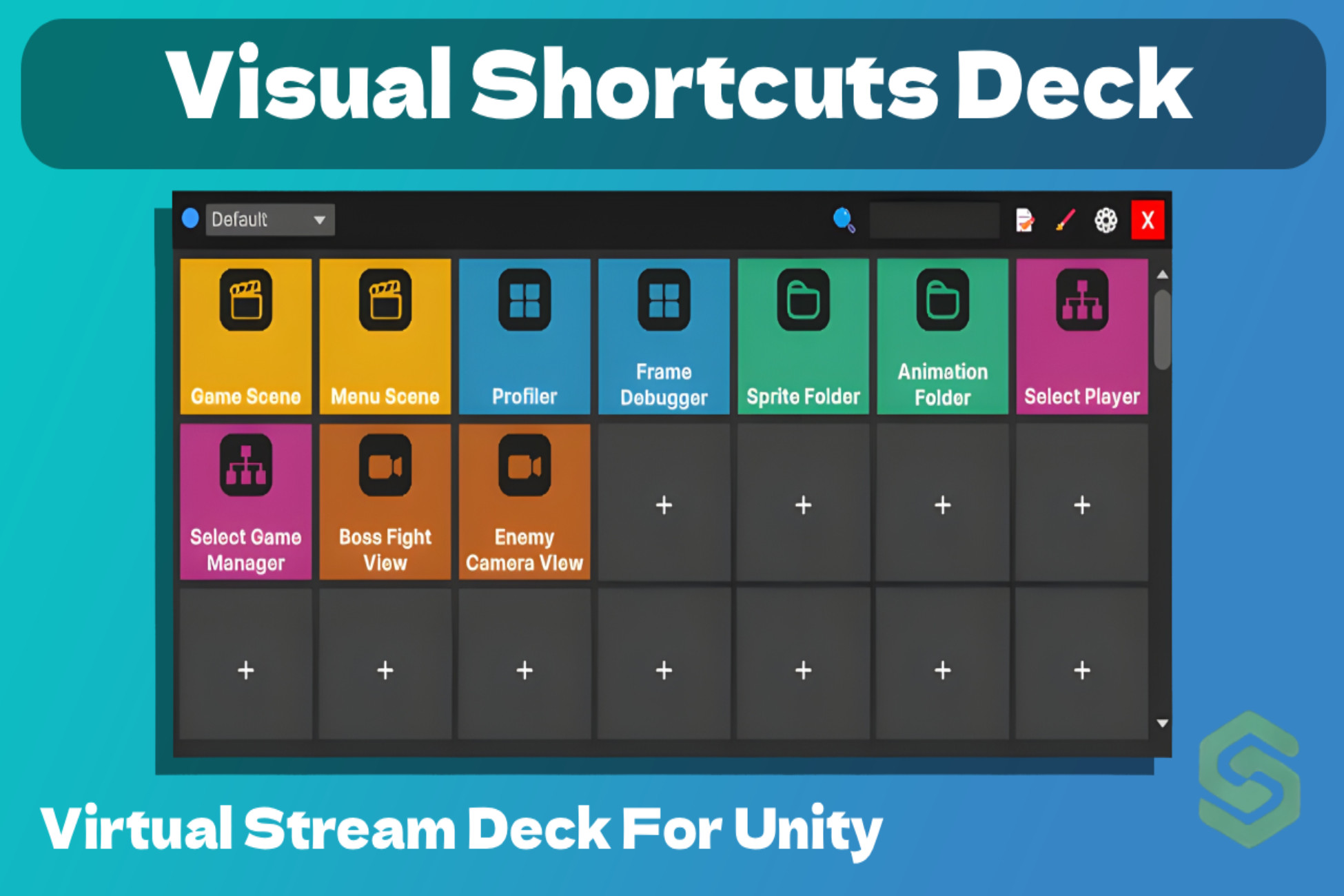
Visual Shortcuts Deck is a professional-grade productivity toolkit designed to eliminate repetitive navigation and menu-diving. Inspired by the efficiency of a physical Stream Deck, this lightweight editor extension puts up to 200 customizable quick-action buttons directly in your Scene View.
Whether you are a Level Designer switching between environments or a Developer executing complex menu commands, Visual Shortcuts Deck keeps your most-used tools exactly one click away.
Key Features:
- Virtual Action Deck: Create a visual grid of up to 200 buttons with custom icons and labels.
- Scene View Overlay: A floating, movable HUD that stays where you need it. No more switching between tabs.
- Powerful Profile System: Create unlimited profiles for different projects or workflows (e.g., Level Design, Coding, Lighting). Switch profiles instantly via a clean dropdown.
- One-Click Actions:
- Quick Scene Switching: Open any scene in your project instantly.
- Execute Menu Items: Bind any Unity Editor command (e.g., "Build Settings", "Clear Console", or custom scripts) to a button.
- SceneView Bookmarks: Save specific camera angles and positions to jump back to them in a second.
- Asset & Hierarchy Shortcuts: Instantly select specific assets in the Project folder or GameObjects in the Hierarchy.
- Visual Organization: Use Color-Coded Groups to categorize your buttons (e.g., Blue for Scenes, Red for Tools).
- Intuitive UX: Drag & Drop Reordering, Smart Search Bar, Custom Icon Picker.
Why Choose Visual Shortcuts Deck?
- Speed Up Your Workflow: Reduce hundreds of daily clicks to single actions.
- Context-Based Productivity: The Profile system allows you to adapt your workspace to the task at hand.
- Minimalist & Lightweight: Designed to be non-intrusive and highly optimized.
- Total Customization: Fully adjustable grid size (rows/columns), button sizes, and spacing.
Target Audience:
- Solo Devs: Stay organized without losing focus.
- Level Designers: Effortlessly jump between scenes and camera bookmarks.
- Tech Artists: Quick access to custom tools and menu commands.
- Teams: Share standardized profiles to keep everyone’s workflow in sync.
Compatibility:
Fully optimized for Unity 6 and Unity 2022 LTS. (Note: Compatibility with versions older than 2021.3 may be limited).
Whether you are a Level Designer switching between environments or a Developer executing complex menu commands, Visual Shortcuts Deck keeps your most-used tools exactly one click away.
Key Features:
- Virtual Action Deck: Create a visual grid of up to 200 buttons with custom icons and labels.
- Scene View Overlay: A floating, movable HUD that stays where you need it. No more switching between tabs.
- Powerful Profile System: Create unlimited profiles for different projects or workflows (e.g., Level Design, Coding, Lighting). Switch profiles instantly via a clean dropdown.
- One-Click Actions:
- Quick Scene Switching: Open any scene in your project instantly.
- Execute Menu Items: Bind any Unity Editor command (e.g., "Build Settings", "Clear Console", or custom scripts) to a button.
- SceneView Bookmarks: Save specific camera angles and positions to jump back to them in a second.
- Asset & Hierarchy Shortcuts: Instantly select specific assets in the Project folder or GameObjects in the Hierarchy.
- Visual Organization: Use Color-Coded Groups to categorize your buttons (e.g., Blue for Scenes, Red for Tools).
- Intuitive UX: Drag & Drop Reordering, Smart Search Bar, Custom Icon Picker.
Why Choose Visual Shortcuts Deck?
- Speed Up Your Workflow: Reduce hundreds of daily clicks to single actions.
- Context-Based Productivity: The Profile system allows you to adapt your workspace to the task at hand.
- Minimalist & Lightweight: Designed to be non-intrusive and highly optimized.
- Total Customization: Fully adjustable grid size (rows/columns), button sizes, and spacing.
Target Audience:
- Solo Devs: Stay organized without losing focus.
- Level Designers: Effortlessly jump between scenes and camera bookmarks.
- Tech Artists: Quick access to custom tools and menu commands.
- Teams: Share standardized profiles to keep everyone’s workflow in sync.
Compatibility:
Fully optimized for Unity 6 and Unity 2022 LTS. (Note: Compatibility with versions older than 2021.3 may be limited).