Price history
Recorded standalone sale prices and the latest available store price, in USD. Historical dots use the sale start date and its recorded offer price. Prices can change during a sale; this is not a daily price log. Bundle prices and upcoming offers are excluded. History covers up to the 100 most recent recorded offers.
Lowest recorded standalone price in this history: $7.99. The latest store price is $7.99, matching the lowest recorded price shown here.
View 1 recorded price
| Sale start / price check | Price | Observation |
|---|---|---|
| $7.99 | Latest store price |
About VfX Particles-Urp Brust
- Art & Visuals > 3D
- Art & Visuals > VFX
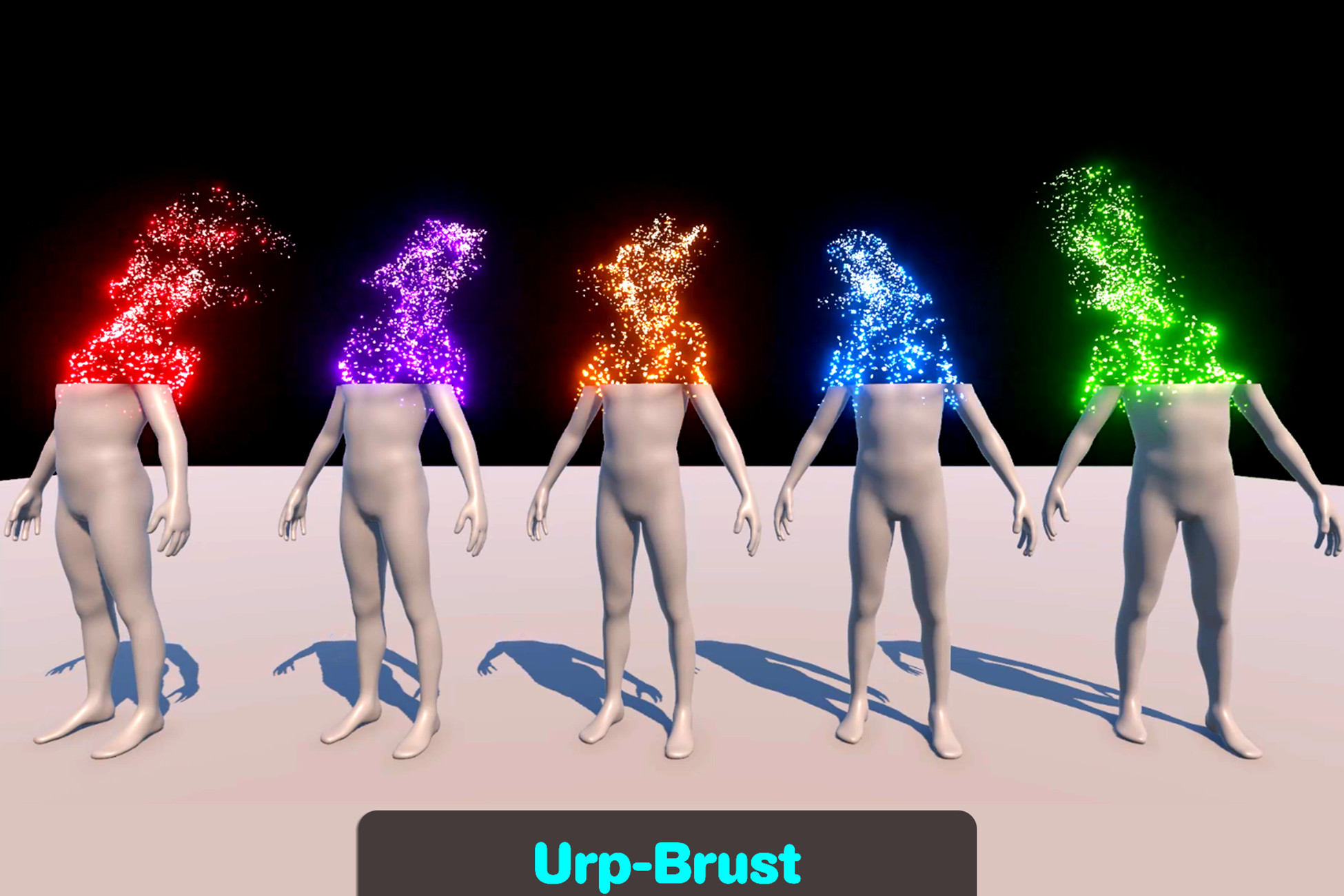
The effect is designed to simulate a character dissolving into particles, with customizable glowing cutting edges and bursts of particles synchronized with the dissolve animation. It includes properties that can be easily customized for different character models and scenes.
Features:
Dissolve Animation: Smooth transition of a character into particles, controlled by a single animation curve.
Particle Burst Effect: Particles burst outward along the dissolve edge using vfx graph.
Edge Highlight Shader: Glowing highlight effect at the cutting edges.
Customization:
Adjust PSEdge, CutEdge, mesh type, particle colors, and other effects for different models.
VFX Graph (BurstEffect)
Properties:
Mesh: The mesh used to emit particles. Typically the character's model mesh.
Transform: Controls the positioning, scaling, and rotation of emitted particles.
Force(Position): Force applied to particles, controlling their movement outward during the burst.
PSEdge: Defines the position of particle bursts based on the dissolve animation. Syncs with cut Edge.
Color: Sets the color gradient or palette for the particle effect.
Shader Graph (CutEdgeShader)
Properties:
CutEdge(float): The mesh used to emit particles. Typically the character's model mesh.
This pack contains the following features:
Animation: This folder contain the CharacterDisolve animation.
Materials: Contains CutEdge material for character/model.
Meshes: Consists of different meshes used vfx graph.
Model: Dummy Character used in demo.
Prefabs: It consists of 2 subfolders first one contains DissolveVFx Styles and their variations and second one contain the meshes prefabs that are used in Vfx graph.
Scene: It contain the demo scene.
Script: Consist of TestEffects script.
VFxGraph: Contain Bursts visual effect graph.
ShaderGraph: This folder contain the CutEdgeShader.
Features:
Dissolve Animation: Smooth transition of a character into particles, controlled by a single animation curve.
Particle Burst Effect: Particles burst outward along the dissolve edge using vfx graph.
Edge Highlight Shader: Glowing highlight effect at the cutting edges.
Customization:
Adjust PSEdge, CutEdge, mesh type, particle colors, and other effects for different models.
VFX Graph (BurstEffect)
Properties:
Mesh: The mesh used to emit particles. Typically the character's model mesh.
Transform: Controls the positioning, scaling, and rotation of emitted particles.
Force(Position): Force applied to particles, controlling their movement outward during the burst.
PSEdge: Defines the position of particle bursts based on the dissolve animation. Syncs with cut Edge.
Color: Sets the color gradient or palette for the particle effect.
Shader Graph (CutEdgeShader)
Properties:
CutEdge(float): The mesh used to emit particles. Typically the character's model mesh.
This pack contains the following features:
Animation: This folder contain the CharacterDisolve animation.
Materials: Contains CutEdge material for character/model.
Meshes: Consists of different meshes used vfx graph.
Model: Dummy Character used in demo.
Prefabs: It consists of 2 subfolders first one contains DissolveVFx Styles and their variations and second one contain the meshes prefabs that are used in Vfx graph.
Scene: It contain the demo scene.
Script: Consist of TestEffects script.
VFxGraph: Contain Bursts visual effect graph.
ShaderGraph: This folder contain the CutEdgeShader.