Price history
Recorded standalone sale prices and the latest available store price, in USD. Historical dots use the sale start date and its recorded offer price. Prices can change during a sale; this is not a daily price log. Bundle prices and upcoming offers are excluded. History covers up to the 100 most recent recorded offers.
Lowest recorded standalone price in this history: $10. The latest store price is $19.99.
View 4 recorded prices
| Sale start / price check | Price | Observation |
|---|---|---|
| $19.99 | Latest store price | |
| $19.99 | Unity Permanent Increase 2026-11-06 2026-11-13 | |
| $15 | Unity Permanent Increase 2026-10-31 2026-11-07 | |
| $10 | Unity First Price 2026-10-19 2026-10-19 |
Sale and bundle history
The 3 most recent recorded offers including this asset. Past offers may no longer be available. Bundle prices cover a package, not this asset alone.
About tsitski ProBuilder Tools
- Tools, Systems & Learning > Development Tools & Automation
- Tools, Systems & Learning > Level & World Building
I built these tools while doing level design for Partizan, my immersive sim FPS. I needed doors, windows, vents and tunnels in ProBuilder walls without hand-cutting geometry, and a few of the modelling conveniences I missed from Blender. They’ve saved me a lot of time, so I’m making them available to other devs building levels in ProBuilder.
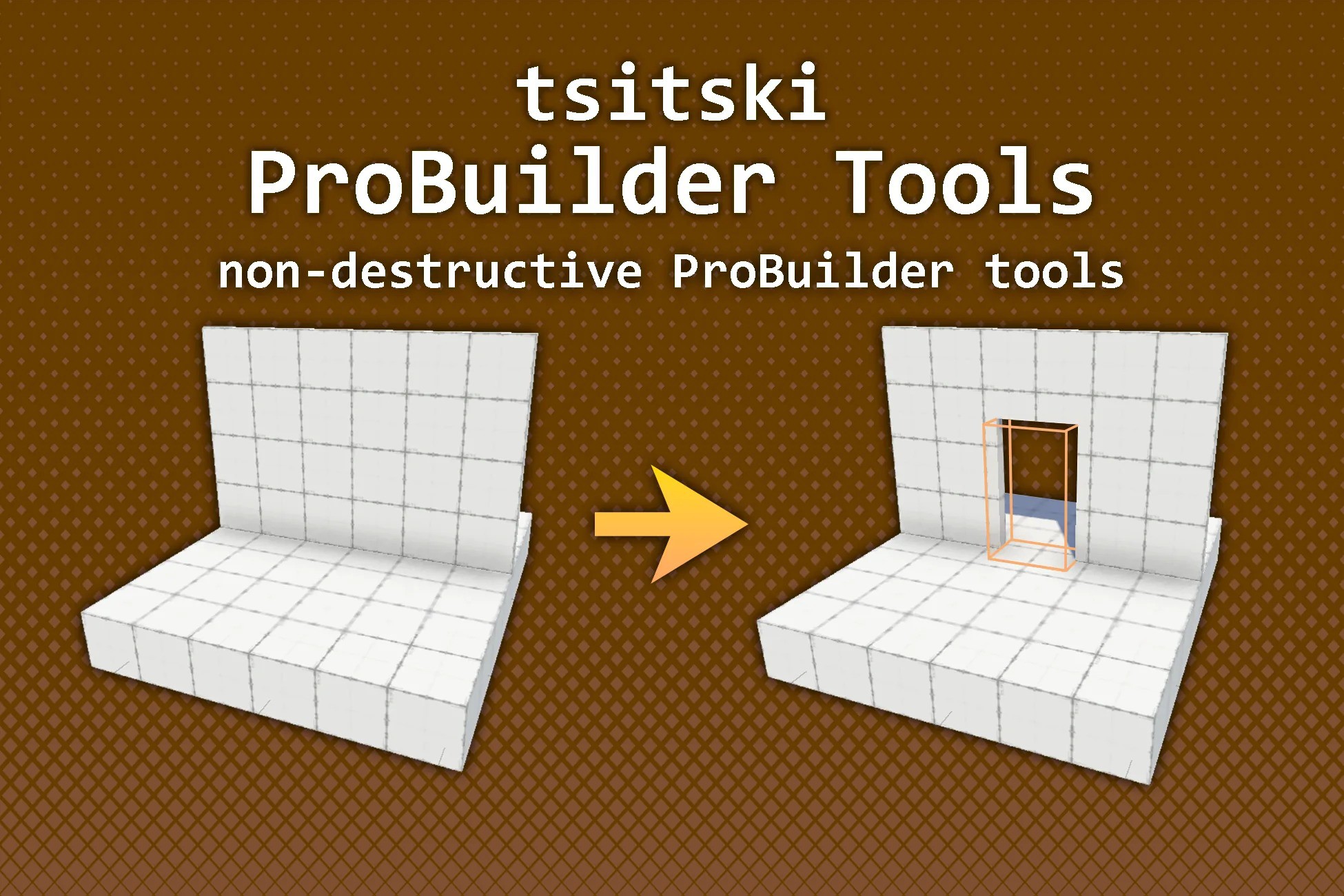
The main tool is the ProBuilder Cutter: a shape that cuts a hole through any ProBuilder mesh it overlaps, live in the editor. Place it where you want an opening and it subtracts its shape from the meshes it touches. It also builds the inside walls, so the opening looks like a real cut through a solid wall. Move, scale or rotate the cutter, or edit the mesh, and the cut updates immediately. Your original mesh is never modified.
Cutter Shapes:
- Box: a plain box, or round each of the four corners on its own. Round just the top two for an arched doorway, or all four for rounded windows.
- Cylinder: round holes, portholes and pipe openings, with an adjustable number of sides. A non-square size gives an oval.
- Polygon: draw any outline you like, concave shapes included, right in the Scene view. Select points with click, Shift+click or Shift+drag. Move, rotate and scale them with Unity’s normal W/E/R tools. Click an edge to add a point, and press Delete to remove points.
The cut result is a separate generated mesh shown in place of the original. Switch to a ProBuilder edit mode and the original comes back to edit. Switch back and the cut rebuilds. Cuts are saved as normal meshes, so nothing runs in play mode or in builds.
Alongside the cutter are three modelling tools:
- Bridge Faces
- Collapse Edges or Vertices
- Center Transform To Mesh
You can reach them from the Tools menu or an Alt+X popup in the Scene view.
The package isn’t tied to a genre. It’s for anyone blocking out or building levels in ProBuilder. It’s also customizable:
- Per-axis control over which inside walls are generated and where they end
- A choice of material for the inside walls
- A small editor scripting API
- Full source code
The main tool is the ProBuilder Cutter: a shape that cuts a hole through any ProBuilder mesh it overlaps, live in the editor. Place it where you want an opening and it subtracts its shape from the meshes it touches. It also builds the inside walls, so the opening looks like a real cut through a solid wall. Move, scale or rotate the cutter, or edit the mesh, and the cut updates immediately. Your original mesh is never modified.
Cutter Shapes:
- Box: a plain box, or round each of the four corners on its own. Round just the top two for an arched doorway, or all four for rounded windows.
- Cylinder: round holes, portholes and pipe openings, with an adjustable number of sides. A non-square size gives an oval.
- Polygon: draw any outline you like, concave shapes included, right in the Scene view. Select points with click, Shift+click or Shift+drag. Move, rotate and scale them with Unity’s normal W/E/R tools. Click an edge to add a point, and press Delete to remove points.
The cut result is a separate generated mesh shown in place of the original. Switch to a ProBuilder edit mode and the original comes back to edit. Switch back and the cut rebuilds. Cuts are saved as normal meshes, so nothing runs in play mode or in builds.
Alongside the cutter are three modelling tools:
- Bridge Faces
- Collapse Edges or Vertices
- Center Transform To Mesh
You can reach them from the Tools menu or an Alt+X popup in the Scene view.
The package isn’t tied to a genre. It’s for anyone blocking out or building levels in ProBuilder. It’s also customizable:
- Per-axis control over which inside walls are generated and where they end
- A choice of material for the inside walls
- A small editor scripting API
- Full source code