Unity
TMP RichText Editor - Rich Text Formatting for TextMesh Pro
$12.49
$24.99
50% off
About TMP RichText Editor - Rich Text Formatting for TextMesh Pro
- Tools, Systems & Learning > Development Tools & Automation
Typing and into that tiny TextMesh Pro box gets old fast. Miss one bracket and the tag shows up in your game.
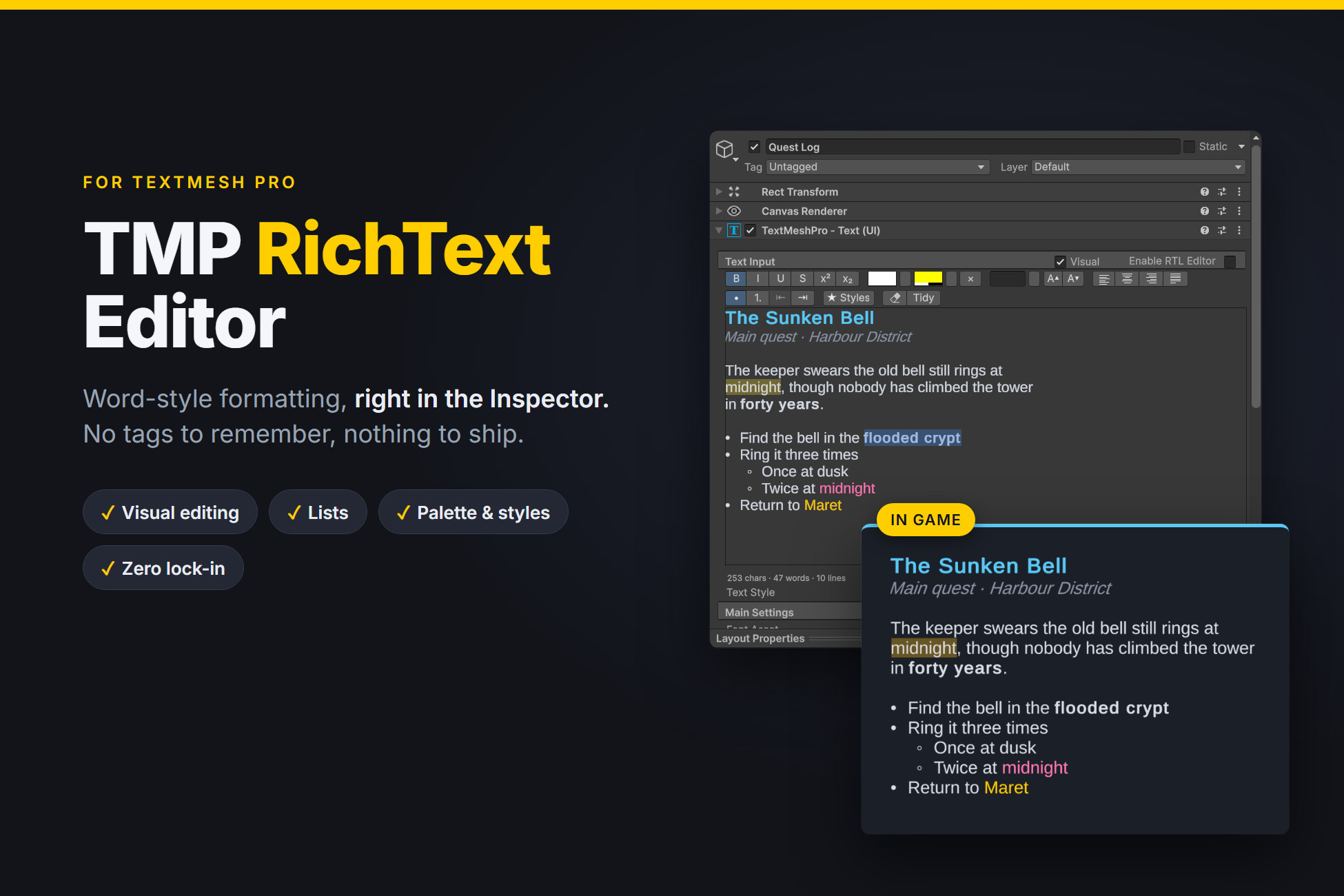
TMP RichText Editor puts a proper formatting toolbar in the TMP Inspector you already use. Select some text and hit B, or pick a colour, or make it a list. It writes the same TMP tags you would type yourself, you just don't have to type them.
There's no setup. Import it, click any TMP text and the toolbar's just there in the Inspector.
What you get
- A toolbar with bold, italic, underline, strikethrough, superscript, subscript, text colour, highlight, font size and alignment
- Visual mode. Tick one box and the tags disappear, so you edit the text the way it looks in game. All the buttons and shortcuts still work.
- Bullet and numbered lists that behave. Enter adds the next item, Tab nests it, Shift+Tab brings it back, and the numbers fix themselves.
- The shortcuts you already know: Ctrl+B, Ctrl+I, Ctrl+U, Ctrl+L/E/R/J to align, Ctrl+Shift+8 for bullets
- Tab types a tab (or changes the list level) instead of jumping out of the text box
- A shared colour palette and named styles like "Quest Title" or "Rare Item", saved in ProjectSettings so everyone on the team uses the same ones
- Font sizes you can click through, in pt or %
- A Tidy button that cleans out markup that doesn't do anything
- Ctrl+Z works on all of it, it's normal Unity undo
No lock-in
This was the part I cared about most. There's no component and no runtime code, and it doesn't put anything in your scenes or prefabs. It's all plain TMP rich text in the normal text field. Delete the folder and your text looks exactly the same as before.
Works with
- TextMeshPro - Text (UI) and TextMeshPro - Text (3D)
- Unity 6000.4 or newer
- Built-in, URP and HDRP. It's an editor tool, it never touches rendering.
Known limits
- Visual mode doesn't support IME input yet (Chinese, Japanese, Korean). Use the normal text box for those, the toolbar works there too.
- When you select several texts with different content, you get the normal TMP text box without the toolbar.
- No right-click menu in the text box yet. Ctrl+X/C/V/A work though.
There's a demo scene and a PDF manual in the package. If something doesn't work or you want a feature, email me at [email protected] and I'll take a look.
Please don't use reviews for bug reports, I can't reply there properly.
TMP RichText Editor puts a proper formatting toolbar in the TMP Inspector you already use. Select some text and hit B, or pick a colour, or make it a list. It writes the same TMP tags you would type yourself, you just don't have to type them.
There's no setup. Import it, click any TMP text and the toolbar's just there in the Inspector.
What you get
- A toolbar with bold, italic, underline, strikethrough, superscript, subscript, text colour, highlight, font size and alignment
- Visual mode. Tick one box and the tags disappear, so you edit the text the way it looks in game. All the buttons and shortcuts still work.
- Bullet and numbered lists that behave. Enter adds the next item, Tab nests it, Shift+Tab brings it back, and the numbers fix themselves.
- The shortcuts you already know: Ctrl+B, Ctrl+I, Ctrl+U, Ctrl+L/E/R/J to align, Ctrl+Shift+8 for bullets
- Tab types a tab (or changes the list level) instead of jumping out of the text box
- A shared colour palette and named styles like "Quest Title" or "Rare Item", saved in ProjectSettings so everyone on the team uses the same ones
- Font sizes you can click through, in pt or %
- A Tidy button that cleans out markup that doesn't do anything
- Ctrl+Z works on all of it, it's normal Unity undo
No lock-in
This was the part I cared about most. There's no component and no runtime code, and it doesn't put anything in your scenes or prefabs. It's all plain TMP rich text in the normal text field. Delete the folder and your text looks exactly the same as before.
Works with
- TextMeshPro - Text (UI) and TextMeshPro - Text (3D)
- Unity 6000.4 or newer
- Built-in, URP and HDRP. It's an editor tool, it never touches rendering.
Known limits
- Visual mode doesn't support IME input yet (Chinese, Japanese, Korean). Use the normal text box for those, the toolbar works there too.
- When you select several texts with different content, you get the normal TMP text box without the toolbar.
- No right-click menu in the text box yet. Ctrl+X/C/V/A work though.
There's a demo scene and a PDF manual in the package. If something doesn't work or you want a feature, email me at [email protected] and I'll take a look.
Please don't use reviews for bug reports, I can't reply there properly.
Current offers including this asset
-
View offer
Unity New Release Discount 2026-10-21 2026-11-04
Ends Nov 4, 2026
-
View offer
Unity New Release Discount 2026-10-21 2026-11-04
Ends Nov 4, 2026