Price history
Recorded standalone sale prices and the latest available store price, in USD. Historical dots use the sale start date and its recorded offer price. Prices can change during a sale; this is not a daily price log. Bundle prices and upcoming offers are excluded. History covers up to the 100 most recent recorded offers.
Lowest recorded standalone price in this history: $5.99. The latest store price is $5.99, matching the lowest recorded price shown here.
View 2 recorded prices
| Sale start / price check | Price | Observation |
|---|---|---|
| $5.99 | Latest store price | |
| $5.99 | Unity Permanent Decrease 2026-10-21 2026-10-28 |
Sale and bundle history
The 1 most recent recorded offers including this asset. Past offers may no longer be available. Bundle prices cover a package, not this asset alone.
About Throw Control 3D with Object Pool
- Tools, Systems & Learning > Game Templates & Systems
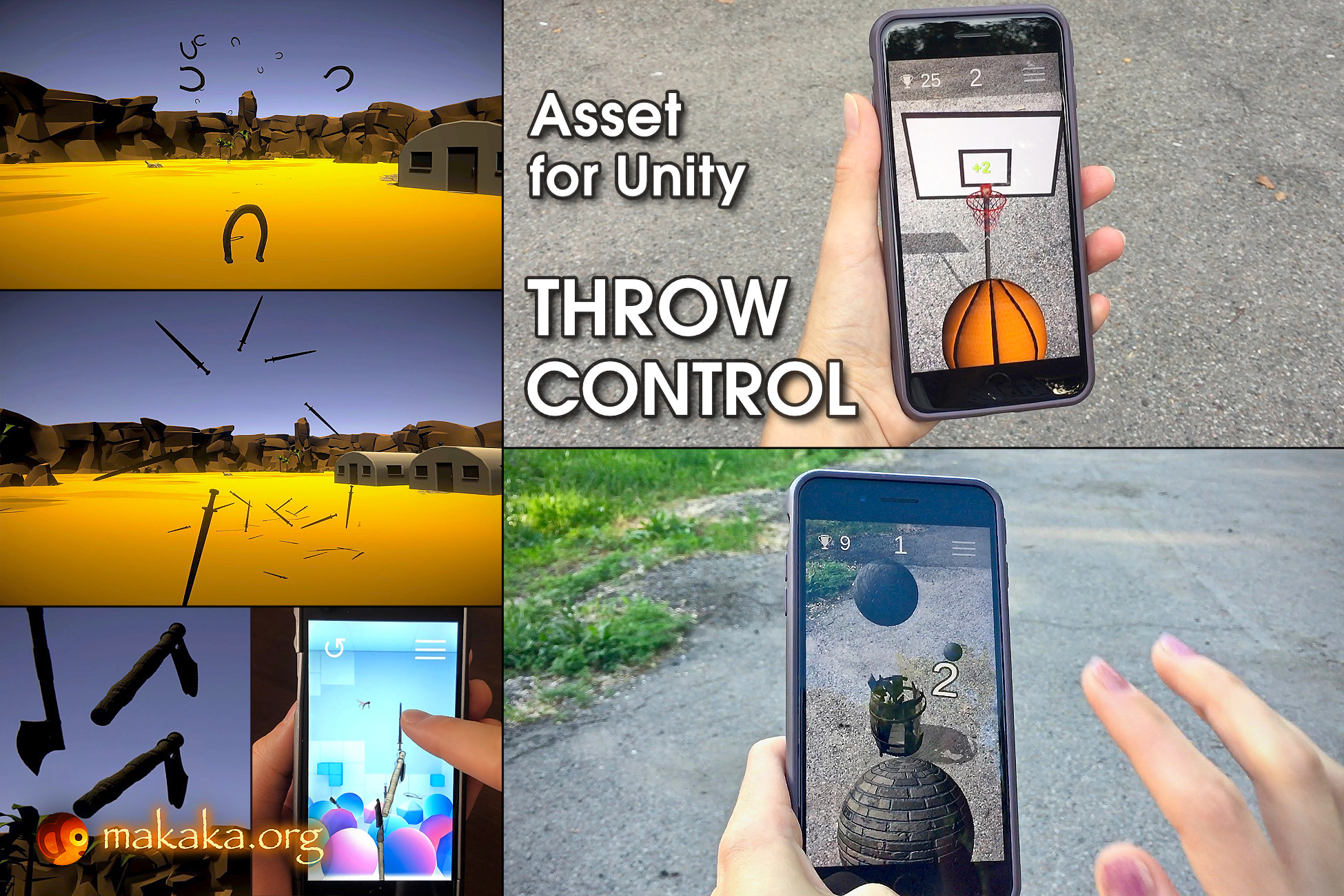
Throw Control 3D — highly customizable Advanced Throwing System.
Just throw anything!
Features
- Cross-platform (Mobile, Desktop) Throwing with 3 Modes:
- “Click Or Tap” (Easy),
- “Flick” (or Swipe: Hard),
- “Press Key” (Easy).
- Device Orientations: Portrait, Landscape.
- 80+ Customizable Parameters.
- 4 Demos: Mobile, Desktop.
- 7 Events.
- 11 customized Throwing Objects.
- Easy implementation of your own Throwing Objects.
- Dynamic Sound System.
- Dynamic Material System.
- Layer Changing: to avoid unwanted and mutual collisions.
- Object Pool for Throwing Objects to manage the memory.
Package Contains
- Cross-Platform Throw & Score Scene (Game Template) using the Sensor Camera (included): Toss Diligently and Try to Get the Best Score by Hitting the Target Containers without touching the Ground (Mode: “Click Or Tap”).
- Desktop FPS Demo Scene with Controls: Walk, Run, Jump, Throw — with Mode: “Click Or Tap”.
- 2 Demo Scenes with Static Camera:
- Cross-Platform (Mode: “Flick”).
- Desktop (Mode: “Press Key”). It also works on Mobiles with a separate Throwing Mode (“Click Or Tap”) that you can indicate in the Editor.
- Menu Scene.
- Loading Screen to switch scenes seamlessly.
80+ Customizable Parameters
Input Sensitivity, Force, Torque, Delays, Position, Rotation, Fading, etc:
- For all Throwing Objects at once,
- For each Throwing Object individually.
11 Customized Throwing Objects
- Weapons: Axe, Sword, Broken Sword;
- Balls: Basketball, Brick Balls (Grey, Red), Football;
- Miscellaneous: Coin, Shovel, Horseshoe, Tree/Branch.
Dynamic Sound System
Play Sounds based on Speed, Pitch, Volume factors of Throwing Objects upon:
- Throw,
- Custom Game Logic (e.g., for Customizing Collisions with Different Surfaces: floor, wall…).
Dynamic Material System
- Fading In & Fading Out: Dissolving/Appearing VFX,
- Material Changing in Runtime for Any Custom Game Logic (e.g., fail, win),
- Preventing Redundant Memory Allocations.
Throwing Modes
During an encounter with a target, a player may throw any object you want by:
- clicking/tapping any point on the screen;
- flicking/swiping the object from the bottom of screen up toward the target;
- pressing a target key on the keyboard.
All modes form different speed and throw direction based on the last position of the mouse cursor (or finger), what makes the game even more interesting.
The higher the last position of the mouse cursor (or finger) during the click (or tap, or key press), the greater the Throwing Force.
Throw Diligently & Hit the Targets!
For the First-Person Shooter (FPS) game, there is an option for fixing the input position in a specific place on the screen (by default in the center of the screen). So it will not depend on the mouse (or finger).
Use Cases
- Games in the style of:
- Pokemon GO, Can Knockdown, Paper Toss Boss, Paper Bin AR;
- AR Unity Assets by Makaka Games;
- Throw Flow Game;
- Sport Games: Basketball, Football.
- FPS, VR Games with Throwing Objects;
- Survival Games;
- Any of your Bold Fantasies.
Just throw anything!
Features
- Cross-platform (Mobile, Desktop) Throwing with 3 Modes:
- “Click Or Tap” (Easy),
- “Flick” (or Swipe: Hard),
- “Press Key” (Easy).
- Device Orientations: Portrait, Landscape.
- 80+ Customizable Parameters.
- 4 Demos: Mobile, Desktop.
- 7 Events.
- 11 customized Throwing Objects.
- Easy implementation of your own Throwing Objects.
- Dynamic Sound System.
- Dynamic Material System.
- Layer Changing: to avoid unwanted and mutual collisions.
- Object Pool for Throwing Objects to manage the memory.
Package Contains
- Cross-Platform Throw & Score Scene (Game Template) using the Sensor Camera (included): Toss Diligently and Try to Get the Best Score by Hitting the Target Containers without touching the Ground (Mode: “Click Or Tap”).
- Desktop FPS Demo Scene with Controls: Walk, Run, Jump, Throw — with Mode: “Click Or Tap”.
- 2 Demo Scenes with Static Camera:
- Cross-Platform (Mode: “Flick”).
- Desktop (Mode: “Press Key”). It also works on Mobiles with a separate Throwing Mode (“Click Or Tap”) that you can indicate in the Editor.
- Menu Scene.
- Loading Screen to switch scenes seamlessly.
80+ Customizable Parameters
Input Sensitivity, Force, Torque, Delays, Position, Rotation, Fading, etc:
- For all Throwing Objects at once,
- For each Throwing Object individually.
11 Customized Throwing Objects
- Weapons: Axe, Sword, Broken Sword;
- Balls: Basketball, Brick Balls (Grey, Red), Football;
- Miscellaneous: Coin, Shovel, Horseshoe, Tree/Branch.
Dynamic Sound System
Play Sounds based on Speed, Pitch, Volume factors of Throwing Objects upon:
- Throw,
- Custom Game Logic (e.g., for Customizing Collisions with Different Surfaces: floor, wall…).
Dynamic Material System
- Fading In & Fading Out: Dissolving/Appearing VFX,
- Material Changing in Runtime for Any Custom Game Logic (e.g., fail, win),
- Preventing Redundant Memory Allocations.
Throwing Modes
During an encounter with a target, a player may throw any object you want by:
- clicking/tapping any point on the screen;
- flicking/swiping the object from the bottom of screen up toward the target;
- pressing a target key on the keyboard.
All modes form different speed and throw direction based on the last position of the mouse cursor (or finger), what makes the game even more interesting.
The higher the last position of the mouse cursor (or finger) during the click (or tap, or key press), the greater the Throwing Force.
Throw Diligently & Hit the Targets!
For the First-Person Shooter (FPS) game, there is an option for fixing the input position in a specific place on the screen (by default in the center of the screen). So it will not depend on the mouse (or finger).
Use Cases
- Games in the style of:
- Pokemon GO, Can Knockdown, Paper Toss Boss, Paper Bin AR;
- AR Unity Assets by Makaka Games;
- Throw Flow Game;
- Sport Games: Basketball, Football.
- FPS, VR Games with Throwing Objects;
- Survival Games;
- Any of your Bold Fantasies.