Unity
SplatBridge — 3D Gaussian Splatting: Import, Stream & Play Real-World Scans
By Stray Cats
$49.99
Rated 0.0/5 from 1 ratings on Unity.
Price history
Recorded standalone sale prices and the latest available store price, in USD. Historical dots use the sale start date and its recorded offer price. Prices can change during a sale; this is not a daily price log. Bundle prices and upcoming offers are excluded. History covers up to the 100 most recent recorded offers.
Lowest recorded standalone price in this history: $24.99. The latest store price is $49.99.
View 4 recorded prices
| Sale start / price check | Price | Observation |
|---|---|---|
| $49.99 | Latest store price | |
| $49.99 | Unity First Price 2026-09-03 2026-09-03 | |
| $24.99 | Unity New Release Discount 2026-09-01 2026-09-15 | |
| $24.99 | Unity New Release Discount 2026-09-01 2026-09-15 |
Sale and bundle history
The 3 most recent recorded offers including this asset. Past offers may no longer be available. Bundle prices cover a package, not this asset alone.
About SplatBridge — 3D Gaussian Splatting: Import, Stream & Play Real-World Scans
- Tools, Systems & Learning > Development Tools & Automation
- Theme > Realistic
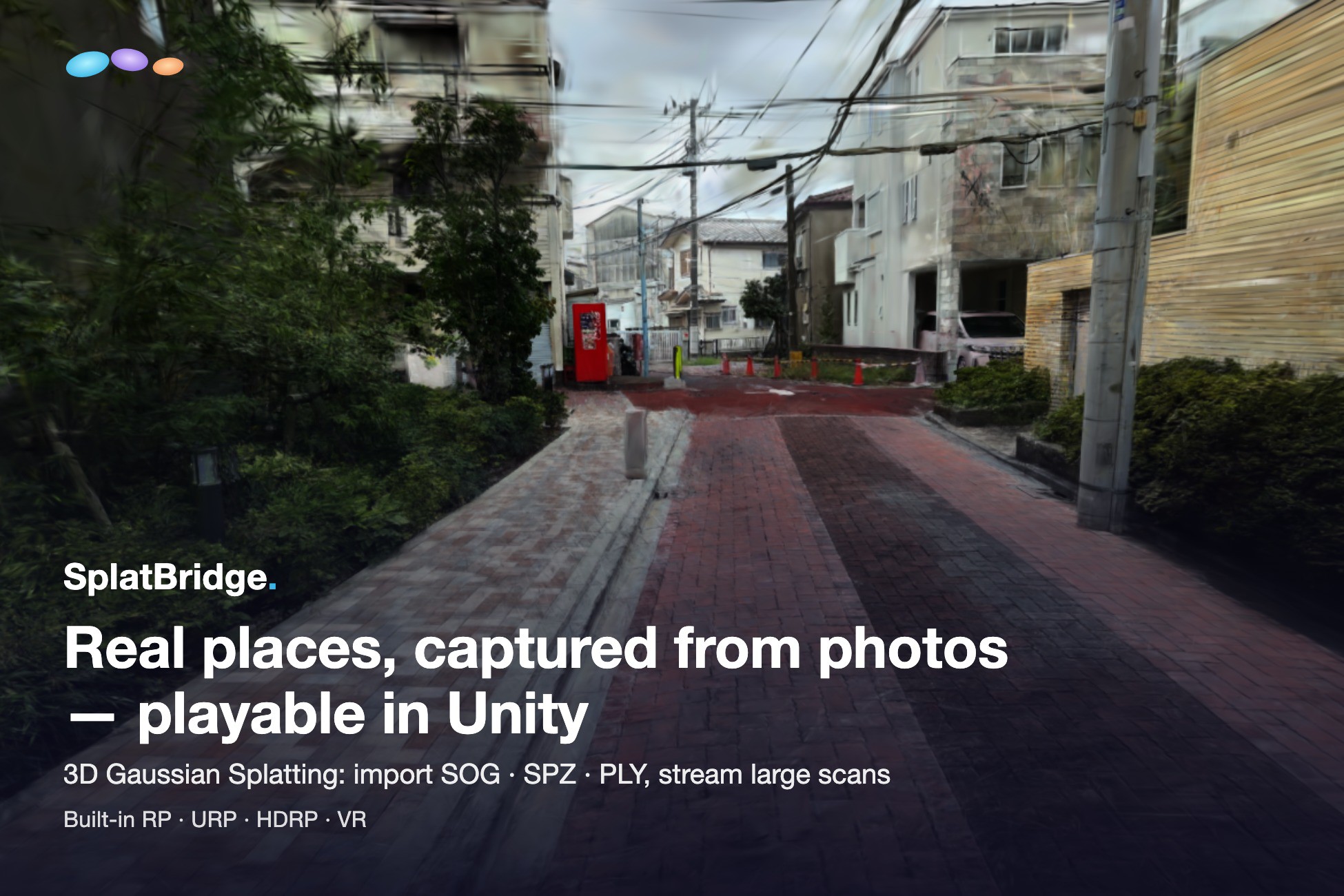
Bring real places into Unity with 3D Gaussian Splatting: explorable scans reconstructed from photos. Drop in a .sog, .spz or 3DGS .ply, add collision and gameplay, or take it to VR. Built-in, URP and HDRP are supported. Large captures stream under a fixed GPU budget — city-scale scans included.
Full manual, troubleshooting table and tuning guide ship inside the package, in English and Japanese. Demo video in the gallery above. All gallery images are unedited in-Unity captures.
## Import: one step, three formats
SOG (PlayCanvas / SuperSplat), SPZ (Niantic, v3 gzip and v4 NGSP+zstd) and 3DGS PLY (SH degree 0–3). Drop a bundled .sog, .spz or .ply into your project for a render-ready GaussianSplatAsset — no external converter, no command line. An unbundled SOG (meta.json plus its WebP files) imports through an editor menu instead, in the same one step. superspl.at datasets import as they are. A binary 3DGS PLY can also be converted directly to a streaming bake from the editor.
## Rendering: every pipeline, correct compositing
- Every render pipeline. Built-in, URP (Unity 6 Render Graph, with Compatibility Mode fallback) and HDRP (Custom Pass). Shaders ship inside the package and are included in player builds automatically — no "Always Included Shaders" setup.
- GPU depth sorting. A radix sort in compute re-sorts the draw order as the camera moves, never on the main thread, with an automatic background CPU fallback where compute sorting is unavailable.
- Render scale. Draw splats into a downscaled offscreen target and composite: fill cost drops roughly with scale², UI and geometry stay full resolution. XR has a stereo-array version of the same lever.
- Correct compositing. Splats depth-test against your scene, so scanned content sits behind walls and props instead of floating over them.
- View-dependent color. The capture's SH bands 1–3 are evaluated per view, so gloss, glass and wet surfaces shift with the camera as recorded; switchable per object.
## Streaming: city-scale under a fixed budget
Large captures do not fit in GPU memory, so SplatBridge streams them under a hard resident-splat budget you set once. If all finest full slices fit after page rounding and transition reserve, full detail stays resident automatically. Otherwise screen-space LOD adapts within the same cap.
- Screen-space quality. Splat Quality Pixels (τ) sets detail in screen pixels, with a fixed 2 px default. An optional Auto preset chooses a platform-specific value.
- Coarser, never holes. The plan pays for every cell of the dataset before spending anything on detail, so an under-sized budget is absorbed by drawing the scene coarser, not by dropping parts of it.
- Know before you ship. The bake log and the inspector report a coverage gate verdict up front: a budget too small even for the cheapest complete view is caught in the editor, not discovered on device.
- Fixed memory. Max Resident Splats is a hard memory cap and the main performance lever — τ sets quality. The GPU buffer is allocated once at that size, with per-frame upload budgets, frustum culling and no-flash chunk swaps.
- Pre-baked, so the runtime never decodes. A one-click bake (.splatbake) turns a streamed-SOG dataset into GPU-ready records, so a runtime chunk load is a seek and a read with no image decoding in the loop.
- Live in the editor. The Scene view runs the real streaming loop before Play — same worker, same budget, same LOD cuts — and idles once converged; move the camera to resume.
## Edit scans in Unity
Select regions in Scene View, preview the result, then split, delete or extract. Use five volume shapes, lasso or selection brush with both SplatObjects and baked Streamers. Add, subtract and intersect selections, filter by opacity, size or color, and adjust selected color/opacity. Review isolated-cluster candidates before deletion. Merge objects and rebuild LODs, or export SOG, streamed SOG ZIP or PLY. Mirror Copy creates reflected parts; separated parts are ordinary GameObjects for Unity animation. Convert a binary 3DGS PLY directly into a streaming bake with generated LODs. Clone Repair and runtime clipping remain Experimental.
- Realtime shadows (URP/HDRP). Cast onto Unity Lit meshes and receive their shadows, with independent Cast Shadows / Receive Shadows switches, both off by default. This adds shadows; it does not remove lighting captured in the scan.
## Make it a game
- Collision. Generate a MeshCollider with adjustable grid size and occupancy. Voxel is the default; smoothing and Experimental surface fitting are optional. Use it with Unity physics and NavMesh baking. Generation reads the dataset independently of the displayed LOD and needs Editor memory. This is not runtime streamed collision.
- Reveal / hide animation. Five patterns (Scatter, FromPoint, Rain, Dissolve, Sweep) animate the actual gaussians in the vertex shader — no particle-to-splat handoff pop, and the fully revealed frame is exactly the normal render. It can wait for the streamer's first full coverage, so the scene converges at once instead of popping in.
- VFX Graph bridge. Sample the live splat buffers from VFX Graph: particles that spawn on the scanned surface, inherit its color and sync to the reveal wave. Two ready-to-paste HLSL recipes are in the manual.
- Runtime loading. SplatRuntimeLoader.LoadFromFile(path) loads .sog / .spz / .ply at runtime; errors surface as typed exceptions with the cause, not silent failure.
## VR — and experimental Meta Quest standalone
PC VR (URP) is a first-class target: Single Pass Instanced and Multiview stereo, verified on Quest 3 over Link (OpenXR). The sort follows the head pose, so depth ordering holds up as you look around.
SplatBridge also runs on Quest 3 standalone (Android, OpenXR, Vulkan, Multiview) — the same importer, streamer, GPU depth sort and stereo path as on desktop, with one-time StreamingAssets extraction handled for you. It works on device today.
Standalone is labelled experimental on purpose. Performance on standalone hardware depends heavily on the size of your capture and on your settings, and tuning work is ongoing. Treat it as something to prototype and measure with, not as a platform where a given frame rate is guaranteed.
One more lever where fill binds: an experimental, opt-in impostor bakes the far field into a billboard, so the live draw only pays for near splats. The included Quest scene ships it on and tuned.
Use the included tuning panel and the manual's Quest setup guide to adjust budget, render scale and splat size on your device. Standalone performance remains scene-dependent and experimental.
## Included samples: 3 ready-made scenes
The smaller demo download includes source SOG. First open ClassroomDemo in the Editor and wait for streaming data to be generated; later openings reuse the verified cache. Then press Play.
- Demo scene. An indoor classroom (1.0M splats, 175 MB), ready to play: streaming, view-dependent color, a Sweep reveal, a camera dolly and physics balls on a splat-generated collider.
- Tuning panel. A ready-made VR scene with streaming/frame-time telemetry and controller adjustments for budget, τ, render scale and quad extent.
- Quest scene. XR rig, floor and streamer preconfigured for standalone. Its README lists the required Android/OpenXR project settings. Both XR scenes stream the classroom set.
Every bundled dataset is our own content — nothing to credit.
## Requirements
- Unity 6000.x (tested on 6000.3.25f1 and 6000.6.1f1).
- Built-in, URP 17.x or HDRP 17.x.
- Windows / macOS desktop and Android (including experimental Meta Quest 3 standalone — see above). WebGL is not supported (streaming needs file IO and compute).
- VR/XR: URP + OpenXR; HDRP + OpenXR is experimental. Built-in XR is unsupported.
## Known limitations
- Splats retain captured lighting; scene lights and GI do not relight them. Shadow receiving adds darkening, not illumination. HDRP exposure/tone mapping affect both color modes; bright HDR backgrounds may need intensity adjustment.
- Meta Quest 3 standalone support is experimental (see above): budget time to tune with the included panel and plan around that.
- Streaming reads local files (no HTTP streaming yet) and requires the baked format; the importer produces it in one step.
- Region edits preserve existing LODs; use Merge or Rebuild LODs to regenerate them. Large exports need temporary disk space and memory for metadata and caches. Lasso/brush supports front-surface, through-depth and manual-depth selection. Surface capture can take longer on large scans.
- Clone Repair and runtime clip editing are experimental. Runtime clipping changes drawing, not collision geometry.
- New shadow paths are validated on desktop Metal; XR and other graphics APIs still need validation. Built-in shadow integration is not supported.
## Roadmap (no dates promised, order may change)
- We are considering further enhancements to the editing tools.
- Standalone Quest performance — continued optimization of the mobile GPU path, aiming to drop the experimental label
- iOS (iPhone / iPad)
- HTTP streaming of remote datasets
All 1.x updates are free for purchasers.
Full manual, troubleshooting table and tuning guide ship inside the package, in English and Japanese. Demo video in the gallery above. All gallery images are unedited in-Unity captures.
## Import: one step, three formats
SOG (PlayCanvas / SuperSplat), SPZ (Niantic, v3 gzip and v4 NGSP+zstd) and 3DGS PLY (SH degree 0–3). Drop a bundled .sog, .spz or .ply into your project for a render-ready GaussianSplatAsset — no external converter, no command line. An unbundled SOG (meta.json plus its WebP files) imports through an editor menu instead, in the same one step. superspl.at datasets import as they are. A binary 3DGS PLY can also be converted directly to a streaming bake from the editor.
## Rendering: every pipeline, correct compositing
- Every render pipeline. Built-in, URP (Unity 6 Render Graph, with Compatibility Mode fallback) and HDRP (Custom Pass). Shaders ship inside the package and are included in player builds automatically — no "Always Included Shaders" setup.
- GPU depth sorting. A radix sort in compute re-sorts the draw order as the camera moves, never on the main thread, with an automatic background CPU fallback where compute sorting is unavailable.
- Render scale. Draw splats into a downscaled offscreen target and composite: fill cost drops roughly with scale², UI and geometry stay full resolution. XR has a stereo-array version of the same lever.
- Correct compositing. Splats depth-test against your scene, so scanned content sits behind walls and props instead of floating over them.
- View-dependent color. The capture's SH bands 1–3 are evaluated per view, so gloss, glass and wet surfaces shift with the camera as recorded; switchable per object.
## Streaming: city-scale under a fixed budget
Large captures do not fit in GPU memory, so SplatBridge streams them under a hard resident-splat budget you set once. If all finest full slices fit after page rounding and transition reserve, full detail stays resident automatically. Otherwise screen-space LOD adapts within the same cap.
- Screen-space quality. Splat Quality Pixels (τ) sets detail in screen pixels, with a fixed 2 px default. An optional Auto preset chooses a platform-specific value.
- Coarser, never holes. The plan pays for every cell of the dataset before spending anything on detail, so an under-sized budget is absorbed by drawing the scene coarser, not by dropping parts of it.
- Know before you ship. The bake log and the inspector report a coverage gate verdict up front: a budget too small even for the cheapest complete view is caught in the editor, not discovered on device.
- Fixed memory. Max Resident Splats is a hard memory cap and the main performance lever — τ sets quality. The GPU buffer is allocated once at that size, with per-frame upload budgets, frustum culling and no-flash chunk swaps.
- Pre-baked, so the runtime never decodes. A one-click bake (.splatbake) turns a streamed-SOG dataset into GPU-ready records, so a runtime chunk load is a seek and a read with no image decoding in the loop.
- Live in the editor. The Scene view runs the real streaming loop before Play — same worker, same budget, same LOD cuts — and idles once converged; move the camera to resume.
## Edit scans in Unity
Select regions in Scene View, preview the result, then split, delete or extract. Use five volume shapes, lasso or selection brush with both SplatObjects and baked Streamers. Add, subtract and intersect selections, filter by opacity, size or color, and adjust selected color/opacity. Review isolated-cluster candidates before deletion. Merge objects and rebuild LODs, or export SOG, streamed SOG ZIP or PLY. Mirror Copy creates reflected parts; separated parts are ordinary GameObjects for Unity animation. Convert a binary 3DGS PLY directly into a streaming bake with generated LODs. Clone Repair and runtime clipping remain Experimental.
- Realtime shadows (URP/HDRP). Cast onto Unity Lit meshes and receive their shadows, with independent Cast Shadows / Receive Shadows switches, both off by default. This adds shadows; it does not remove lighting captured in the scan.
## Make it a game
- Collision. Generate a MeshCollider with adjustable grid size and occupancy. Voxel is the default; smoothing and Experimental surface fitting are optional. Use it with Unity physics and NavMesh baking. Generation reads the dataset independently of the displayed LOD and needs Editor memory. This is not runtime streamed collision.
- Reveal / hide animation. Five patterns (Scatter, FromPoint, Rain, Dissolve, Sweep) animate the actual gaussians in the vertex shader — no particle-to-splat handoff pop, and the fully revealed frame is exactly the normal render. It can wait for the streamer's first full coverage, so the scene converges at once instead of popping in.
- VFX Graph bridge. Sample the live splat buffers from VFX Graph: particles that spawn on the scanned surface, inherit its color and sync to the reveal wave. Two ready-to-paste HLSL recipes are in the manual.
- Runtime loading. SplatRuntimeLoader.LoadFromFile(path) loads .sog / .spz / .ply at runtime; errors surface as typed exceptions with the cause, not silent failure.
## VR — and experimental Meta Quest standalone
PC VR (URP) is a first-class target: Single Pass Instanced and Multiview stereo, verified on Quest 3 over Link (OpenXR). The sort follows the head pose, so depth ordering holds up as you look around.
SplatBridge also runs on Quest 3 standalone (Android, OpenXR, Vulkan, Multiview) — the same importer, streamer, GPU depth sort and stereo path as on desktop, with one-time StreamingAssets extraction handled for you. It works on device today.
Standalone is labelled experimental on purpose. Performance on standalone hardware depends heavily on the size of your capture and on your settings, and tuning work is ongoing. Treat it as something to prototype and measure with, not as a platform where a given frame rate is guaranteed.
One more lever where fill binds: an experimental, opt-in impostor bakes the far field into a billboard, so the live draw only pays for near splats. The included Quest scene ships it on and tuned.
Use the included tuning panel and the manual's Quest setup guide to adjust budget, render scale and splat size on your device. Standalone performance remains scene-dependent and experimental.
## Included samples: 3 ready-made scenes
The smaller demo download includes source SOG. First open ClassroomDemo in the Editor and wait for streaming data to be generated; later openings reuse the verified cache. Then press Play.
- Demo scene. An indoor classroom (1.0M splats, 175 MB), ready to play: streaming, view-dependent color, a Sweep reveal, a camera dolly and physics balls on a splat-generated collider.
- Tuning panel. A ready-made VR scene with streaming/frame-time telemetry and controller adjustments for budget, τ, render scale and quad extent.
- Quest scene. XR rig, floor and streamer preconfigured for standalone. Its README lists the required Android/OpenXR project settings. Both XR scenes stream the classroom set.
Every bundled dataset is our own content — nothing to credit.
## Requirements
- Unity 6000.x (tested on 6000.3.25f1 and 6000.6.1f1).
- Built-in, URP 17.x or HDRP 17.x.
- Windows / macOS desktop and Android (including experimental Meta Quest 3 standalone — see above). WebGL is not supported (streaming needs file IO and compute).
- VR/XR: URP + OpenXR; HDRP + OpenXR is experimental. Built-in XR is unsupported.
## Known limitations
- Splats retain captured lighting; scene lights and GI do not relight them. Shadow receiving adds darkening, not illumination. HDRP exposure/tone mapping affect both color modes; bright HDR backgrounds may need intensity adjustment.
- Meta Quest 3 standalone support is experimental (see above): budget time to tune with the included panel and plan around that.
- Streaming reads local files (no HTTP streaming yet) and requires the baked format; the importer produces it in one step.
- Region edits preserve existing LODs; use Merge or Rebuild LODs to regenerate them. Large exports need temporary disk space and memory for metadata and caches. Lasso/brush supports front-surface, through-depth and manual-depth selection. Surface capture can take longer on large scans.
- Clone Repair and runtime clip editing are experimental. Runtime clipping changes drawing, not collision geometry.
- New shadow paths are validated on desktop Metal; XR and other graphics APIs still need validation. Built-in shadow integration is not supported.
## Roadmap (no dates promised, order may change)
- We are considering further enhancements to the editing tools.
- Standalone Quest performance — continued optimization of the mobile GPU path, aiming to drop the experimental label
- iOS (iPhone / iPad)
- HTTP streaming of remote datasets
All 1.x updates are free for purchasers.