Price history
Recorded standalone sale prices and the latest available store price, in USD. Historical dots use the sale start date and its recorded offer price. Prices can change during a sale; this is not a daily price log. Bundle prices and upcoming offers are excluded. History covers up to the 100 most recent recorded offers.
Lowest recorded standalone price in this history: $13.99. The latest store price is $19.99.
View 4 recorded prices
| Sale start / price check | Price | Observation |
|---|---|---|
| $19.99 | Latest store price | |
| $19.98 | Unity First Price 2026-08-04 2026-08-04 | |
| $13.99 | Unity New Release Discount 2026-08-04 2026-08-18 | |
| $13.99 | Unity New Release Discount 2026-08-04 2026-08-18 |
Sale and bundle history
The 3 most recent recorded offers including this asset. Past offers may no longer be available. Bundle prices cover a package, not this asset alone.
About SceneWheel - Radial Tool Menu for Scene View
- Tools, Systems & Learning > Development Tools & Automation
- Tools, Systems & Learning > Level & World Building
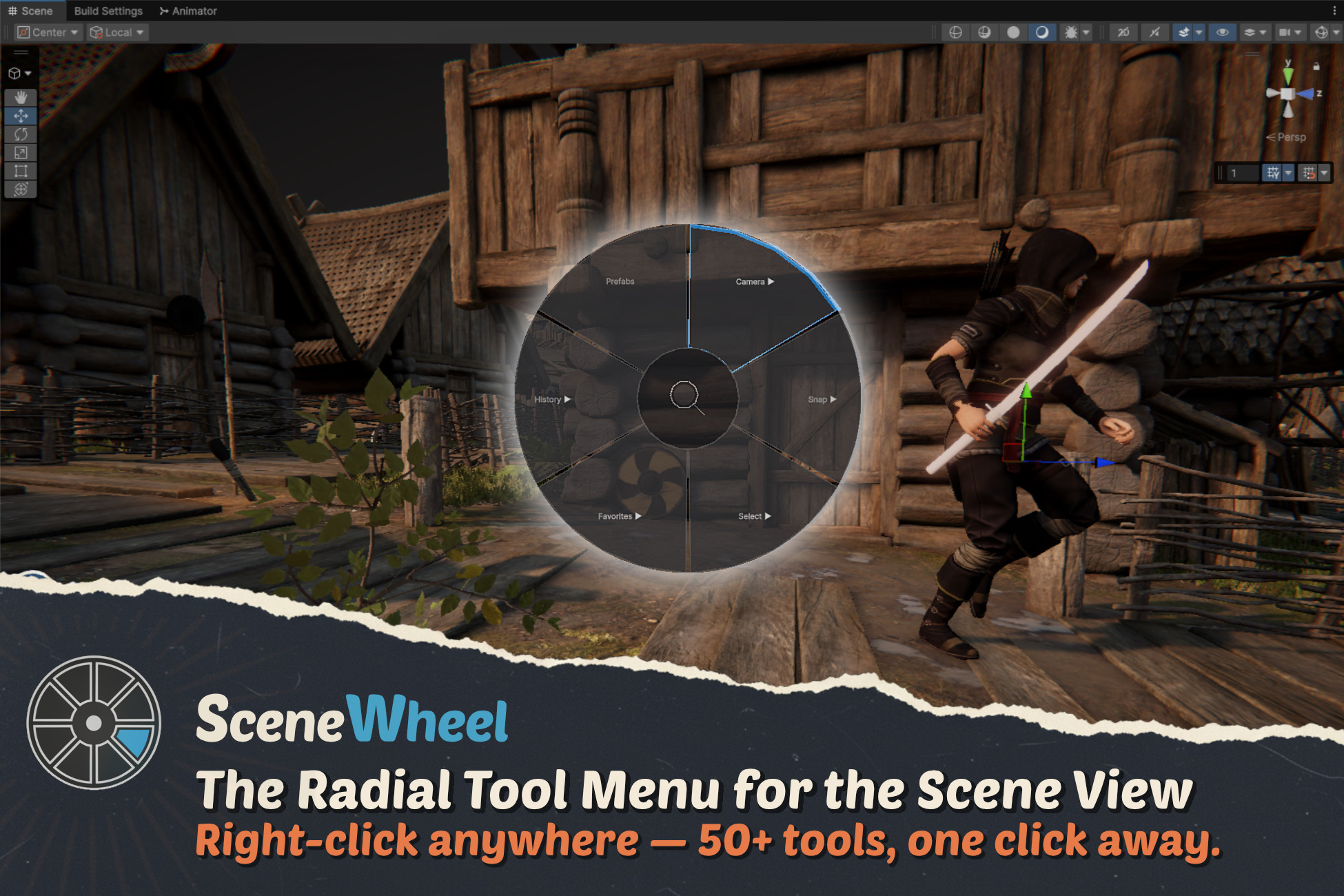
SceneWheel — a radial tool menu for the Unity Scene View. Right-click, and your most-used tools appear around the cursor. No more digging through top menus or memorizing shortcuts.
Level design, scene dressing and editor work mean the same actions over and over: create an object, frame the camera, snap something to the ground, drop in a prefab, pick a material, measure a gap. SceneWheel puts all of that one gesture away — right where you're already looking.
The menu is context-aware: select a light and you get lighting tools, select a camera and you get camera tools, select several objects and you get layout and alignment tools. You only ever see what's useful right now.
WHY YOU'LL LOVE IT
- Faster scene editing — every common action is one right-click away, no menu hunting
- Stay in flow — keep your eyes on the Scene View instead of scanning toolbars
- Less to remember — tools surface themselves based on what you've selected
- Make it yours — rearrange sectors, save profiles, and add your own actions
KEY FEATURES
- Radial menu in the Scene View — open it with a quick right-click around your cursor; smooth animated open/close
- Context-aware tools — different layouts for empty space, single objects, lights, cameras and multi-selections
- Object creation — empty objects, primitives (cube, sphere, cylinder, plane), lights (point, spot, directional, area) and cameras placed right at the cursor
- Camera tools — view angles (top/front/side/back), iso to perspective, frame selected/all, save & restore position, save angle & height for bird's-eye work, follow object, FOV and clipping tweaks, camera info overlay, and a floating Scene Cameras panel
- Prefab palette & placement — a built-in palette with thumbnails, search and category tabs; place prefabs with a live ghost preview that snaps to surfaces, brush mode for continuous placement, scroll-wheel rotation, scaling, surface-normal alignment, grid snap and random rotation
- Snapping & alignment — snap to ground, align to surface, reset transform
- Selection tools — select by material, tag or layer, select within a radius, or select all instances of a prefab
- Material tools — eyedropper to pick a material, paint it onto other objects, or set a shared material across a whole selection
- Measurement — point-to-point distance and three-point angle, drawn right in the Scene View
- Layout tools — distribute objects in a line, circle or grid, randomize rotation & scale, mirror across an axis
- Lighting tools — adjust intensity, switch light type on the fly, toggle shadows
- Scene notes — pin notes to world positions, jump the camera to them, show/hide all
- Favorites & history — mark objects as favorites and revisit recent selections, with Scene View hover highlighting
- Quick search — search the scene by name, tag or component and jump straight to the result
MAKE IT YOURS
- Visual settings window with live preview
- Drag-and-drop to reorder menu sectors
- Three menu shapes: Full Circle, Half Circle and Minimal
- Dark and light themes with per-category accent colors
- Save and load layouts as profiles (JSON import/export)
EXTEND IT WITH YOUR OWN TOOLS
Add your own actions with a single attribute:
[RadialMenuItem("My Category/My Action")]
public static void MyAction(RadialMenuContext context)
{
// context.mouseWorldPosition, context.selectedObjects, context.hitInfo
}
Need more control? Implement the IRadialAction interface. SceneWheel scans your assemblies automatically — your tools appear in the menu and settings window after a recompile.
COMPATIBILITY
- Unity 2022.3 LTS through Unity 6
- Editor-only — no runtime overhead, nothing shipped in your build
- Built-in, URP and HDRP friendly (editor tooling, render-pipeline independent)
Level design, scene dressing and editor work mean the same actions over and over: create an object, frame the camera, snap something to the ground, drop in a prefab, pick a material, measure a gap. SceneWheel puts all of that one gesture away — right where you're already looking.
The menu is context-aware: select a light and you get lighting tools, select a camera and you get camera tools, select several objects and you get layout and alignment tools. You only ever see what's useful right now.
WHY YOU'LL LOVE IT
- Faster scene editing — every common action is one right-click away, no menu hunting
- Stay in flow — keep your eyes on the Scene View instead of scanning toolbars
- Less to remember — tools surface themselves based on what you've selected
- Make it yours — rearrange sectors, save profiles, and add your own actions
KEY FEATURES
- Radial menu in the Scene View — open it with a quick right-click around your cursor; smooth animated open/close
- Context-aware tools — different layouts for empty space, single objects, lights, cameras and multi-selections
- Object creation — empty objects, primitives (cube, sphere, cylinder, plane), lights (point, spot, directional, area) and cameras placed right at the cursor
- Camera tools — view angles (top/front/side/back), iso to perspective, frame selected/all, save & restore position, save angle & height for bird's-eye work, follow object, FOV and clipping tweaks, camera info overlay, and a floating Scene Cameras panel
- Prefab palette & placement — a built-in palette with thumbnails, search and category tabs; place prefabs with a live ghost preview that snaps to surfaces, brush mode for continuous placement, scroll-wheel rotation, scaling, surface-normal alignment, grid snap and random rotation
- Snapping & alignment — snap to ground, align to surface, reset transform
- Selection tools — select by material, tag or layer, select within a radius, or select all instances of a prefab
- Material tools — eyedropper to pick a material, paint it onto other objects, or set a shared material across a whole selection
- Measurement — point-to-point distance and three-point angle, drawn right in the Scene View
- Layout tools — distribute objects in a line, circle or grid, randomize rotation & scale, mirror across an axis
- Lighting tools — adjust intensity, switch light type on the fly, toggle shadows
- Scene notes — pin notes to world positions, jump the camera to them, show/hide all
- Favorites & history — mark objects as favorites and revisit recent selections, with Scene View hover highlighting
- Quick search — search the scene by name, tag or component and jump straight to the result
MAKE IT YOURS
- Visual settings window with live preview
- Drag-and-drop to reorder menu sectors
- Three menu shapes: Full Circle, Half Circle and Minimal
- Dark and light themes with per-category accent colors
- Save and load layouts as profiles (JSON import/export)
EXTEND IT WITH YOUR OWN TOOLS
Add your own actions with a single attribute:
[RadialMenuItem("My Category/My Action")]
public static void MyAction(RadialMenuContext context)
{
// context.mouseWorldPosition, context.selectedObjects, context.hitInfo
}
Need more control? Implement the IRadialAction interface. SceneWheel scans your assemblies automatically — your tools appear in the menu and settings window after a recompile.
COMPATIBILITY
- Unity 2022.3 LTS through Unity 6
- Editor-only — no runtime overhead, nothing shipped in your build
- Built-in, URP and HDRP friendly (editor tooling, render-pipeline independent)