Price history
Recorded standalone sale prices and the latest available store price, in USD. Historical dots use the sale start date and its recorded offer price. Prices can change during a sale; this is not a daily price log. Bundle prices and upcoming offers are excluded. History covers up to the 100 most recent recorded offers.
Lowest recorded standalone price in this history: $10. The latest store price is $20.
View 4 recorded prices
| Sale start / price check | Price | Observation |
|---|---|---|
| $20 | Latest store price | |
| $20 | Unity First Price 2026-09-03 2026-09-03 | |
| $10 | Unity New Release Discount 2026-09-01 2026-09-15 | |
| $10 | Unity New Release Discount 2026-09-01 2026-09-15 |
Sale and bundle history
The 3 most recent recorded offers including this asset. Past offers may no longer be available. Bundle prices cover a package, not this asset alone.
About Scene View Workspace: Save & Switch Presets, Smart Isolation
- Tools, Systems & Learning > Development Tools & Automation
Save Your Scene View Setup and Switch It in One Click
Is your Scene View fighting you instead of helping you?
Every time you switch tasks, you reset the same Scene View settings by hand — over and over:
- Toggling 2D/3D, projection, and draw modes for each job.
- Turning Scene Lighting, Fog, Skybox, and image effects on and off.
- Hiding Gizmos and icons to see true UI colors, then bringing them back.
- Switching tools, pivot mode, and grid snap for modeling vs. layout.
- Fixing a cluttered, noisy viewport just to focus on one thing.
This context-switching tax adds up across a full day of development — and it breaks your concentration every single time.
Meet Scene View Workspace.
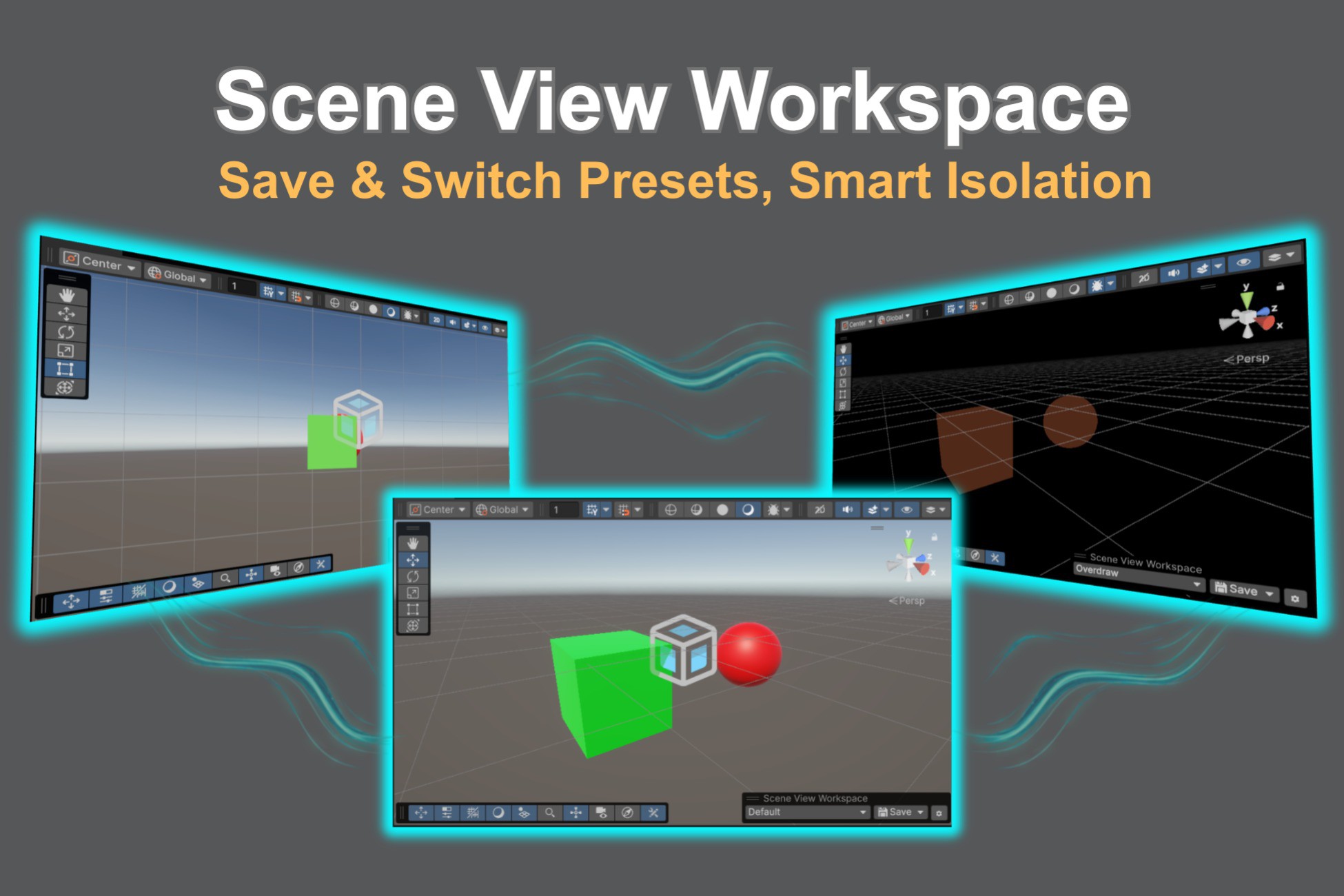
Scene View Workspace is an Editor extension that brings the concept of a work context to the Unity Editor. Capture the perfect Scene View state once, save it as a task-optimized Workspace, and restore it instantly whenever you need it. Your Scene, your Prefabs, and your version control stay completely untouched.
Key Features
Why choose Scene View Workspace?
- Smart Isolation Auto-Switch: Enter Unity's native Isolation view (Shift + H) and the right Workspace applies itself, chosen from the selected object's name, tag, or layer — then your previous view returns the moment you exit. When the right setup is obvious, you skip choosing it.
- One-Click Scene View Preset Switching: When you do want to choose, switch your entire Scene View setup from a dropdown overlay right inside the Scene View. No extra windows to hunt through.
- Captures Every Scene View Setting That Matters — Including the Camera: Not just the obvious toggles, but the camera viewpoint and every per-component Gizmo setting too. The full breakdown is below.
- Non-Destructive — and Your Original Setup Is Safe: It only changes Editor-side Scene View state, never your Scene or your assets, so your Git history stays diff-free. The setup you had before you started using Workspaces is stashed automatically, so one click brings it back.
- Fully Customizable Rules: Build the auto-switch rules with And/Or conditions using Equals, NotEquals, Contains, StartsWith, EndsWith, and Regex. Reorder by drag-and-drop; disable any rule with a checkbox.
- Ready-to-Use Presets: Ships with UI, Modeling, Lighting, Overdraw, and Capture Workspaces so you feel the value the moment you import. Customize them, overwrite them, or reset them to the defaults anytime.
- Export & Import as JSON: Back up your Workspaces and rules, or share them across projects and teammates.
What a Scene View Workspace Saves — and What It Doesn't
Saved and restored per Workspace
- Camera pose — yes, the viewpoint is saved: pivot position, rotation, and zoom, restored instantly with no fly-over animation. Use a Workspace as a viewpoint bookmark as well as a display preset — switching Workspaces takes you back to where you were working, not just to how the Scene looked. The pivot is a world-space position, so it is meaningful in the Scene where you saved it. Moving the camera does not mark a Workspace as modified, so looking around never nags you with an unsaved-change asterisk; to update the viewpoint a Workspace returns to, overwrite the Workspace explicitly.
- Projection & mode: 2D/3D mode, perspective/orthographic, camera rotation lock.
- Camera settings: Field of View, near/far clip planes, dynamic clipping, occlusion culling, navigation speed range, acceleration, and easing.
- Draw mode: Shaded, Wireframe, Shaded Wireframe, Overdraw, and every other built-in mode.
- Scene View toggles: Scene Lighting, Audio, Grid visibility, the Scene Visibility master toggle, and the master Gizmos toggle.
- Effects: Fog, Skybox, Flares, Image Effects, Particle Systems, Visual Effect Graphs, Always Refresh.
- Tools: active tool, Pivot/Center, Local/Global, handle visibility, and the layer visibility mask.
- Grid & Snap: grid axis, opacity, size, grid pivot, snap toggles, and the move/rotate/scale snap increments.
- Gizmos window, in full: every per-component gizmo and icon toggle, plus 3D icons, icon size, gizmo fade, selection outline/wire, and Light Probe visualization.
Not saved — and never modified
- Your Scene and asset data. GameObjects, Transforms, active states, Prefabs, materials, and assets are never written to. Nothing is added to your Scene.
- Per-object Scene Visibility. Which individual objects you hid or isolated with the eye icon is not captured — only the master toggle is.
- Which Scene is open. Switching a Workspace never opens, closes, or saves a Scene.
- Locked (non-pickable) layers. Layer visibility is saved; layer locking is not.
- Editor window layout. Docking, overlay positions, and window arrangement are left to Unity's own layout system.
- Project-wide settings. Project Settings, Quality and Graphics settings, Lighting settings, and Game View settings are all out of scope.
Getting Back to Where You Were
The setup you already had is the thing you cannot afford to lose — so it is protected before anything is applied.
- Automatic stash. The first time you activate a Workspace, your entire current Scene View state — including your Gizmo toggles, layer mask, and snap settings — is captured automatically. You do not have to save it yourself first.
- One-click revert. Choose No Workspace from the dropdown and that stashed state is applied back in full. You are returned to the setup you had before you started using Workspaces, not just one step back.
- Isolation restores itself. A Workspace applied automatically on entering Isolation is rolled back the moment you exit — back to the Workspace you were in, or to your own pre-Isolation state if none was active.
- It survives a restart. The stash is kept across script compiles and Editor restarts, so an accidental recompile never strands you in the wrong view.
- Undo is not supported. Revert a manually applied Workspace from the dropdown rather than with Ctrl + Z.
Use Cases — A Workspace for Every Task
- UI work: Flat 2D view with lighting, fog, post effects, and gizmos off — see true UI colors with the Rect tool ready.
- Modeling & level layout: 3D perspective with grid and snapping on and shaded wireframe for precise placement.
- Lighting & look-dev: Skybox, fog, and effects on, gizmos hidden, for a clean in-game-like preview.
- Performance checks: Drop into Overdraw mode at the spot you always check — the crowded part of the level — without touching a single toggle.
- Screenshots & trailers: Your hero angle, with gizmos, grid, and selection outlines removed, in one click — reproduce the exact same shot after every art change.
- Team standardization: Export your Workspaces and hand the file around — everyone who imports it reviews the Scene the same way.
Before You Buy — Frequently Asked Questions
- Do I need to write code? No. Scene View Workspace is plug-and-play — install it, and the overlay plus five presets are ready to use.
- Beginner friendly? Yes. The built-in presets work out of the box, while regex-based auto-switch rules are there when advanced users want them.
- Any dependencies? None. Editor-only assembly, so it never affects your builds.
- Can I use it with multiple Scene Views? It works, but a Workspace belongs to the Editor rather than to one Scene View. Per-view settings — the viewpoint, draw mode, lighting — apply to the Scene View you switched from, while Unity's editor-wide settings, such as tools, snapping, and the Gizmos window, change everywhere. The selected Workspace is shared too, so the view you did not switch from will not match its label.
Built for developers who wear every hat.
Whether you're a solo creator juggling UI, gameplay, lighting, and VFX, or part of a studio standardizing Scene View setups across a team, Scene View Workspace is designed to cut context-switching out of your Unity Editor workflow, reduce cognitive load, and keep you in flow.
Is your Scene View fighting you instead of helping you?
Every time you switch tasks, you reset the same Scene View settings by hand — over and over:
- Toggling 2D/3D, projection, and draw modes for each job.
- Turning Scene Lighting, Fog, Skybox, and image effects on and off.
- Hiding Gizmos and icons to see true UI colors, then bringing them back.
- Switching tools, pivot mode, and grid snap for modeling vs. layout.
- Fixing a cluttered, noisy viewport just to focus on one thing.
This context-switching tax adds up across a full day of development — and it breaks your concentration every single time.
Meet Scene View Workspace.
Scene View Workspace is an Editor extension that brings the concept of a work context to the Unity Editor. Capture the perfect Scene View state once, save it as a task-optimized Workspace, and restore it instantly whenever you need it. Your Scene, your Prefabs, and your version control stay completely untouched.
Key Features
Why choose Scene View Workspace?
- Smart Isolation Auto-Switch: Enter Unity's native Isolation view (Shift + H) and the right Workspace applies itself, chosen from the selected object's name, tag, or layer — then your previous view returns the moment you exit. When the right setup is obvious, you skip choosing it.
- One-Click Scene View Preset Switching: When you do want to choose, switch your entire Scene View setup from a dropdown overlay right inside the Scene View. No extra windows to hunt through.
- Captures Every Scene View Setting That Matters — Including the Camera: Not just the obvious toggles, but the camera viewpoint and every per-component Gizmo setting too. The full breakdown is below.
- Non-Destructive — and Your Original Setup Is Safe: It only changes Editor-side Scene View state, never your Scene or your assets, so your Git history stays diff-free. The setup you had before you started using Workspaces is stashed automatically, so one click brings it back.
- Fully Customizable Rules: Build the auto-switch rules with And/Or conditions using Equals, NotEquals, Contains, StartsWith, EndsWith, and Regex. Reorder by drag-and-drop; disable any rule with a checkbox.
- Ready-to-Use Presets: Ships with UI, Modeling, Lighting, Overdraw, and Capture Workspaces so you feel the value the moment you import. Customize them, overwrite them, or reset them to the defaults anytime.
- Export & Import as JSON: Back up your Workspaces and rules, or share them across projects and teammates.
What a Scene View Workspace Saves — and What It Doesn't
Saved and restored per Workspace
- Camera pose — yes, the viewpoint is saved: pivot position, rotation, and zoom, restored instantly with no fly-over animation. Use a Workspace as a viewpoint bookmark as well as a display preset — switching Workspaces takes you back to where you were working, not just to how the Scene looked. The pivot is a world-space position, so it is meaningful in the Scene where you saved it. Moving the camera does not mark a Workspace as modified, so looking around never nags you with an unsaved-change asterisk; to update the viewpoint a Workspace returns to, overwrite the Workspace explicitly.
- Projection & mode: 2D/3D mode, perspective/orthographic, camera rotation lock.
- Camera settings: Field of View, near/far clip planes, dynamic clipping, occlusion culling, navigation speed range, acceleration, and easing.
- Draw mode: Shaded, Wireframe, Shaded Wireframe, Overdraw, and every other built-in mode.
- Scene View toggles: Scene Lighting, Audio, Grid visibility, the Scene Visibility master toggle, and the master Gizmos toggle.
- Effects: Fog, Skybox, Flares, Image Effects, Particle Systems, Visual Effect Graphs, Always Refresh.
- Tools: active tool, Pivot/Center, Local/Global, handle visibility, and the layer visibility mask.
- Grid & Snap: grid axis, opacity, size, grid pivot, snap toggles, and the move/rotate/scale snap increments.
- Gizmos window, in full: every per-component gizmo and icon toggle, plus 3D icons, icon size, gizmo fade, selection outline/wire, and Light Probe visualization.
Not saved — and never modified
- Your Scene and asset data. GameObjects, Transforms, active states, Prefabs, materials, and assets are never written to. Nothing is added to your Scene.
- Per-object Scene Visibility. Which individual objects you hid or isolated with the eye icon is not captured — only the master toggle is.
- Which Scene is open. Switching a Workspace never opens, closes, or saves a Scene.
- Locked (non-pickable) layers. Layer visibility is saved; layer locking is not.
- Editor window layout. Docking, overlay positions, and window arrangement are left to Unity's own layout system.
- Project-wide settings. Project Settings, Quality and Graphics settings, Lighting settings, and Game View settings are all out of scope.
Getting Back to Where You Were
The setup you already had is the thing you cannot afford to lose — so it is protected before anything is applied.
- Automatic stash. The first time you activate a Workspace, your entire current Scene View state — including your Gizmo toggles, layer mask, and snap settings — is captured automatically. You do not have to save it yourself first.
- One-click revert. Choose No Workspace from the dropdown and that stashed state is applied back in full. You are returned to the setup you had before you started using Workspaces, not just one step back.
- Isolation restores itself. A Workspace applied automatically on entering Isolation is rolled back the moment you exit — back to the Workspace you were in, or to your own pre-Isolation state if none was active.
- It survives a restart. The stash is kept across script compiles and Editor restarts, so an accidental recompile never strands you in the wrong view.
- Undo is not supported. Revert a manually applied Workspace from the dropdown rather than with Ctrl + Z.
Use Cases — A Workspace for Every Task
- UI work: Flat 2D view with lighting, fog, post effects, and gizmos off — see true UI colors with the Rect tool ready.
- Modeling & level layout: 3D perspective with grid and snapping on and shaded wireframe for precise placement.
- Lighting & look-dev: Skybox, fog, and effects on, gizmos hidden, for a clean in-game-like preview.
- Performance checks: Drop into Overdraw mode at the spot you always check — the crowded part of the level — without touching a single toggle.
- Screenshots & trailers: Your hero angle, with gizmos, grid, and selection outlines removed, in one click — reproduce the exact same shot after every art change.
- Team standardization: Export your Workspaces and hand the file around — everyone who imports it reviews the Scene the same way.
Before You Buy — Frequently Asked Questions
- Do I need to write code? No. Scene View Workspace is plug-and-play — install it, and the overlay plus five presets are ready to use.
- Beginner friendly? Yes. The built-in presets work out of the box, while regex-based auto-switch rules are there when advanced users want them.
- Any dependencies? None. Editor-only assembly, so it never affects your builds.
- Can I use it with multiple Scene Views? It works, but a Workspace belongs to the Editor rather than to one Scene View. Per-view settings — the viewpoint, draw mode, lighting — apply to the Scene View you switched from, while Unity's editor-wide settings, such as tools, snapping, and the Gizmos window, change everywhere. The selected Workspace is shared too, so the view you did not switch from will not match its label.
Built for developers who wear every hat.
Whether you're a solo creator juggling UI, gameplay, lighting, and VFX, or part of a studio standardizing Scene View setups across a team, Scene View Workspace is designed to cut context-switching out of your Unity Editor workflow, reduce cognitive load, and keep you in flow.