Price history
Recorded standalone sale prices and the latest available store price, in USD. Historical dots use the sale start date and its recorded offer price. Prices can change during a sale; this is not a daily price log. Bundle prices and upcoming offers are excluded. History covers up to the 100 most recent recorded offers.
Lowest recorded standalone price in this history: FREE. The latest store price is FREE, matching the lowest recorded price shown here.
View 2 recorded prices
| Sale start / price check | Price | Observation |
|---|---|---|
| FREE | Latest store price | |
| FREE | Unity First Price 2026-10-04 2026-10-04 |
Sale and bundle history
The 1 most recent recorded offers including this asset. Past offers may no longer be available. Bundle prices cover a package, not this asset alone.
About Save Flow - PlayerPrefs Editor
- Tools, Systems & Learning > Development Tools & Automation
Save Flow turns PlayerPrefs from a black box into something you can actually see.
Unity gives you no way to list your own keys, no way to know their types, and no history when a save goes wrong. Save Flow reads the real store — the Windows registry, the macOS plist, the Linux prefs file and shows you everything in one clean window, live, while your game runs.
SEE EVERYTHING
Every key, its real type and its current value in a searchable table. Search keys AND values, filter by type, sort, and pin the keys you keep coming back to. Values flash as your game writes them. The table is virtualised, so it stays fast with thousands of keys.
EDIT WITHOUT BREAKING YOUR SAVE
Edits are staged, not written on every keystroke. Type freely, then Apply or Revert as a batch and undo it afterwards if you change your mind. Ints, floats and strings get proper fields, 0/1 ints can be shown as real toggles, and long JSON values open in a full multi-line editor instead of a cramped text box.
SAVE STATES
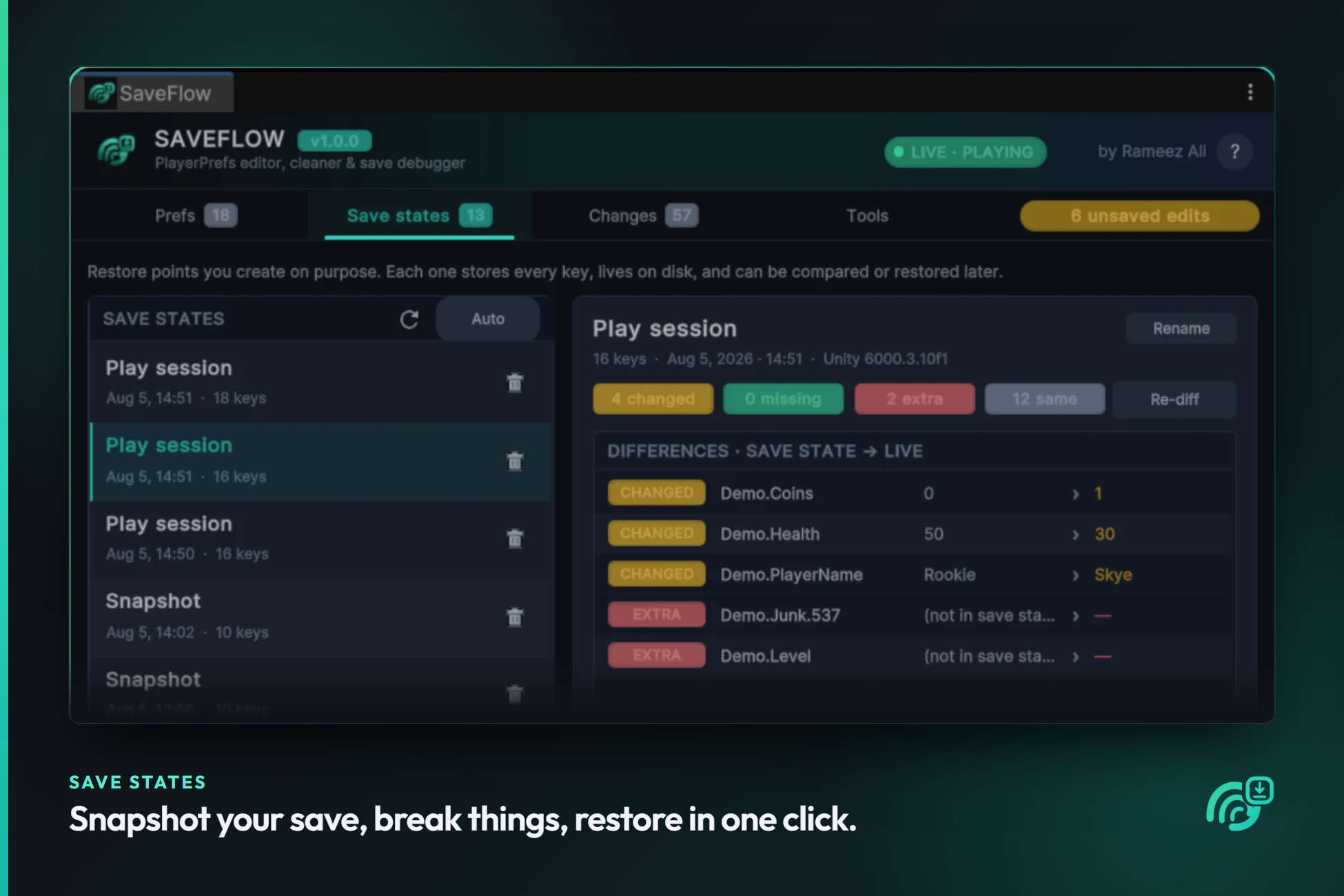
Capture the entire store as a named restore point: "level 10, full inventory", "fresh install", "QA profile". Compare any save state against your live data and see exactly what is changed, missing or extra then restore it as a merge or a full replace. Save states are plain JSON kept outside your Assets folder, so you can commit them, share them with QA, or diff them in git.
A LIVE CHANGE LOG
Every add, change and delete as it happens, with timestamps, old and new values, and a numeric delta. Filter it, follow the tail, export it to CSV, or right-click any entry to restore the value it used to have. Numeric keys get a graph of how they changed over time — perfect for catching the one line of code that quietly resets your player's coins.
SAFE BY DEFAULT
Unity's own bookkeeping keys are shown for reference but are strictly read-only, and even "Delete all" leaves them untouched. A backup save state is captured automatically before anything destructive, destructive actions sit behind typed confirmations, and there is a 25-step undo stack behind the whole tool.
MOVE YOUR DATA AROUND
Export to JSON or CSV, import with merge, replace or fill-missing modes, or copy a readable key = value list straight to your clipboard for a bug report. Imports also accept plain {"Key": value} JSON, so data from other tools drops right in.
BUILT TO LOOK RIGHT
Dark, light, or follow-your-editor-skin. Drop in your own .ttf and the whole UI uses it. Everything is drawn procedurally, so there are no textures to import and it looks identical in every project.
GET STARTED IN A MINUTE
A guided demo scene ships with the asset. Press Play and follow the on-screen checklist: press buttons in the game, watch keys appear in SaveFlow, then edit them from SaveFlow and watch the game update live. It ticks itself off as you go.
GOOD TO KNOW
SaveFlow edits the editor's PlayerPrefs store, which is the same one play mode uses. A shipped build writes to a different location by Unity's design — an optional in-game overlay is included for inspecting prefs in development builds on device.
Full C# source. No third-party dependencies. Nothing is added to your project settings, and nothing runs unless the window is open.
Unity gives you no way to list your own keys, no way to know their types, and no history when a save goes wrong. Save Flow reads the real store — the Windows registry, the macOS plist, the Linux prefs file and shows you everything in one clean window, live, while your game runs.
SEE EVERYTHING
Every key, its real type and its current value in a searchable table. Search keys AND values, filter by type, sort, and pin the keys you keep coming back to. Values flash as your game writes them. The table is virtualised, so it stays fast with thousands of keys.
EDIT WITHOUT BREAKING YOUR SAVE
Edits are staged, not written on every keystroke. Type freely, then Apply or Revert as a batch and undo it afterwards if you change your mind. Ints, floats and strings get proper fields, 0/1 ints can be shown as real toggles, and long JSON values open in a full multi-line editor instead of a cramped text box.
SAVE STATES
Capture the entire store as a named restore point: "level 10, full inventory", "fresh install", "QA profile". Compare any save state against your live data and see exactly what is changed, missing or extra then restore it as a merge or a full replace. Save states are plain JSON kept outside your Assets folder, so you can commit them, share them with QA, or diff them in git.
A LIVE CHANGE LOG
Every add, change and delete as it happens, with timestamps, old and new values, and a numeric delta. Filter it, follow the tail, export it to CSV, or right-click any entry to restore the value it used to have. Numeric keys get a graph of how they changed over time — perfect for catching the one line of code that quietly resets your player's coins.
SAFE BY DEFAULT
Unity's own bookkeeping keys are shown for reference but are strictly read-only, and even "Delete all" leaves them untouched. A backup save state is captured automatically before anything destructive, destructive actions sit behind typed confirmations, and there is a 25-step undo stack behind the whole tool.
MOVE YOUR DATA AROUND
Export to JSON or CSV, import with merge, replace or fill-missing modes, or copy a readable key = value list straight to your clipboard for a bug report. Imports also accept plain {"Key": value} JSON, so data from other tools drops right in.
BUILT TO LOOK RIGHT
Dark, light, or follow-your-editor-skin. Drop in your own .ttf and the whole UI uses it. Everything is drawn procedurally, so there are no textures to import and it looks identical in every project.
GET STARTED IN A MINUTE
A guided demo scene ships with the asset. Press Play and follow the on-screen checklist: press buttons in the game, watch keys appear in SaveFlow, then edit them from SaveFlow and watch the game update live. It ticks itself off as you go.
GOOD TO KNOW
SaveFlow edits the editor's PlayerPrefs store, which is the same one play mode uses. A shipped build writes to a different location by Unity's design — an optional in-game overlay is included for inspecting prefs in development builds on device.
Full C# source. No third-party dependencies. Nothing is added to your project settings, and nothing runs unless the window is open.