Unity
Post-Apocalyptic Pickup Truck | Physics-Based Vehicle Controller
- Current price
- $24.99
- Lowest recorded
- $24.99
4 likes
Screenshots and videos
 1 / 10


Price history
Lowest recorded standalone price: $24.99. Recorded observations span to . This is our available history, not a guaranteed all-time low. Bundle package prices are separate.
Standalone price
Last three months, in USD. Bundle prices cover the whole package.
About Post-Apocalyptic Pickup Truck | Physics-Based Vehicle Controller
- Theme > Sci-fi & Space
- Theme > Dystopian & Post-apocalyptic
- Art & Visuals > 3D
- Art & Visuals > UI & GUI
Post-Apocalyptic Pickup Truck is a ready-to-use vehicle asset built around a realistic physics-based controller. It includes a full driving system with engine simulation, transmission, steering, brakes, traction control, and adjustable suspension — all working with both Legacy Input and the New Input System.
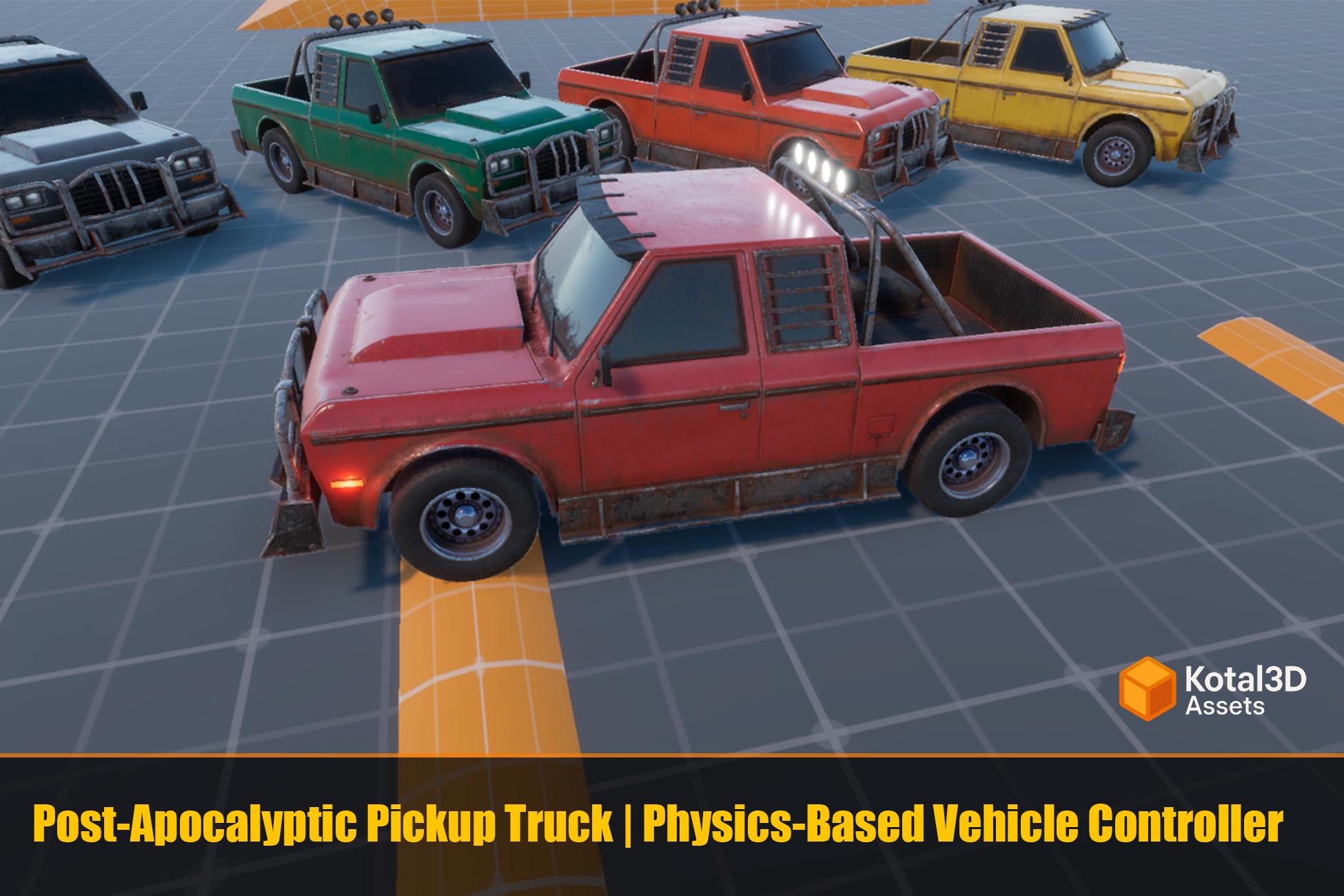
The asset comes with pre-configured demo scenes for all three render pipelines, 6 color variants of the pickup truck, and a complete set of supporting systems: camera, lights, UI, and wheel visuals.
Features
Physics Vehicle Controller
- Engine simulation with torque curve and RPM range (800–7000 RPM)
- Manual and automatic transmission with configurable gear ratios
- All-wheel drive and rear-wheel drive modes
- Steering that adjusts based on vehicle speed
- Traction control to prevent wheel slip
- Adjustable suspension height at runtime
- Collision detection with impact force events
- Adaptable to other vehicles – manual wheel repositioning (this process is shown in the asset's demo video on the store page)
Input Systems
Supports both input systems — use whichever your project requires:
- Legacy Input (no extra packages)
- New Input System (Input Action Asset included)
Default controls work with keyboard/mouse and can be remapped for gamepad.
Camera System
Smooth orbiting camera with:
- Right mouse button drag to orbit
- Mouse wheel to zoom
- Auto-follow mode when not orbiting
- Adjustable rotation speed, smoothness, and vertical angle limits
Lights System
Functional vehicle lights controlled via code or editor context menu:
- Headlights and taillights (toggle on/off)
- Top/roof light (toggle on/off)
- Brake lights (activate automatically when braking)
- Reverse lights (activate automatically in reverse gear)
- Turn signals with blinking animation
UI Dashboard
In-game interface showing:
- Speed in km/h
- Current RPM
- Current gear (R, 1, 2, 3...)
- Suspension height slider with reset button
Wheel Visuals
Visual wheel bones automatically sync with physics:
- Wheel rotation matching WheelCollider RPM
- Steering angle on front wheels
- Suspension compression/extension animation
Events for Custom Integration
CarController exposes events for connecting your own systems:
- OnSpeedChanged, OnRpmChanged, OnGearChanged
- OnStartBraking, OnStopBraking
- OnHit (collision force)
- OnSuspensionChanged
Render Pipeline Support
Separate demo scenes and prefabs are included for:
- Built-in Render Pipeline
- Universal Render Pipeline (URP)
- High Definition Render Pipeline (HDRP)
Included Content
- 3 demo scenes (one per render pipeline)
- Main pickup truck prefab for each render pipeline
- 5 color variants: Blue, Gray, Green, Orange, Yellow (Red is the original color on the main prefab)
- Demo UI canvas with HUD elements
- Input Action Asset for New Input System
- Full C# source code
Quick Start
1. Open the demo scene matching your project's render pipeline
2. Press Play
3. Drive with WASD + mouse for camera control
4. Adjust suspension via the UI slider
Customization
All vehicle parameters are editable in the Inspector:
- Engine power and torque curve
- Gear ratios and final drive
- Steering angles and speed limits
- Brake power and traction control sensitivity
- Suspension height limits
- Camera distance, speed, and smoothness
- Light blink intervals
The asset comes with pre-configured demo scenes for all three render pipelines, 6 color variants of the pickup truck, and a complete set of supporting systems: camera, lights, UI, and wheel visuals.
Features
Physics Vehicle Controller
- Engine simulation with torque curve and RPM range (800–7000 RPM)
- Manual and automatic transmission with configurable gear ratios
- All-wheel drive and rear-wheel drive modes
- Steering that adjusts based on vehicle speed
- Traction control to prevent wheel slip
- Adjustable suspension height at runtime
- Collision detection with impact force events
- Adaptable to other vehicles – manual wheel repositioning (this process is shown in the asset's demo video on the store page)
Input Systems
Supports both input systems — use whichever your project requires:
- Legacy Input (no extra packages)
- New Input System (Input Action Asset included)
Default controls work with keyboard/mouse and can be remapped for gamepad.
Camera System
Smooth orbiting camera with:
- Right mouse button drag to orbit
- Mouse wheel to zoom
- Auto-follow mode when not orbiting
- Adjustable rotation speed, smoothness, and vertical angle limits
Lights System
Functional vehicle lights controlled via code or editor context menu:
- Headlights and taillights (toggle on/off)
- Top/roof light (toggle on/off)
- Brake lights (activate automatically when braking)
- Reverse lights (activate automatically in reverse gear)
- Turn signals with blinking animation
UI Dashboard
In-game interface showing:
- Speed in km/h
- Current RPM
- Current gear (R, 1, 2, 3...)
- Suspension height slider with reset button
Wheel Visuals
Visual wheel bones automatically sync with physics:
- Wheel rotation matching WheelCollider RPM
- Steering angle on front wheels
- Suspension compression/extension animation
Events for Custom Integration
CarController exposes events for connecting your own systems:
- OnSpeedChanged, OnRpmChanged, OnGearChanged
- OnStartBraking, OnStopBraking
- OnHit (collision force)
- OnSuspensionChanged
Render Pipeline Support
Separate demo scenes and prefabs are included for:
- Built-in Render Pipeline
- Universal Render Pipeline (URP)
- High Definition Render Pipeline (HDRP)
Included Content
- 3 demo scenes (one per render pipeline)
- Main pickup truck prefab for each render pipeline
- 5 color variants: Blue, Gray, Green, Orange, Yellow (Red is the original color on the main prefab)
- Demo UI canvas with HUD elements
- Input Action Asset for New Input System
- Full C# source code
Quick Start
1. Open the demo scene matching your project's render pipeline
2. Press Play
3. Drive with WASD + mouse for camera control
4. Adjust suspension via the UI slider
Customization
All vehicle parameters are editable in the Inspector:
- Engine power and torque curve
- Gear ratios and final drive
- Steering angles and speed limits
- Brake power and traction control sensitivity
- Suspension height limits
- Camera distance, speed, and smoothness
- Light blink intervals