Unity
Map GUI Pro - Minimap, Map & Compass
By AnkleBreaker
$59.99
Rated 5.0/5 from 5 ratings on Unity.
About Map GUI Pro - Minimap, Map & Compass
- Tools, Systems & Learning > Development Tools & Automation
- Art & Visuals > UI & GUI
MapGUIPro is a complete runtime map navigation suite — minimap HUD, compass, fullscreen world map, POIs, player markers, live entity tracking, and fog of war — themeable end to end, and it ships in minutes.
Three Map Displays, One System
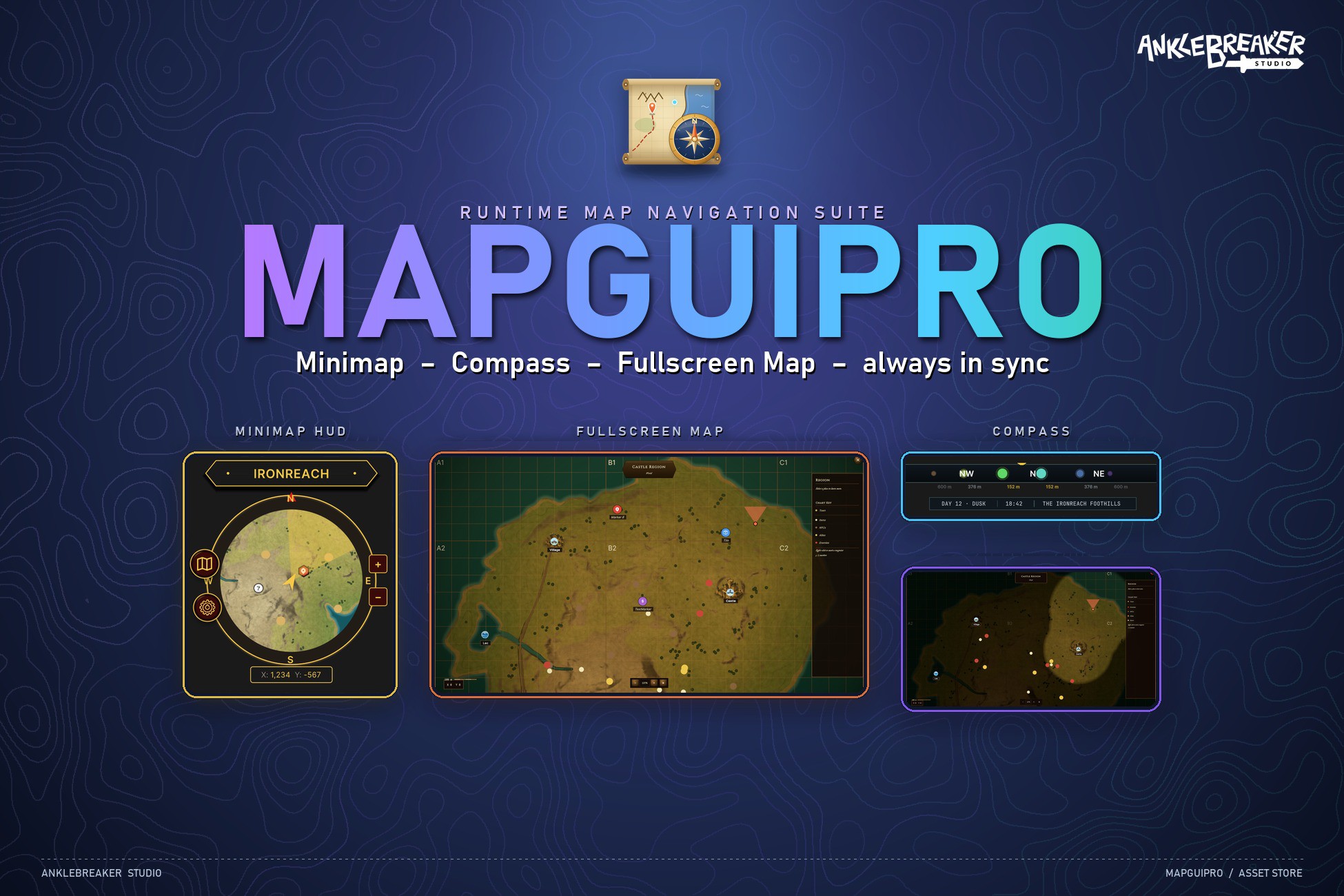
Minimap HUD — 7 frame shapes, North-Up or Camera-Relative rotation, zoom and mouse pan with auto return-to-player, live player coordinates, and edge indicators that clamp distant markers to the rim. Orbit buttons dock custom actions around the frame — 7 shapes, tooltips, even add/remove from code at runtime.
Compass — cardinal markers, degree ticks, needle, and POIs projected along a configurable FOV cone with distance labels. The sub-data panel pipes date/time, zone name, or any custom text right under the bar.
Fullscreen Map — windowed or true fullscreen, inertial pan, touch pinch zoom, interactive POIs with hover tooltips, a per-category legend, a coordinate grid with axis headers (A1, B2…), and a World > Zone breadcrumb.
Place a marker on the world map — it appears on the minimap and the compass instantly. One data set, three displays, zero sync code.
6 Complete Visual Themes
Beautiful results out of the box — one click reskins all three displays at once. Every preset is a ScriptableObject you can duplicate and customize.
DarkBronze — riveted medieval bronze for fantasy worlds.
FieldAtlas — modern military steel & cyan, with the data-rich sub-data bar.
GoldenDark — premium fantasy gold.
GoldenDarkFull — ornate full-chrome gold for high-fantasy UIs.
Minimal — clean, flat, desaturated.
SurvivalTopo — mil-sim olive with tactical grid.
All chrome is drawn procedurally as vectors — recolor everything from a role-based palette, no sprite editing required.
Why MapGUIPro?
One Suite, Not Five Assets — The market is split into silos: a minimap here, a compass there, a map screen somewhere else. MapGUIPro unifies all three in one coherent, consistently themed system.
100% UI Toolkit — UXML + USS + procedural vector rendering. Crisp at any resolution, render-pipeline-agnostic, future-proof. Rare on the Asset Store, where most map assets still ship legacy sprite-based uGUI.
No Second Camera — maps are textures (hand-made, baked, or generated by Cartograph), projected and styled in UI. No render-texture camera silently eating frame time every update.
Design in the Editor, Not in Play Mode — the Designer window previews everything live: one-click re-theming, camera yaw simulation, HUD placement on a simulated 1920×1080 screen, 16:9 / 4:3 / 1:1 / 21:9 aspect checks, and a per-element color inspector.
Event-Driven & Data-Driven — 12 decoupled event buses, every feature configured through ScriptableObjects, and a code generator that writes typed event hubs for your custom buttons.
Performance That Scales — Burst-accelerated fog reveal and entity projection (managed fallbacks included), pooled icons, push-based updates instead of per-frame polling.
Cartograph Synergy (optional) — with Cartograph installed, map textures load straight from its registry, maps auto-swap on zone entry, and interiors get multi-floor plans with a floor switcher. Fully standalone otherwise — zero dependency.
Gameplay Features Players Feel
A full gameplay layer ships on top of the UI:
POI System — typed categories (icon, color, legend visibility) with discovery by radius, trigger, or API — undiscovered POIs show as mystery “?” markers until found.
Dynamic POI States — flip any POI between custom states at runtime (Open / Closed / Out of stock…) with badges and custom tooltip fields.
User Markers — players right-click to place, rename, drag, and delete their own markers, with the icon sets and palettes you define. Marker limits, JSON persistence, per-map scoping.
Entity Tracking — track the player, NPCs, allies, enemies, or vehicles via a drop-in component or interface; filter by category, cull off-map entities, list them in the legend.
Fog of War — radius reveal around the player or authored region/polygon reveals, edge softness, per-zone persistence, on the fullscreen map and the minimap (experimental — API may evolve before v1.1).
Regions & Zones — draw regions with polygon / circle / rect tools or auto-generate them via flood fill; banners update live as players cross borders, and zones carry their own maps and fog state.
Map Transitions — smooth animated transitions when switching maps, zones, or floors.
Made for All Genres
RPG / Adventure — golden parchment themes, POI discovery, named player markers.
Dungeon Crawler — interior floor plans with multi-floor switching (with Cartograph).
Survival / Open-World — fog of war, entity tracking, SurvivalTopo tactical grid.
Strategy / 4X — grid overlay with axis headers, zone maps, category legends.
Sci-Fi / Modern — FieldAtlas steel-and-cyan HUD or the clean Minimal theme.
Horror / Dark — dark chrome and fog-heavy slow reveals.
Mobile / Casual — touch pinch zoom and lightweight vector UI.
What's in the Box
3 synced runtime displays: minimap, compass, fullscreen map.
6 visual themes — 35 preset & config ScriptableObjects across all surfaces.
18 drop-in prefabs — the three surfaces, fog of war, baked map source, compass controller, and 12 pre-wired managers.
The MapGUIPro Designer editor window with live previews, placement simulator, color inspector, and region tools.
8 sample scenes covering every major feature + 3 optional integration sample packs (Cartograph, ManagersLoader, both combined).
12 illustrated PDF guides covering setup, architecture, editor windows, runtime API, events, and integrations.
268 NUnit tests shipped with the source.
Welcome, Examples, and Documentation windows for instant onboarding.
Requirements
Unity 2022.3 LTS or newer (including Unity 6). Built-in / URP / HDRP all supported — the entire UI runs on UI Toolkit, render-pipeline-agnostic by design (demo materials auto-convert to your pipeline).
Third-Party Content
Asset uses bundled open-source fonts under the SIL Open Font License 1.1 and the Apache License 2.0; see Third-Party Notices.txt file in package for details.
Three Map Displays, One System
Minimap HUD — 7 frame shapes, North-Up or Camera-Relative rotation, zoom and mouse pan with auto return-to-player, live player coordinates, and edge indicators that clamp distant markers to the rim. Orbit buttons dock custom actions around the frame — 7 shapes, tooltips, even add/remove from code at runtime.
Compass — cardinal markers, degree ticks, needle, and POIs projected along a configurable FOV cone with distance labels. The sub-data panel pipes date/time, zone name, or any custom text right under the bar.
Fullscreen Map — windowed or true fullscreen, inertial pan, touch pinch zoom, interactive POIs with hover tooltips, a per-category legend, a coordinate grid with axis headers (A1, B2…), and a World > Zone breadcrumb.
Place a marker on the world map — it appears on the minimap and the compass instantly. One data set, three displays, zero sync code.
6 Complete Visual Themes
Beautiful results out of the box — one click reskins all three displays at once. Every preset is a ScriptableObject you can duplicate and customize.
DarkBronze — riveted medieval bronze for fantasy worlds.
FieldAtlas — modern military steel & cyan, with the data-rich sub-data bar.
GoldenDark — premium fantasy gold.
GoldenDarkFull — ornate full-chrome gold for high-fantasy UIs.
Minimal — clean, flat, desaturated.
SurvivalTopo — mil-sim olive with tactical grid.
All chrome is drawn procedurally as vectors — recolor everything from a role-based palette, no sprite editing required.
Why MapGUIPro?
One Suite, Not Five Assets — The market is split into silos: a minimap here, a compass there, a map screen somewhere else. MapGUIPro unifies all three in one coherent, consistently themed system.
100% UI Toolkit — UXML + USS + procedural vector rendering. Crisp at any resolution, render-pipeline-agnostic, future-proof. Rare on the Asset Store, where most map assets still ship legacy sprite-based uGUI.
No Second Camera — maps are textures (hand-made, baked, or generated by Cartograph), projected and styled in UI. No render-texture camera silently eating frame time every update.
Design in the Editor, Not in Play Mode — the Designer window previews everything live: one-click re-theming, camera yaw simulation, HUD placement on a simulated 1920×1080 screen, 16:9 / 4:3 / 1:1 / 21:9 aspect checks, and a per-element color inspector.
Event-Driven & Data-Driven — 12 decoupled event buses, every feature configured through ScriptableObjects, and a code generator that writes typed event hubs for your custom buttons.
Performance That Scales — Burst-accelerated fog reveal and entity projection (managed fallbacks included), pooled icons, push-based updates instead of per-frame polling.
Cartograph Synergy (optional) — with Cartograph installed, map textures load straight from its registry, maps auto-swap on zone entry, and interiors get multi-floor plans with a floor switcher. Fully standalone otherwise — zero dependency.
Gameplay Features Players Feel
A full gameplay layer ships on top of the UI:
POI System — typed categories (icon, color, legend visibility) with discovery by radius, trigger, or API — undiscovered POIs show as mystery “?” markers until found.
Dynamic POI States — flip any POI between custom states at runtime (Open / Closed / Out of stock…) with badges and custom tooltip fields.
User Markers — players right-click to place, rename, drag, and delete their own markers, with the icon sets and palettes you define. Marker limits, JSON persistence, per-map scoping.
Entity Tracking — track the player, NPCs, allies, enemies, or vehicles via a drop-in component or interface; filter by category, cull off-map entities, list them in the legend.
Fog of War — radius reveal around the player or authored region/polygon reveals, edge softness, per-zone persistence, on the fullscreen map and the minimap (experimental — API may evolve before v1.1).
Regions & Zones — draw regions with polygon / circle / rect tools or auto-generate them via flood fill; banners update live as players cross borders, and zones carry their own maps and fog state.
Map Transitions — smooth animated transitions when switching maps, zones, or floors.
Made for All Genres
RPG / Adventure — golden parchment themes, POI discovery, named player markers.
Dungeon Crawler — interior floor plans with multi-floor switching (with Cartograph).
Survival / Open-World — fog of war, entity tracking, SurvivalTopo tactical grid.
Strategy / 4X — grid overlay with axis headers, zone maps, category legends.
Sci-Fi / Modern — FieldAtlas steel-and-cyan HUD or the clean Minimal theme.
Horror / Dark — dark chrome and fog-heavy slow reveals.
Mobile / Casual — touch pinch zoom and lightweight vector UI.
What's in the Box
3 synced runtime displays: minimap, compass, fullscreen map.
6 visual themes — 35 preset & config ScriptableObjects across all surfaces.
18 drop-in prefabs — the three surfaces, fog of war, baked map source, compass controller, and 12 pre-wired managers.
The MapGUIPro Designer editor window with live previews, placement simulator, color inspector, and region tools.
8 sample scenes covering every major feature + 3 optional integration sample packs (Cartograph, ManagersLoader, both combined).
12 illustrated PDF guides covering setup, architecture, editor windows, runtime API, events, and integrations.
268 NUnit tests shipped with the source.
Welcome, Examples, and Documentation windows for instant onboarding.
Requirements
Unity 2022.3 LTS or newer (including Unity 6). Built-in / URP / HDRP all supported — the entire UI runs on UI Toolkit, render-pipeline-agnostic by design (demo materials auto-convert to your pipeline).
Third-Party Content
Asset uses bundled open-source fonts under the SIL Open Font License 1.1 and the Apache License 2.0; see Third-Party Notices.txt file in package for details.