Unity
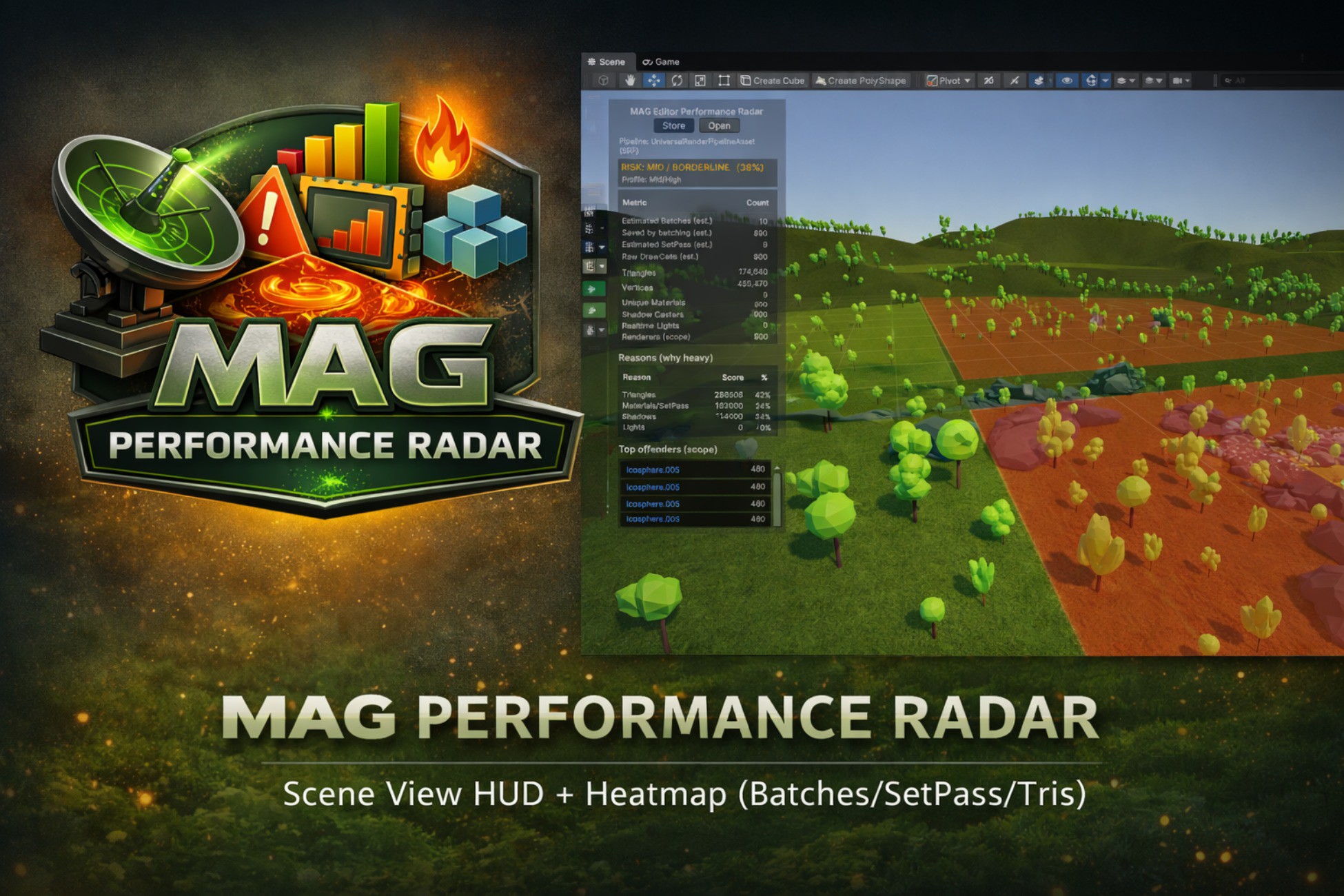
MAG Performance Radar – Scene View HUD + Heatmap (Batches/SetPass/Tris)
By MAG Software
$6.99
Rated 0.0/5 from 2 ratings on Unity.
Price history
Recorded standalone sale prices and the latest available store price, in USD. Historical dots use the sale start date and its recorded offer price. Prices can change during a sale; this is not a daily price log. Bundle prices and upcoming offers are excluded. History covers up to the 100 most recent recorded offers.
Lowest recorded standalone price in this history: $6.99. The latest store price is $6.99, matching the lowest recorded price shown here.
View 3 recorded prices
| Sale start / price check | Price | Observation |
|---|---|---|
| $6.99 | Latest store price | |
| $6.99 | Unity Permanent Decrease 2026-07-20 2026-07-27 | |
| $27.99 | Unity First Price 2026-06-20 2026-06-27 |
Sale and bundle history
The 2 most recent recorded offers including this asset. Past offers may no longer be available. Bundle prices cover a package, not this asset alone.
About MAG Performance Radar – Scene View HUD + Heatmap (Batches/SetPass/Tris)
- Tools, Systems & Learning > Development Tools & Automation
Track performance LIVE in Edit Mode and simulate camera movement to see Play-mode behavior instantly — batches, tris, draw calls, materials and more, exactly in the direction your camera is looking. Ultra-fast optimization for mobile, console and PC.
MAG Performance Radar – Scene View HUD + Heatmap
Stop guessing where your scene becomes heavy.
MAG Performance Radar shows you real rendering cost directly in Scene View, while you design levels — no Play Mode, no Profiler setup, no workflow interruption.Move the camera → instantly see what becomes expensive.
Just like testing gameplay performance, but inside the editor.
What it does
Live HUD in Scene View with:
- Estimated Batches
- SetPass
- DrawCalls
- Triangles / Vertices
- Materials
- Shadow casters
- Realtime lights
- Simulates camera view:
- Frustum-based analysis
- Custom far-clip simulation
-Radius scan mode
Real-time heatmap:
- See heavy zones instantly
- Identify problem segments while building maps
- Click any cell → select all objects inside
Top offenders detection:
- Heaviest objects ranked automatically
- Click to select & frame
- Jump directly to optimization targets
- Instant optimization helpers:
- Disable Cast Shadows (Undo supported)
- Enable GPU Instancing
- Select material / triangle / batch offenders
Risk scoring:
- LOW / MID / HEAVY performance indicator
- Mobile-friendly thresholds (Low-end profile)
- Understand performance impact at a glance
Export tools:
- H TML performance report
-CSV path recording
- Share optimization data with team
Built for real production workflows
Perfect for:
- Mobile games
- Open worlds
- Simulators
- Large environments
- Level designers
Optimization passes before releaseInstead of entering Play Mode and opening Profiler constantly, you:
- Move camera in Scene View
- See performance cost instantly
- Jump to heavy objects
- Fix them in seconds. Why it’s different
- Unity Profiler shows numbers.
MAG Performance Radar shows WHERE the problem is.You see:
- which direction is heavy
- which segment breaks performance
- which objects cause it
and you can fix them immediatelyAll without leaving Edit Mode.
Performance metrics (important)
- Batches / SetPass / DrawCalls are estimated using real renderer grouping
(mesh + material + lightmap + shadow settings).They are designed for fast optimization decisions in editor, not as a replacement for the Unity Profiler.Use Radar → detect problems fast
- Use Profiler → validate final resultsThis combo is extremely powerful.
Profiles included
- Low-end mobile (30 FPS)
- Mid devices
- High-end PC/console
Custom profiles (save your own thresholds)
Use cases
- Optimize mobile scenes before publishing
- Detect heavy map zones instantly
- Validate LOD / shadows / batching visually
- Speed up level design workflow
- Reduce iteration time dramatically
Ideal for teams & solo devs
Level designers see instantly if:
- a prop is too heavy
- a segment kills performance
- shadows are overused
materials break batchingNo need to wait for build or profiling sessions.
Result
You optimize while building, not after.Faster workflow.
- Cleaner scenes.
Better performance on every platform.If you build environments, large maps or mobile games, this tool will save you hours every week.
MAG Performance Radar – Scene View HUD + Heatmap
Stop guessing where your scene becomes heavy.
MAG Performance Radar shows you real rendering cost directly in Scene View, while you design levels — no Play Mode, no Profiler setup, no workflow interruption.Move the camera → instantly see what becomes expensive.
Just like testing gameplay performance, but inside the editor.
What it does
Live HUD in Scene View with:
- Estimated Batches
- SetPass
- DrawCalls
- Triangles / Vertices
- Materials
- Shadow casters
- Realtime lights
- Simulates camera view:
- Frustum-based analysis
- Custom far-clip simulation
-Radius scan mode
Real-time heatmap:
- See heavy zones instantly
- Identify problem segments while building maps
- Click any cell → select all objects inside
Top offenders detection:
- Heaviest objects ranked automatically
- Click to select & frame
- Jump directly to optimization targets
- Instant optimization helpers:
- Disable Cast Shadows (Undo supported)
- Enable GPU Instancing
- Select material / triangle / batch offenders
Risk scoring:
- LOW / MID / HEAVY performance indicator
- Mobile-friendly thresholds (Low-end profile)
- Understand performance impact at a glance
Export tools:
- H TML performance report
-CSV path recording
- Share optimization data with team
Built for real production workflows
Perfect for:
- Mobile games
- Open worlds
- Simulators
- Large environments
- Level designers
Optimization passes before releaseInstead of entering Play Mode and opening Profiler constantly, you:
- Move camera in Scene View
- See performance cost instantly
- Jump to heavy objects
- Fix them in seconds. Why it’s different
- Unity Profiler shows numbers.
MAG Performance Radar shows WHERE the problem is.You see:
- which direction is heavy
- which segment breaks performance
- which objects cause it
and you can fix them immediatelyAll without leaving Edit Mode.
Performance metrics (important)
- Batches / SetPass / DrawCalls are estimated using real renderer grouping
(mesh + material + lightmap + shadow settings).They are designed for fast optimization decisions in editor, not as a replacement for the Unity Profiler.Use Radar → detect problems fast
- Use Profiler → validate final resultsThis combo is extremely powerful.
Profiles included
- Low-end mobile (30 FPS)
- Mid devices
- High-end PC/console
Custom profiles (save your own thresholds)
Use cases
- Optimize mobile scenes before publishing
- Detect heavy map zones instantly
- Validate LOD / shadows / batching visually
- Speed up level design workflow
- Reduce iteration time dramatically
Ideal for teams & solo devs
Level designers see instantly if:
- a prop is too heavy
- a segment kills performance
- shadows are overused
materials break batchingNo need to wait for build or profiling sessions.
Result
You optimize while building, not after.Faster workflow.
- Cleaner scenes.
Better performance on every platform.If you build environments, large maps or mobile games, this tool will save you hours every week.