Unity
MAG Parking Builder PRO - Terrain Parking Generator
By MAG Software
$15.19
Rated 0.0/5 from 2 ratings on Unity.
Price history
Recorded standalone sale prices and the latest available store price, in USD. Historical dots use the sale start date and its recorded offer price. Prices can change during a sale; this is not a daily price log. Bundle prices and upcoming offers are excluded. History covers up to the 100 most recent recorded offers.
Lowest recorded standalone price in this history: $10.63. The latest store price is $15.19.
View 5 recorded prices
| Sale start / price check | Price | Observation |
|---|---|---|
| $15.19 | Latest store price | |
| $15.19 | Unity First Price 2026-08-21 2026-08-21 | |
| $10.63 | Unity New Release Discount 2026-08-21 2026-09-04 | |
| $10.63 | Unity New Release Discount 2026-08-21 2026-09-04 | |
| $10.63 | Unity New Release Discount 2026-08-21 2026-09-04 |
Sale and bundle history
The 4 most recent recorded offers including this asset. Past offers may no longer be available. Bundle prices cover a package, not this asset alone.
About MAG Parking Builder PRO - Terrain Parking Generator
- Tools, Systems & Learning > Development Tools & Automation
- Tools, Systems & Learning > Level & World Building
MAG Parking Builder PRO is a powerful Unity Editor tool for creating custom parking areas directly on Unity Terrain.
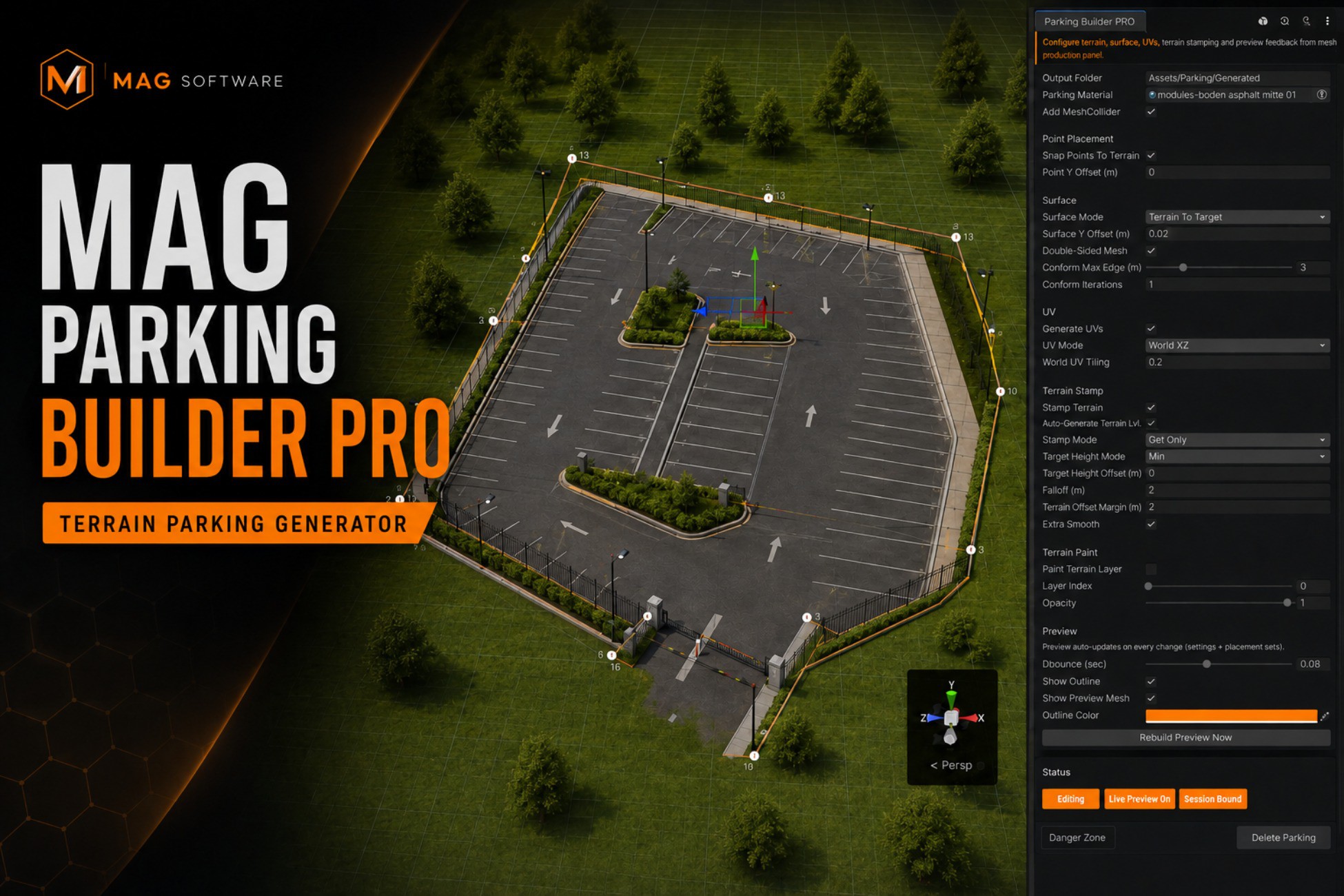
Draw any parking shape using editable control points, preview the result instantly, adjust the terrain, generate the final mesh and populate the perimeter with fences, sidewalks, lights, barriers, vegetation or your own prefabs.
Designed for open-world games, city environments, driving games, simulation projects, construction games and realistic level design workflows.
BUILD CUSTOM PARKING AREAS
Create parking areas of almost any shape by placing points directly in the Scene view.
Every generated parking remains editable. Return to an existing parking, move its points, modify its settings and regenerate the same mesh asset without creating unnecessary duplicates.
LIVE EDITOR PREVIEW
See the generated parking surface and perimeter objects while editing.
The live preview updates as points and settings change, allowing you to quickly test different shapes, surface modes, offsets, materials and placement configurations before generating the final result.
TERRAIN-AWARE SURFACE GENERATION
Choose how the generated parking surface interacts with your terrain:
• Flat surface at a calculated target height
• Surface based on control point heights
• Surface conformed to the underlying terrain
• Terrain adjusted toward the point-defined surface
Additional controls are available for surface offsets, subdivision quality, double-sided geometry and terrain conformity.
TERRAIN STAMPING AND PAINTING
Automatically modify the Unity Terrain beneath and around the parking area.
Available terrain tools include:
• Cut Only
• Fill Only
• Cut and Fill
• Configurable target height
• Falloff blending
• Additional flattening margin
• Optional smoothing passes
• Terrain Layer painting
• Adjustable paint opacity
The tool stores terrain backup data so the terrain can be restored when the generated parking is deleted.
AUTOMATIC MESH AND UV GENERATION
Generate a reusable Unity Mesh asset for every parking area.
Features include:
• Automatic polygon triangulation
• Optional double-sided geometry
• Automatic normal and bounds recalculation
• Optional MeshCollider generation
• World-space planar UV mapping
• Bounds-based UV mapping
• Adjustable UV tiling
• Configurable output folder
• Regeneration of the existing mesh asset instead of producing duplicates
PERIMETER PLACEMENT SYSTEM
Populate the perimeter using reusable prefab placement sets.
Use the system for:
• Fences
• Guardrails
• Barriers
• Sidewalk elements
• Street lights
• Signs
• Trees and vegetation
• Decorative props
• Custom modular assets
Each placement set provides control over spacing, outward offset, height offset, terrain alignment, orientation, random rotation, scale variation and prefab selection.
SELECT INDIVIDUAL EDGES
Apply a placement set around the entire parking perimeter or select only the edges that should receive objects.
For example, place fences along the rear edges, lights along the entrance and sidewalks only along the road-facing side.
CONTINUOUS FENCE MODE
Fence Mode automatically positions modular fence pieces end-to-end along the selected parking edges.
Fence sections can follow the terrain height or remain aligned along a straight horizontal line.
PROCEDURAL PLACEMENT MODE
Combine placed objects into a generated mesh to reduce the number of individual GameObjects in the scene.
This is useful for larger parking areas, repeated modular objects and projects targeting improved scene organization and runtime performance.
FENCE COLLIDER OPTIMIZATION
Remove individual colliders from generated fence pieces and replace them with an optimized generated collider.
Choose between:
• Combined Mesh Collider
• Simplified procedural collider strip
The simplified strip option is suitable for projects where a lower-complexity fence collision solution is preferred.
NON-DESTRUCTIVE EDITING WORKFLOW
Created parking areas retain their control points and generation settings.
You can:
• Finish and lock an editing session
• Select an existing parking
• Re-enter editing mode
• Insert or delete control points
• Move points directly in the Scene view
• Change materials and generation settings
• Regenerate the existing mesh
• Undo editor operations
• Delete the parking and restore backed-up terrain data
IDEAL FOR
• Open-world environments
• Driving and racing games
• City-building games
• Parking simulators
• Construction games
• Urban scenes
• Large outdoor environments
• Procedural level-design workflows
• Mobile, PC and console projects
MAG Parking Builder PRO is an Editor extension. It generates standard Unity meshes, GameObjects and colliders that can be used in your finished game without requiring the editor window at runtime.
Your own terrain materials, parking materials, fence prefabs, sidewalk prefabs and decorative assets can be assigned to the tool.
Draw any parking shape using editable control points, preview the result instantly, adjust the terrain, generate the final mesh and populate the perimeter with fences, sidewalks, lights, barriers, vegetation or your own prefabs.
Designed for open-world games, city environments, driving games, simulation projects, construction games and realistic level design workflows.
BUILD CUSTOM PARKING AREAS
Create parking areas of almost any shape by placing points directly in the Scene view.
Every generated parking remains editable. Return to an existing parking, move its points, modify its settings and regenerate the same mesh asset without creating unnecessary duplicates.
LIVE EDITOR PREVIEW
See the generated parking surface and perimeter objects while editing.
The live preview updates as points and settings change, allowing you to quickly test different shapes, surface modes, offsets, materials and placement configurations before generating the final result.
TERRAIN-AWARE SURFACE GENERATION
Choose how the generated parking surface interacts with your terrain:
• Flat surface at a calculated target height
• Surface based on control point heights
• Surface conformed to the underlying terrain
• Terrain adjusted toward the point-defined surface
Additional controls are available for surface offsets, subdivision quality, double-sided geometry and terrain conformity.
TERRAIN STAMPING AND PAINTING
Automatically modify the Unity Terrain beneath and around the parking area.
Available terrain tools include:
• Cut Only
• Fill Only
• Cut and Fill
• Configurable target height
• Falloff blending
• Additional flattening margin
• Optional smoothing passes
• Terrain Layer painting
• Adjustable paint opacity
The tool stores terrain backup data so the terrain can be restored when the generated parking is deleted.
AUTOMATIC MESH AND UV GENERATION
Generate a reusable Unity Mesh asset for every parking area.
Features include:
• Automatic polygon triangulation
• Optional double-sided geometry
• Automatic normal and bounds recalculation
• Optional MeshCollider generation
• World-space planar UV mapping
• Bounds-based UV mapping
• Adjustable UV tiling
• Configurable output folder
• Regeneration of the existing mesh asset instead of producing duplicates
PERIMETER PLACEMENT SYSTEM
Populate the perimeter using reusable prefab placement sets.
Use the system for:
• Fences
• Guardrails
• Barriers
• Sidewalk elements
• Street lights
• Signs
• Trees and vegetation
• Decorative props
• Custom modular assets
Each placement set provides control over spacing, outward offset, height offset, terrain alignment, orientation, random rotation, scale variation and prefab selection.
SELECT INDIVIDUAL EDGES
Apply a placement set around the entire parking perimeter or select only the edges that should receive objects.
For example, place fences along the rear edges, lights along the entrance and sidewalks only along the road-facing side.
CONTINUOUS FENCE MODE
Fence Mode automatically positions modular fence pieces end-to-end along the selected parking edges.
Fence sections can follow the terrain height or remain aligned along a straight horizontal line.
PROCEDURAL PLACEMENT MODE
Combine placed objects into a generated mesh to reduce the number of individual GameObjects in the scene.
This is useful for larger parking areas, repeated modular objects and projects targeting improved scene organization and runtime performance.
FENCE COLLIDER OPTIMIZATION
Remove individual colliders from generated fence pieces and replace them with an optimized generated collider.
Choose between:
• Combined Mesh Collider
• Simplified procedural collider strip
The simplified strip option is suitable for projects where a lower-complexity fence collision solution is preferred.
NON-DESTRUCTIVE EDITING WORKFLOW
Created parking areas retain their control points and generation settings.
You can:
• Finish and lock an editing session
• Select an existing parking
• Re-enter editing mode
• Insert or delete control points
• Move points directly in the Scene view
• Change materials and generation settings
• Regenerate the existing mesh
• Undo editor operations
• Delete the parking and restore backed-up terrain data
IDEAL FOR
• Open-world environments
• Driving and racing games
• City-building games
• Parking simulators
• Construction games
• Urban scenes
• Large outdoor environments
• Procedural level-design workflows
• Mobile, PC and console projects
MAG Parking Builder PRO is an Editor extension. It generates standard Unity meshes, GameObjects and colliders that can be used in your finished game without requiring the editor window at runtime.
Your own terrain materials, parking materials, fence prefabs, sidewalk prefabs and decorative assets can be assigned to the tool.