Unity
Low Poly Goblins Modular Armors - LOWPOLY MEDIEVAL FANTASY SERIES
$64.99
About Low Poly Goblins Modular Armors - LOWPOLY MEDIEVAL FANTASY SERIES
- Tools, Systems & Learning > Development Tools & Automation
- Theme > Stylized
- Theme > Low Poly
- Theme > Fantasy & Mythology
- Theme > Military & Combat
- Theme > Buildings & Infrastructure
- Art & Visuals > 3D
- Art & Visuals > Textures & Materials
Try before you buy — install the free interactive demo and preview modular armor sets on a live character in real time.
This pack is the goblins version of the base modular armors package: Low Poly Modular Armors.
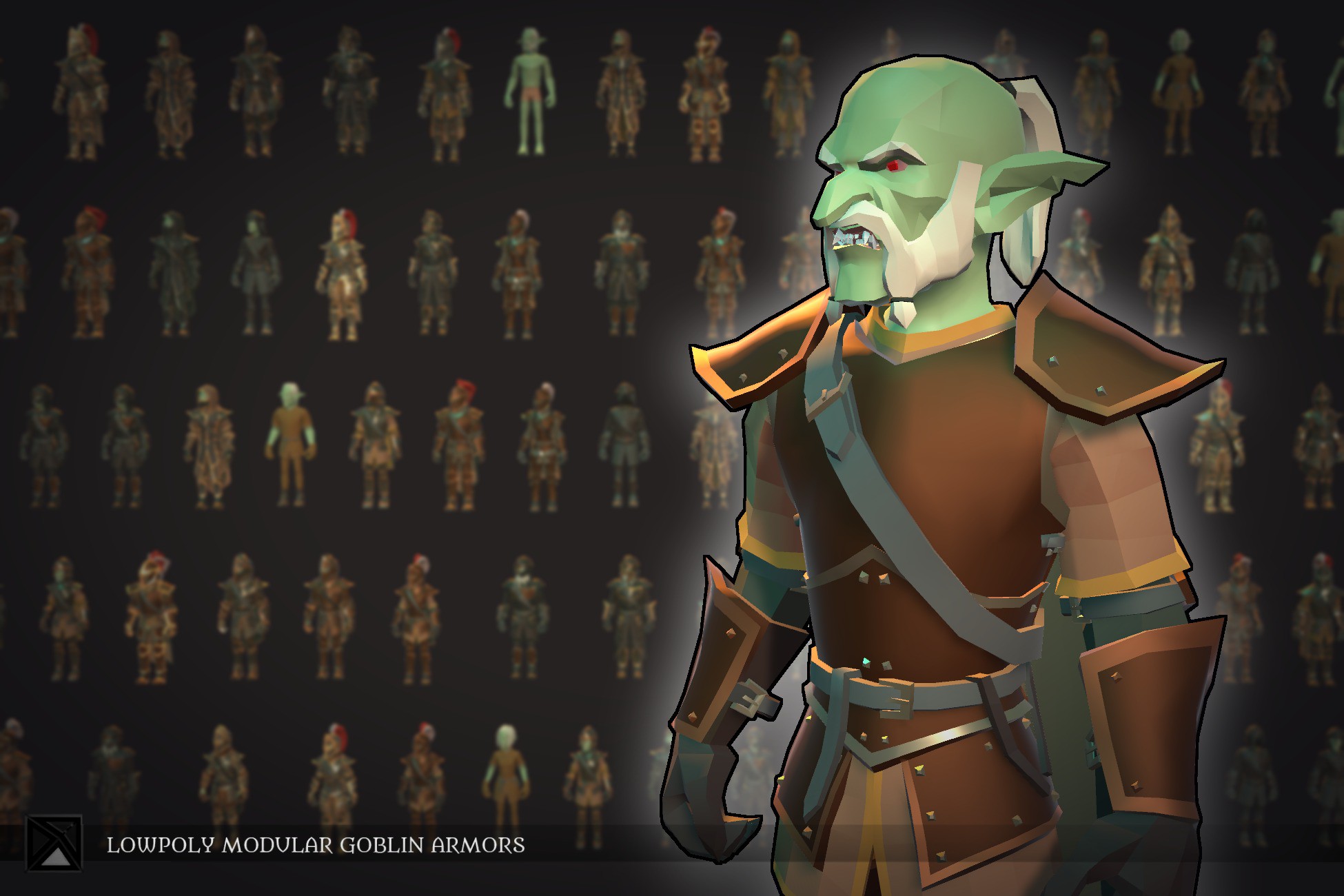
A fully modular low-poly armor system for RPG, strategy, and action games. Every character is built from interchangeable parts: helmet, cape, body, gauntlets, legs, boots, head, hair and beard, all skinned to a single shared humanoid rig. Mix and match parts freely by hand, or let the included PT_Create_Prefab editor tool assemble and bake clean prefabs automatically using a rule-driven naming system.
Compatible with Built-in and URP. Mecanim and Mixamo ready. This pack contains no animations.
CONTENTS
- 10 modular armor sets (5 male, 5 female), each in 3 tiers (A, B, C)
- 6 base armor sets: cloth, leather and plate for male and female
- 2 undressed base characters (male and female)
- 20 male hair sets, 20 male facial hair sets, 20 female hair sets
- 10 male head variations, 10 female head variations
- 2 custom shaders (PBR and Toon) built with Amplify Shader Editor
- Per-material color, metallic and smoothness control
- Coat-of-arms cape texture slot — 8 included, add your own as transparent .png
- Base 256x256 color texture atlas, one material per character, low draw calls
- 8 coat of arms textures at 512x512 px
- 22 weapons and soldier props
- 9 interior environment assets + 7 interior props
- 1 diorama demo scene
- Polycount range: 2,090 — 9,490 tris
EXPANSION COMPATIBLE
This pack is the base for a growing armor system. It is fully compatible with: Low Poly Goblins Modular Armors Ex1 and Low Poly Goblins Modular Armors Ex2.
PT_CREATE_PREFAB — EDITOR TOOL
An editor-only authoring tool for building, mixing and baking armor prefabs without writing any code.
- Load: scans the master prefab and groups all parts into sets automatically
- Armor Set dropdown: assembles the full character the moment you select a set — no separate Apply step
- Mix: swap individual parts per slot (helmet, cape, body, gauntlets, legs, boots)
- Toggle helmet and cape on/off, or hit Randomize
- Material panel: adjust colors, metallic and smoothness — values are never overwritten by set changes
- Import Expansion: merges an expansion prefab onto the current one, extending the set list
- Create Prefab: bakes your configuration into a clean, fully rigged prefab
SHADERS
Two custom Amplify shaders ship with the pack:
PBR Shader — adjust color, metallic and smoothness for three independent material groups; load and tint a coat-of-arms texture.
Toon Shader — adjust color for three independent material groups; load and tint a coat-of-arms texture; configure up to three scene lights with adjustable size, power and tint.
Both shaders work with Built-in and URP. For accurate colors, set your project Color Space to Linear (Edit > Project Settings > Player > Other Settings > Color Space).
We update our packs periodically so if you want to see something specific please use the support email to make a request.
This pack is the goblins version of the base modular armors package: Low Poly Modular Armors.
A fully modular low-poly armor system for RPG, strategy, and action games. Every character is built from interchangeable parts: helmet, cape, body, gauntlets, legs, boots, head, hair and beard, all skinned to a single shared humanoid rig. Mix and match parts freely by hand, or let the included PT_Create_Prefab editor tool assemble and bake clean prefabs automatically using a rule-driven naming system.
Compatible with Built-in and URP. Mecanim and Mixamo ready. This pack contains no animations.
CONTENTS
- 10 modular armor sets (5 male, 5 female), each in 3 tiers (A, B, C)
- 6 base armor sets: cloth, leather and plate for male and female
- 2 undressed base characters (male and female)
- 20 male hair sets, 20 male facial hair sets, 20 female hair sets
- 10 male head variations, 10 female head variations
- 2 custom shaders (PBR and Toon) built with Amplify Shader Editor
- Per-material color, metallic and smoothness control
- Coat-of-arms cape texture slot — 8 included, add your own as transparent .png
- Base 256x256 color texture atlas, one material per character, low draw calls
- 8 coat of arms textures at 512x512 px
- 22 weapons and soldier props
- 9 interior environment assets + 7 interior props
- 1 diorama demo scene
- Polycount range: 2,090 — 9,490 tris
EXPANSION COMPATIBLE
This pack is the base for a growing armor system. It is fully compatible with: Low Poly Goblins Modular Armors Ex1 and Low Poly Goblins Modular Armors Ex2.
PT_CREATE_PREFAB — EDITOR TOOL
An editor-only authoring tool for building, mixing and baking armor prefabs without writing any code.
- Load: scans the master prefab and groups all parts into sets automatically
- Armor Set dropdown: assembles the full character the moment you select a set — no separate Apply step
- Mix: swap individual parts per slot (helmet, cape, body, gauntlets, legs, boots)
- Toggle helmet and cape on/off, or hit Randomize
- Material panel: adjust colors, metallic and smoothness — values are never overwritten by set changes
- Import Expansion: merges an expansion prefab onto the current one, extending the set list
- Create Prefab: bakes your configuration into a clean, fully rigged prefab
SHADERS
Two custom Amplify shaders ship with the pack:
PBR Shader — adjust color, metallic and smoothness for three independent material groups; load and tint a coat-of-arms texture.
Toon Shader — adjust color for three independent material groups; load and tint a coat-of-arms texture; configure up to three scene lights with adjustable size, power and tint.
Both shaders work with Built-in and URP. For accurate colors, set your project Color Space to Linear (Edit > Project Settings > Player > Other Settings > Color Space).
We update our packs periodically so if you want to see something specific please use the support email to make a request.