Price history
Recorded standalone sale prices and the latest available store price, in USD. Historical dots use the sale start date and its recorded offer price. Prices can change during a sale; this is not a daily price log. Bundle prices and upcoming offers are excluded. History covers up to the 100 most recent recorded offers.
Lowest recorded standalone price in this history: $29.75. The latest store price is $59.50.
View 3 recorded prices
| Sale start / price check | Price | Observation |
|---|---|---|
| $59.50 | Latest store price | |
| $29.75 | Autumn Sale | |
| $59.50 | Unity First Price 2026-06-20 2026-06-27 |
Sale and bundle history
The 2 most recent recorded offers including this asset. Past offers may no longer be available. Bundle prices cover a package, not this asset alone.
About Line Kit: Advanced Outline Rendering
- Art & Visuals > VFX
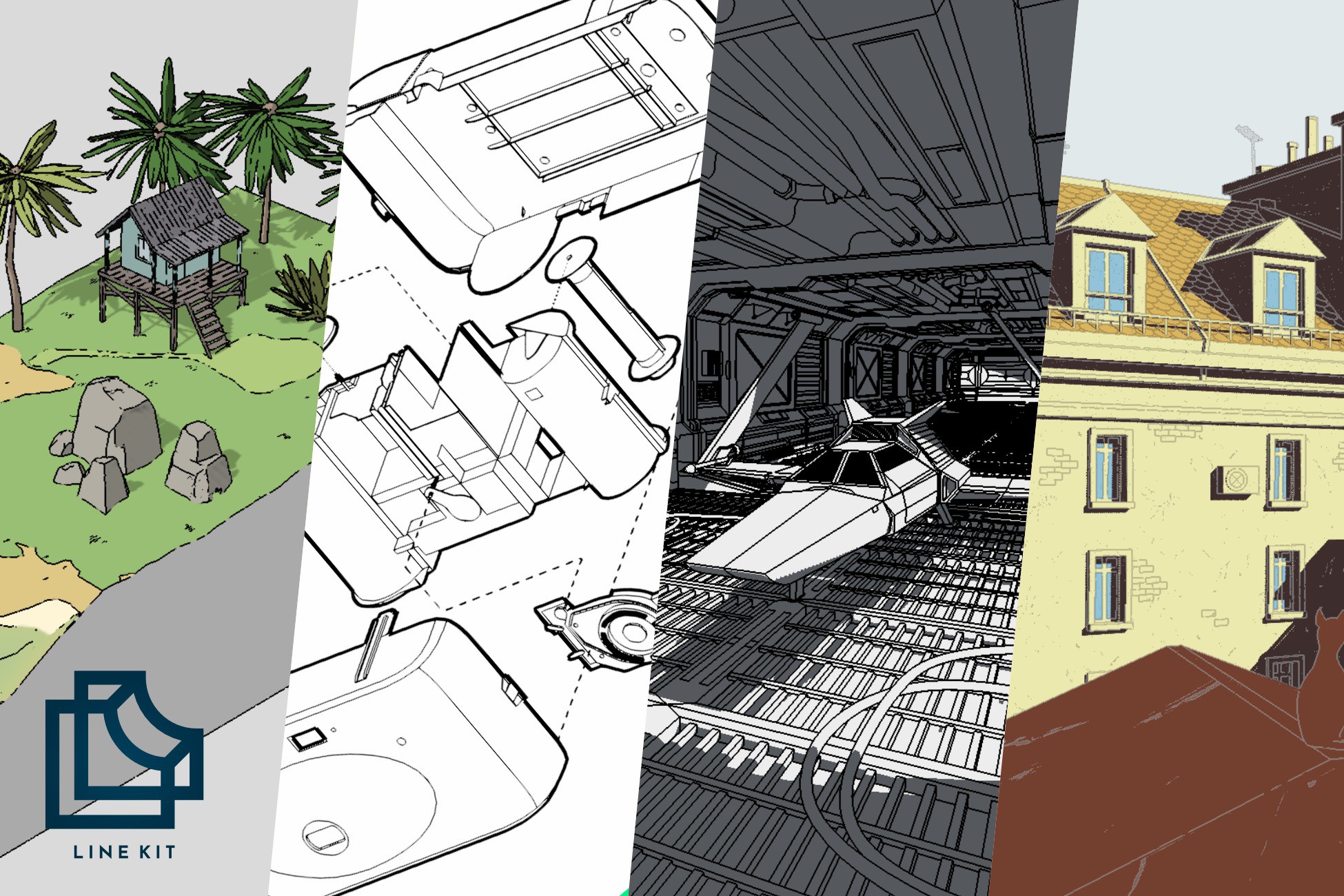
Line Kit is an advanced outline rendering toolkit for Unity URP for projects where lines are a core part of the visual identity, not just a finishing effect. It gives you deliberate control over silhouettes, inner lines, object separation, transparent objects, and hand-drawn imperfections — all in a single, layerable system.
No single edge detection method works for every scene. Line Kit solves this by letting you layer seven independent sources — camera color, depth, normals, object map, line map on objects, line map on layers, and vertex colors — each with dedicated tolerance and variance controls. Enable only what you need, blend them together, and get results that a single-method approach cannot deliver.
Line Maps — Draw Lines Exactly Where You Want Them
Line Maps let you place lines anywhere on a model, including across surfaces where no geometric edge exists. Apply them per-object with a dedicated material and separate UV channel selection, or per-layer with a shared texture for efficient multi-object control. Red, blue, and green channels give you precise control over line placement, removal, and fill — completely independent of your albedo workflow. This is how you get deliberate detail lines on a character's face, panel seams on a vehicle, or mortar lines on a wall.
Vertex Colors offer a lightweight alternative to Line Maps — paint edge data directly on your meshes without any texture authoring, ideal for stylized props and characters.
Stable, Clean Lines
Thin-line shimmer at distance is a common problem in outlined games. Line Kit includes a purpose-built Temporal Anti-Aliasing system designed specifically for line rendering, with blend control, motion vector integration, and neighbor dilation. The result is significantly reduced flicker and cleaner outlines at any resolution and camera distance, including in motion.
Transparent & Animated Object Support
Line Kit renders outlines on transparent and vertex-animated objects through a dedicated normals workflow, with the option to use each object's own material for correct displacement and animation. Water, glass, foliage — outlines follow the geometry faithfully.
Artistic Effects
- Line Breaks — 3D noise-driven interruptions for a hand-drawn, organic feel.
- Line Shifts — Animated displaced copies for sketchy, living lines with configurable framerate.
- Override in Shadows — Distinct line colors in shaded areas (invert or custom color).
- Blend Modes — Overwrite, Add (neon/glow with bloom), Multiply, Screen, Overlay.
- Fade with Distance — Lines fade over a configurable world-space range.
- Vignette — Screen-edge line darkening with size, fade, and color controls.
Line Kit is built for production — and proven in it. It ships in released games like Super Loco World on Steam and was developed through years of work on Dustyroom's own titles. The package includes a refined inspector, comprehensive debug views for every pass, and full source code with no compiled libraries.
- Ideal for: stylized worlds, ligne claire and Moebius-inspired rendering, toon projects, technical and exploded visuals, architectural scenes, dioramas, retro looks, and bold graphic presentations.
- From the creators of Flat Kit: Line Kit builds on the same foundation — refined and expanded for projects that need deeper line control.
- Ready to learn from: 10 demo scenes covering distinct artistic directions, plus online documentation at linekit.dustyroom.com.
No single edge detection method works for every scene. Line Kit solves this by letting you layer seven independent sources — camera color, depth, normals, object map, line map on objects, line map on layers, and vertex colors — each with dedicated tolerance and variance controls. Enable only what you need, blend them together, and get results that a single-method approach cannot deliver.
Line Maps — Draw Lines Exactly Where You Want Them
Line Maps let you place lines anywhere on a model, including across surfaces where no geometric edge exists. Apply them per-object with a dedicated material and separate UV channel selection, or per-layer with a shared texture for efficient multi-object control. Red, blue, and green channels give you precise control over line placement, removal, and fill — completely independent of your albedo workflow. This is how you get deliberate detail lines on a character's face, panel seams on a vehicle, or mortar lines on a wall.
Vertex Colors offer a lightweight alternative to Line Maps — paint edge data directly on your meshes without any texture authoring, ideal for stylized props and characters.
Stable, Clean Lines
Thin-line shimmer at distance is a common problem in outlined games. Line Kit includes a purpose-built Temporal Anti-Aliasing system designed specifically for line rendering, with blend control, motion vector integration, and neighbor dilation. The result is significantly reduced flicker and cleaner outlines at any resolution and camera distance, including in motion.
Transparent & Animated Object Support
Line Kit renders outlines on transparent and vertex-animated objects through a dedicated normals workflow, with the option to use each object's own material for correct displacement and animation. Water, glass, foliage — outlines follow the geometry faithfully.
Artistic Effects
- Line Breaks — 3D noise-driven interruptions for a hand-drawn, organic feel.
- Line Shifts — Animated displaced copies for sketchy, living lines with configurable framerate.
- Override in Shadows — Distinct line colors in shaded areas (invert or custom color).
- Blend Modes — Overwrite, Add (neon/glow with bloom), Multiply, Screen, Overlay.
- Fade with Distance — Lines fade over a configurable world-space range.
- Vignette — Screen-edge line darkening with size, fade, and color controls.
Line Kit is built for production — and proven in it. It ships in released games like Super Loco World on Steam and was developed through years of work on Dustyroom's own titles. The package includes a refined inspector, comprehensive debug views for every pass, and full source code with no compiled libraries.
- Ideal for: stylized worlds, ligne claire and Moebius-inspired rendering, toon projects, technical and exploded visuals, architectural scenes, dioramas, retro looks, and bold graphic presentations.
- From the creators of Flat Kit: Line Kit builds on the same foundation — refined and expanded for projects that need deeper line control.
- Ready to learn from: 10 demo scenes covering distinct artistic directions, plus online documentation at linekit.dustyroom.com.