Price history
Recorded standalone sale prices and the latest available store price, in USD. Historical dots use the sale start date and its recorded offer price. Prices can change during a sale; this is not a daily price log. Bundle prices and upcoming offers are excluded. History covers up to the 100 most recent recorded offers.
Lowest recorded standalone price in this history: $13.50. The latest store price is $15.
View 4 recorded prices
| Sale start / price check | Price | Observation |
|---|---|---|
| $15 | Latest store price | |
| $13.50 | Unity New Release Discount 2026-09-07 2026-09-21 | |
| $13.50 | Unity New Release Discount 2026-09-07 2026-09-21 | |
| $15 | Unity First Price 2026-09-07 2026-09-07 |
Sale and bundle history
The 3 most recent recorded offers including this asset. Past offers may no longer be available. Bundle prices cover a package, not this asset alone.
About Hierarchy Rules & Tags Pro
- Tools, Systems & Learning > Development Tools & Automation
Hierarchy Roles & Tags Pro — Visual Hierarchy & Project Organization
Transform cluttered scenes and chaotic project folders into clean, intuitive, and highly organized workspaces.
Hierarchy Roles & Tags Pro is a comprehensive editor enhancement and workflow utility designed to speed up scene navigation, streamline team collaboration, and keep your Unity Hierarchy and Project windows visually structured.
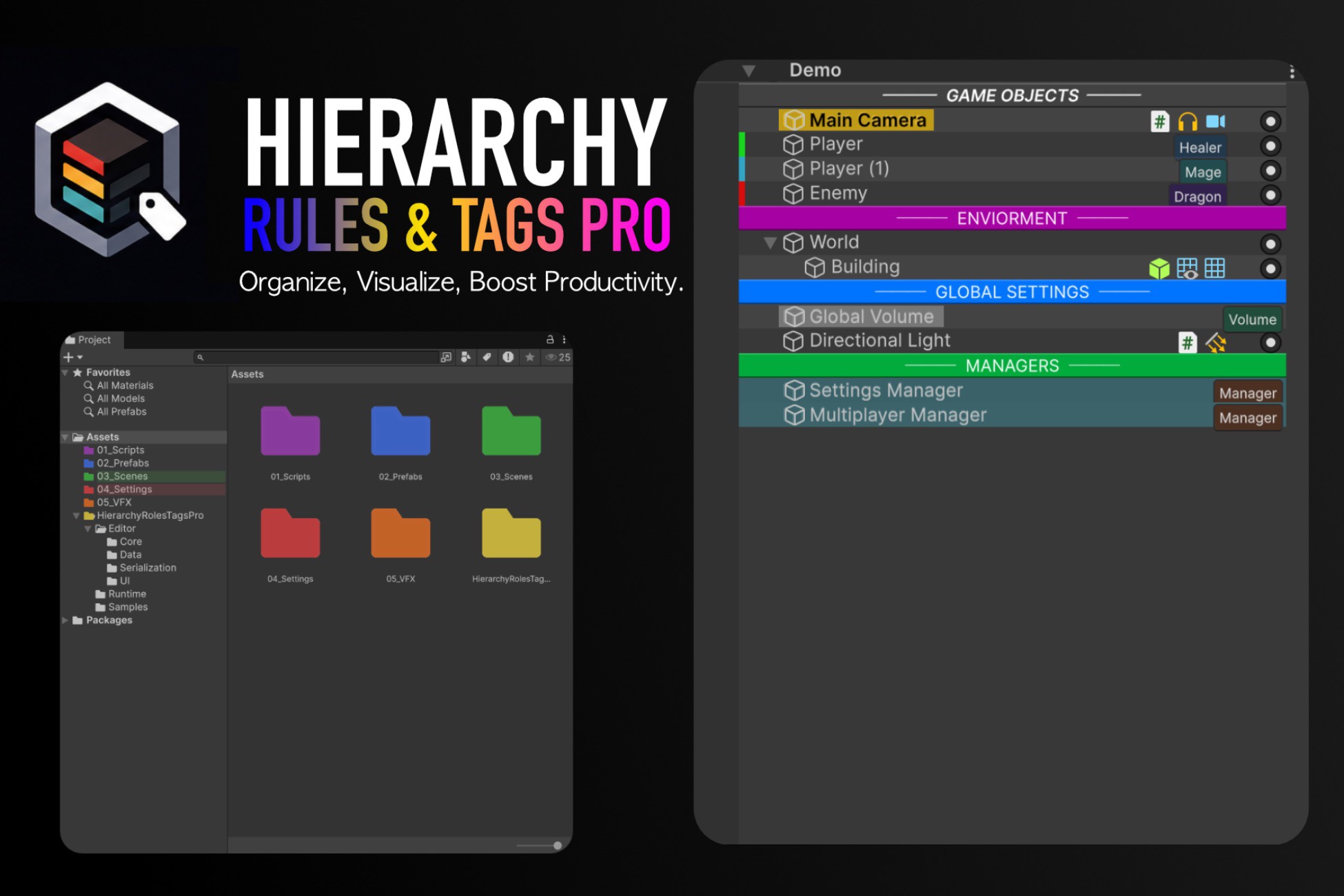
Assign multi-tag "Roles" alongside standard Unity tags, create clean category headers, color-code folders, style items dynamically with priority rules, and manage object states with one-click inline toggles.
Key Features
Multi-Tagging ("Roles") System Assign multiple functional tags (Player, Enemy, VFX, UI, Networked, Audio, etc.) to any GameObject without replacing standard Unity Tags or Layers. Query or modify roles in runtime gameplay scripts with a clean C# API.
Priority Rule-Based Dynamic Styling Automate your hierarchy's appearance with flexible rules. Match GameObjects by Role, Unity Tag, Layer, Component Type, Name Prefix, Substring, or Header status to apply custom backgrounds, text styling, and colors automatically.
Category Headers & Visual Separators Turn GameObjects into bold, clean section dividers (--- ENVIRONMENT ---, // LIGHTING, etc.) with customizable text alignment (Center or Left), background colors, and divider lines.
Interactive Multi-Tag Badges Display colored role badges on the right side of hierarchy rows with automatic, deterministic hue palettes. Click any badge to quickly remove roles or select objects.
Quick Action Toggles (Active & Lock)Visibility Toggle ([✓]): Instantly enable or disable GameObjects directly from the row with full Undo support.
Lock Toggle ([🔒] / [🔓]): Lock objects (HideFlags.NotEditable) to protect critical scene elements from accidental movement or edits.
Component Mini-Icons Instantly identify attached components (Colliders, AudioSources, NavMeshAgents, ParticleSystems, etc.) directly in the hierarchy row with official Unity component textures.
Project Window Folder Tinting & Custom Icons Color-code asset folders by name or path across both List View and Grid View, or set colors instantly with a right-click context menu. Supports custom folder icons and background pill highlights.
Scene View Overlay & Profile Switching Switch styling profiles seamlessly via Unity’s Scene View Toolbar Overlay or open the dedicated Rule Editor in a single click.
JSON Import & Export Export your styling profiles to share consistent visual guidelines across your team and version-control them in .json format.
Zero Runtime Overhead & Smart Caching Built on an event-driven HierarchyCache system that repaints without garbage allocation (GC) or editor lag. All heavy GUI logic is strictly isolated in editor assemblies.
What’s Included?
Dedicated Rule Editor Window (Tools > Hierarchy Roles & Tags > Rule Editor)
Scene View Toolbar Overlay integration
Custom Inspector for GameObjectRoles
Preconfigured Example Profile (HierarchyProfile.asset)
Interactive Demo Scene showcasing headers, roles, icons, and folder rules
Full C# Source Code with Assembly Definitions (.asmdef)
Comprehensive Documentation (PDF / Markdown)
Transform cluttered scenes and chaotic project folders into clean, intuitive, and highly organized workspaces.
Hierarchy Roles & Tags Pro is a comprehensive editor enhancement and workflow utility designed to speed up scene navigation, streamline team collaboration, and keep your Unity Hierarchy and Project windows visually structured.
Assign multi-tag "Roles" alongside standard Unity tags, create clean category headers, color-code folders, style items dynamically with priority rules, and manage object states with one-click inline toggles.
Key Features
Multi-Tagging ("Roles") System Assign multiple functional tags (Player, Enemy, VFX, UI, Networked, Audio, etc.) to any GameObject without replacing standard Unity Tags or Layers. Query or modify roles in runtime gameplay scripts with a clean C# API.
Priority Rule-Based Dynamic Styling Automate your hierarchy's appearance with flexible rules. Match GameObjects by Role, Unity Tag, Layer, Component Type, Name Prefix, Substring, or Header status to apply custom backgrounds, text styling, and colors automatically.
Category Headers & Visual Separators Turn GameObjects into bold, clean section dividers (--- ENVIRONMENT ---, // LIGHTING, etc.) with customizable text alignment (Center or Left), background colors, and divider lines.
Interactive Multi-Tag Badges Display colored role badges on the right side of hierarchy rows with automatic, deterministic hue palettes. Click any badge to quickly remove roles or select objects.
Quick Action Toggles (Active & Lock)Visibility Toggle ([✓]): Instantly enable or disable GameObjects directly from the row with full Undo support.
Lock Toggle ([🔒] / [🔓]): Lock objects (HideFlags.NotEditable) to protect critical scene elements from accidental movement or edits.
Component Mini-Icons Instantly identify attached components (Colliders, AudioSources, NavMeshAgents, ParticleSystems, etc.) directly in the hierarchy row with official Unity component textures.
Project Window Folder Tinting & Custom Icons Color-code asset folders by name or path across both List View and Grid View, or set colors instantly with a right-click context menu. Supports custom folder icons and background pill highlights.
Scene View Overlay & Profile Switching Switch styling profiles seamlessly via Unity’s Scene View Toolbar Overlay or open the dedicated Rule Editor in a single click.
JSON Import & Export Export your styling profiles to share consistent visual guidelines across your team and version-control them in .json format.
Zero Runtime Overhead & Smart Caching Built on an event-driven HierarchyCache system that repaints without garbage allocation (GC) or editor lag. All heavy GUI logic is strictly isolated in editor assemblies.
What’s Included?
Dedicated Rule Editor Window (Tools > Hierarchy Roles & Tags > Rule Editor)
Scene View Toolbar Overlay integration
Custom Inspector for GameObjectRoles
Preconfigured Example Profile (HierarchyProfile.asset)
Interactive Demo Scene showcasing headers, roles, icons, and folder rules
Full C# Source Code with Assembly Definitions (.asmdef)
Comprehensive Documentation (PDF / Markdown)