Price history
Recorded standalone sale prices and the latest available store price, in USD. Historical dots use the sale start date and its recorded offer price. Prices can change during a sale; this is not a daily price log. Bundle prices and upcoming offers are excluded. History covers up to the 100 most recent recorded offers.
Lowest recorded standalone price in this history: $6. The latest store price is $6, matching the lowest recorded price shown here.
View 2 recorded prices
| Sale start / price check | Price | Observation |
|---|---|---|
| $6 | Latest store price | |
| $6 | Unity First Price 2026-10-28 2026-10-28 |
Sale and bundle history
The 1 most recent recorded offers including this asset. Past offers may no longer be available. Bundle prices cover a package, not this asset alone.
About Customizable Bottle Pack (High Poly)
- Theme > Modern
- Art & Visuals > 3D
Customizable Bottle Pack (High Poly) for HDRP
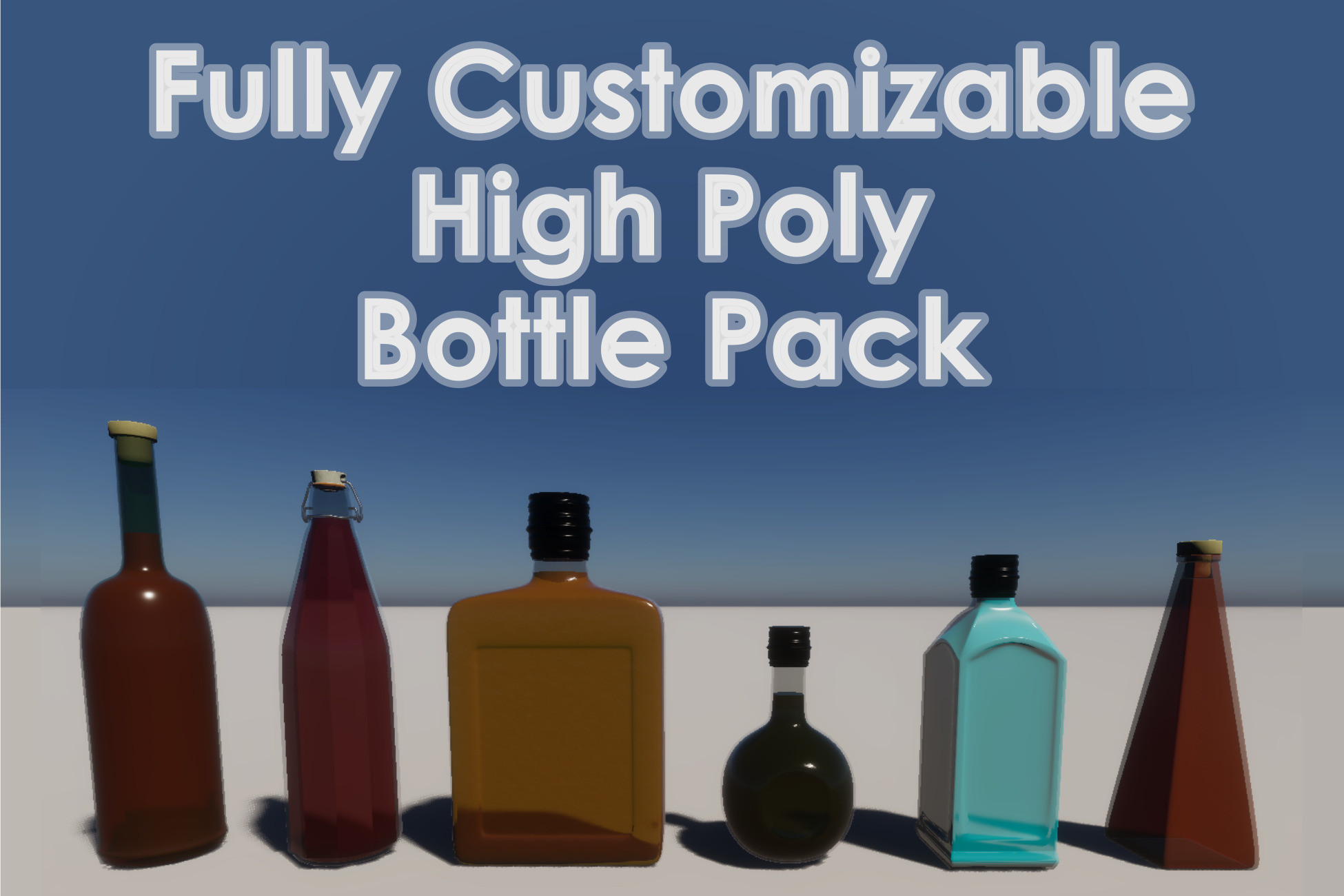
The pack includes 6 different high poly bottle models with customizable colors, imperfections, smoothness and refractions, for both the bottles and the liquids inside. It also includes 3 types of bottle caps already paired with and scaled with respect to their specific bottle.
Bottle shapes included in the pack:
- Cylindrical Bottle (Metal Cap)
- Cylindrical Faceted Bottle (Hinge Cap)
- Rectangular Bottle (Metal Cap)
- Spherical Bottle (Metal Cap)
- Square Bottle (Metal Cap)
- Triangular Bottle (Cork Cap)
Customization
To customize the look of the bottles, you can either change the parameters of the default materials or create new materials with the included shader graphs.
If you want to use new materials, you can either duplicate the default materials (and change their parameters), or:
- Create two materials, one with GlassShader, the other with LiquidShader
- Make sure to set Surface Type to Transparent for both materials, unless you want an opaque bottle or liquid
- Set the Sorting Priority for the glass material to 1
- For the liquid material, set Refraction Model to Planar and check the Double-Sided box
- In the Mesh Renderer component of the bottle object inside the prefab, assign the materials to their respective slots under the Materials menu
- Tweak the materials' parameters to your liking
Note: the shaders and the materials are only compatible with HDRP.
The pack includes 6 different high poly bottle models with customizable colors, imperfections, smoothness and refractions, for both the bottles and the liquids inside. It also includes 3 types of bottle caps already paired with and scaled with respect to their specific bottle.
Bottle shapes included in the pack:
- Cylindrical Bottle (Metal Cap)
- Cylindrical Faceted Bottle (Hinge Cap)
- Rectangular Bottle (Metal Cap)
- Spherical Bottle (Metal Cap)
- Square Bottle (Metal Cap)
- Triangular Bottle (Cork Cap)
Customization
To customize the look of the bottles, you can either change the parameters of the default materials or create new materials with the included shader graphs.
If you want to use new materials, you can either duplicate the default materials (and change their parameters), or:
- Create two materials, one with GlassShader, the other with LiquidShader
- Make sure to set Surface Type to Transparent for both materials, unless you want an opaque bottle or liquid
- Set the Sorting Priority for the glass material to 1
- For the liquid material, set Refraction Model to Planar and check the Double-Sided box
- In the Mesh Renderer component of the bottle object inside the prefab, assign the materials to their respective slots under the Materials menu
- Tweak the materials' parameters to your liking
Note: the shaders and the materials are only compatible with HDRP.