Price history
Recorded standalone sale prices and the latest available store price, in USD. Historical dots use the sale start date and its recorded offer price. Prices can change during a sale; this is not a daily price log. Bundle prices and upcoming offers are excluded. History covers up to the 100 most recent recorded offers.
Lowest recorded standalone price in this history: $24.99. The latest store price is $24.99, matching the lowest recorded price shown here.
View 2 recorded prices
| Sale start / price check | Price | Observation |
|---|---|---|
| $24.99 | Latest store price | |
| $24.99 | Unity First Price 2026-10-14 2026-10-14 |
Sale and bundle history
The 1 most recent recorded offers including this asset. Past offers may no longer be available. Bundle prices cover a package, not this asset alone.
About Curved Carousel Menu Pro
- Tools, Systems & Learning > Development Tools & Automation
- Art & Visuals > UI & GUI
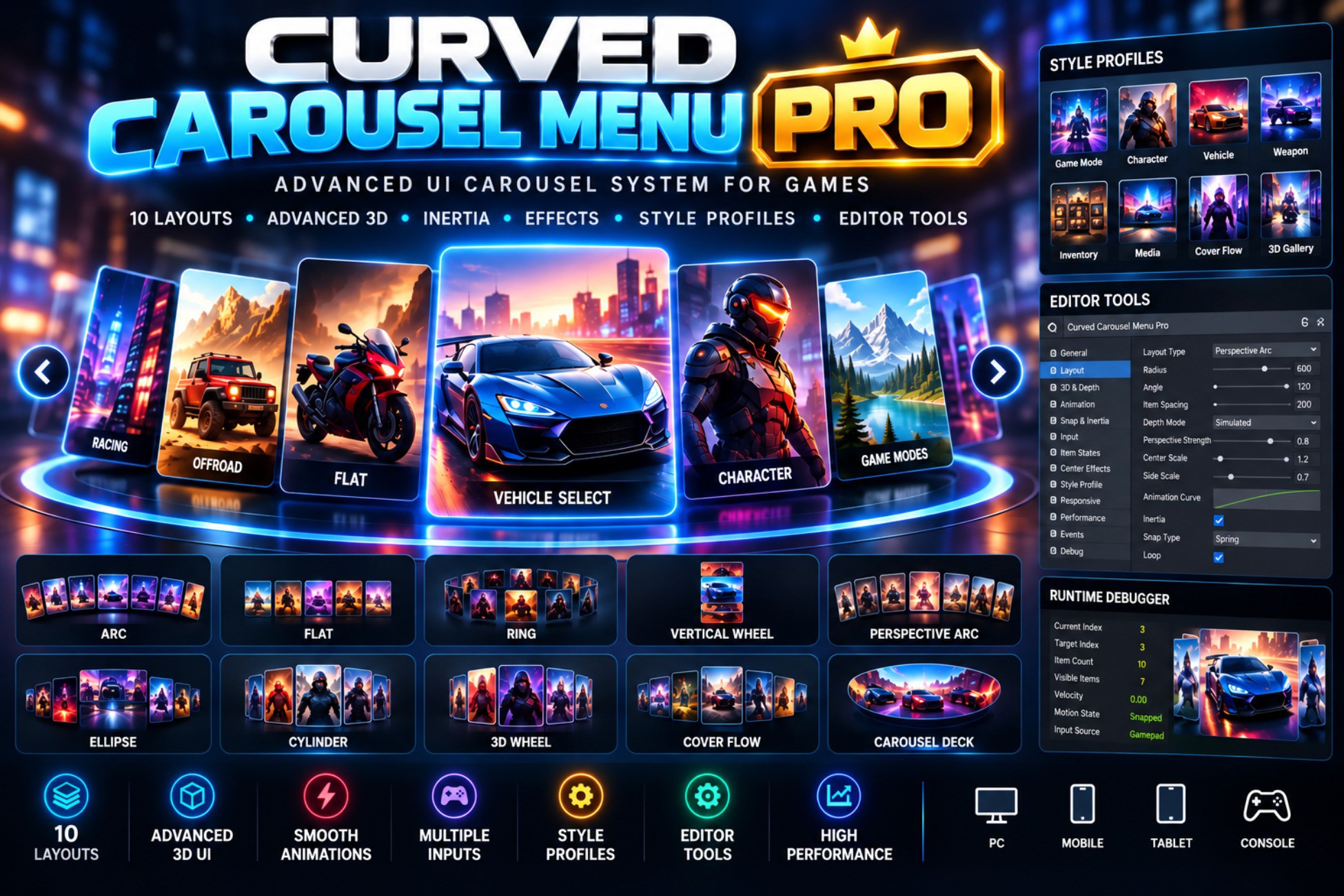
Curved Carousel Menu Pro is a professional Unity UI carousel framework for creating advanced game menus, character selection screens, vehicle selection screens, game-mode selectors, weapon selection interfaces, inventories, media browsers, galleries, and other interactive UI experiences.
The package provides 10 carousel layouts, advanced 3D depth and perspective controls, smooth snapping, inertia and momentum, item states, center and hover effects, customizable style profiles, responsive UI options, layout morphing, editor tools, and a runtime debugger.
LAYOUTS
Classic layouts:
• Arc
• Flat
• Ring
• Vertical Wheel
Advanced Pro layouts:
• Perspective Arc
• Ellipse
• Cylinder
• 3D Wheel
• Cover Flow
• Carousel Deck
ADVANCED 3D AND DEPTH
• Z-depth positioning
• Simulated perspective
• Native camera perspective
• Depth-based scale
• Depth-based opacity
• Depth-based rotation
• Configurable depth curves
• Depth sorting
• Center item priority
ANIMATION AND MOTION
• Smooth snapping
• Instant snapping
• Spring snapping
• Elastic snapping
• Bounce snapping
• Custom AnimationCurve support
• Inertia and momentum
• Velocity and deceleration controls
• Friction
• Drag resistance
• Edge resistance
• Rubber-band overscroll
• Layout morphing
• Selection effects
• Arrival effects
• Optional animation while the game is paused
INPUT
• Mouse drag
• Touch
• Swipe
• Mouse wheel
• Keyboard
• Gamepad
• Previous and Next buttons
• Click and tap selection
• Configurable input sensitivity
• Swipe and drag thresholds
• Wheel sensitivity
• Gamepad dead zone
• Navigation repeat controls
ITEM STATES
The Pro system supports configurable item states including:
• Normal
• Hovered
• Focused
• Selected
• Locked
• Disabled
• Hidden
• Transitioning
State properties can include scale, opacity, rotation, color, position offset, depth, interaction, and animated transitions.
CENTER AND HOVER EFFECTS
Optional center-item effects include:
• Scale
• Color
• Glow
• Outline
• Shadow
• Brightness
• Saturation
• Position
• Rotation
• Depth
Hover effects can include scale, brightness, opacity, rotation, offset, transition duration, and animation curves.
CUSTOMIZATION
Carousel items can contain:
• Background images
• Main images
• Icons
• Titles
• Subtitles
• Badges
• Lock indicators
• Custom content
• Completely custom item prefabs
Developers are not restricted to a specific card visual design.
STYLE PROFILES
Carousel Style Profiles use ScriptableObjects to store reusable carousel configurations including layout, colors, scale, opacity, rotation, animation, snapping, depth, center effects, and input settings.
The package includes ready-to-use style presets and allows developers to create and edit their own profiles.
RESPONSIVE UI
The carousel supports responsive configurations for:
• 16:9
• 16:10
• 4:3
• 9:16
• Portrait
• Landscape
• Mobile
• Tablet
• Desktop
Developers can configure settings based on screen orientation, aspect ratio, and resolution class.
EDITOR TOOLS
The Pro package includes a professional custom Inspector with organized controls for:
• General
• Layout
• 3D
• Depth
• Animation
• Snap
• Input
• Item States
• Center Effects
• Style
• Performance
• Events
• Debug
Scene View preview and gizmos can display curves, radii, centers, item positions, depth, direction, active items, and visible slots.
DEBUGGER
The built-in debugger provides information such as:
• Current index
• Item count
• Visible item count
• Velocity
• Snap state
• Input state
• Layout mode
• Pooled objects
• Selected item
• Hovered item
• Loop state
DEVELOPER API
The package provides a public API for navigation, selection, item management, layouts, style profiles, input, looping, visible slots, and item access.
It also supports UnityEvents and C# events for center changes, selection, clicks, scrolling, item creation/removal, layout changes, and snap transitions.
PERFORMANCE
The carousel uses pooling and item reuse where appropriate to avoid unnecessarily creating large numbers of UI objects.
It is designed to support larger item collections while keeping the number of active visible objects close to the required visible slots where the architecture permits.
MULTIPLE CAROUSELS
Multiple carousels can be used on the same screen, with navigation input controls to prevent keyboard or gamepad input from unintentionally controlling every carousel.
DEMO CONTENT
The package includes a professional demonstration scene showcasing all 10 layouts.
Additional examples demonstrate real-world uses such as:
• Racing Game Mode Selection
• Character Selection
• Custom Cards
• Locked Items
• Selected Items
• Center Effects
• Cover Flow
• Perspective Arc
REQUIREMENTS
• Unity 6000.3.16f1
• Unity UI / uGUI
• TextMeshPro
• Unity Input System for keyboard and gamepad functionality
The package does not require DOTween, LeanTween, paid plugins, or external UI frameworks.
Curved Carousel Menu Pro is designed to be customizable and can be adapted to different game genres and UI styles, including racing, RPG, arcade, sci-fi, fantasy, mobile games, inventory systems, character selection, vehicle selection, and media/gallery interfaces.
The package provides 10 carousel layouts, advanced 3D depth and perspective controls, smooth snapping, inertia and momentum, item states, center and hover effects, customizable style profiles, responsive UI options, layout morphing, editor tools, and a runtime debugger.
LAYOUTS
Classic layouts:
• Arc
• Flat
• Ring
• Vertical Wheel
Advanced Pro layouts:
• Perspective Arc
• Ellipse
• Cylinder
• 3D Wheel
• Cover Flow
• Carousel Deck
ADVANCED 3D AND DEPTH
• Z-depth positioning
• Simulated perspective
• Native camera perspective
• Depth-based scale
• Depth-based opacity
• Depth-based rotation
• Configurable depth curves
• Depth sorting
• Center item priority
ANIMATION AND MOTION
• Smooth snapping
• Instant snapping
• Spring snapping
• Elastic snapping
• Bounce snapping
• Custom AnimationCurve support
• Inertia and momentum
• Velocity and deceleration controls
• Friction
• Drag resistance
• Edge resistance
• Rubber-band overscroll
• Layout morphing
• Selection effects
• Arrival effects
• Optional animation while the game is paused
INPUT
• Mouse drag
• Touch
• Swipe
• Mouse wheel
• Keyboard
• Gamepad
• Previous and Next buttons
• Click and tap selection
• Configurable input sensitivity
• Swipe and drag thresholds
• Wheel sensitivity
• Gamepad dead zone
• Navigation repeat controls
ITEM STATES
The Pro system supports configurable item states including:
• Normal
• Hovered
• Focused
• Selected
• Locked
• Disabled
• Hidden
• Transitioning
State properties can include scale, opacity, rotation, color, position offset, depth, interaction, and animated transitions.
CENTER AND HOVER EFFECTS
Optional center-item effects include:
• Scale
• Color
• Glow
• Outline
• Shadow
• Brightness
• Saturation
• Position
• Rotation
• Depth
Hover effects can include scale, brightness, opacity, rotation, offset, transition duration, and animation curves.
CUSTOMIZATION
Carousel items can contain:
• Background images
• Main images
• Icons
• Titles
• Subtitles
• Badges
• Lock indicators
• Custom content
• Completely custom item prefabs
Developers are not restricted to a specific card visual design.
STYLE PROFILES
Carousel Style Profiles use ScriptableObjects to store reusable carousel configurations including layout, colors, scale, opacity, rotation, animation, snapping, depth, center effects, and input settings.
The package includes ready-to-use style presets and allows developers to create and edit their own profiles.
RESPONSIVE UI
The carousel supports responsive configurations for:
• 16:9
• 16:10
• 4:3
• 9:16
• Portrait
• Landscape
• Mobile
• Tablet
• Desktop
Developers can configure settings based on screen orientation, aspect ratio, and resolution class.
EDITOR TOOLS
The Pro package includes a professional custom Inspector with organized controls for:
• General
• Layout
• 3D
• Depth
• Animation
• Snap
• Input
• Item States
• Center Effects
• Style
• Performance
• Events
• Debug
Scene View preview and gizmos can display curves, radii, centers, item positions, depth, direction, active items, and visible slots.
DEBUGGER
The built-in debugger provides information such as:
• Current index
• Item count
• Visible item count
• Velocity
• Snap state
• Input state
• Layout mode
• Pooled objects
• Selected item
• Hovered item
• Loop state
DEVELOPER API
The package provides a public API for navigation, selection, item management, layouts, style profiles, input, looping, visible slots, and item access.
It also supports UnityEvents and C# events for center changes, selection, clicks, scrolling, item creation/removal, layout changes, and snap transitions.
PERFORMANCE
The carousel uses pooling and item reuse where appropriate to avoid unnecessarily creating large numbers of UI objects.
It is designed to support larger item collections while keeping the number of active visible objects close to the required visible slots where the architecture permits.
MULTIPLE CAROUSELS
Multiple carousels can be used on the same screen, with navigation input controls to prevent keyboard or gamepad input from unintentionally controlling every carousel.
DEMO CONTENT
The package includes a professional demonstration scene showcasing all 10 layouts.
Additional examples demonstrate real-world uses such as:
• Racing Game Mode Selection
• Character Selection
• Custom Cards
• Locked Items
• Selected Items
• Center Effects
• Cover Flow
• Perspective Arc
REQUIREMENTS
• Unity 6000.3.16f1
• Unity UI / uGUI
• TextMeshPro
• Unity Input System for keyboard and gamepad functionality
The package does not require DOTween, LeanTween, paid plugins, or external UI frameworks.
Curved Carousel Menu Pro is designed to be customizable and can be adapted to different game genres and UI styles, including racing, RPG, arcade, sci-fi, fantasy, mobile games, inventory systems, character selection, vehicle selection, and media/gallery interfaces.