Price history
Recorded standalone sale prices and the latest available store price, in USD. Historical dots use the sale start date and its recorded offer price. Prices can change during a sale; this is not a daily price log. Bundle prices and upcoming offers are excluded. History covers up to the 100 most recent recorded offers.
Lowest recorded standalone price in this history: $27.99. The latest store price is $27.99, matching the lowest recorded price shown here.
View 4 recorded prices
| Sale start / price check | Price | Observation |
|---|---|---|
| $27.99 | Latest store price | |
| $39.99 | Unity First Price 2026-11-06 2026-11-06 | |
| $27.99 | Unity New Release Discount 2026-11-06 2026-11-20 | |
| $27.99 | Unity New Release Discount 2026-11-06 2026-11-20 |
Sale and bundle history
The 3 most recent recorded offers including this asset. Past offers may no longer be available. Bundle prices cover a package, not this asset alone.
About Chrono Inspector
CHRONO INSPECTOR
Time Travel Debugger for Unity
Find Bugs Exactly Where They Happened.
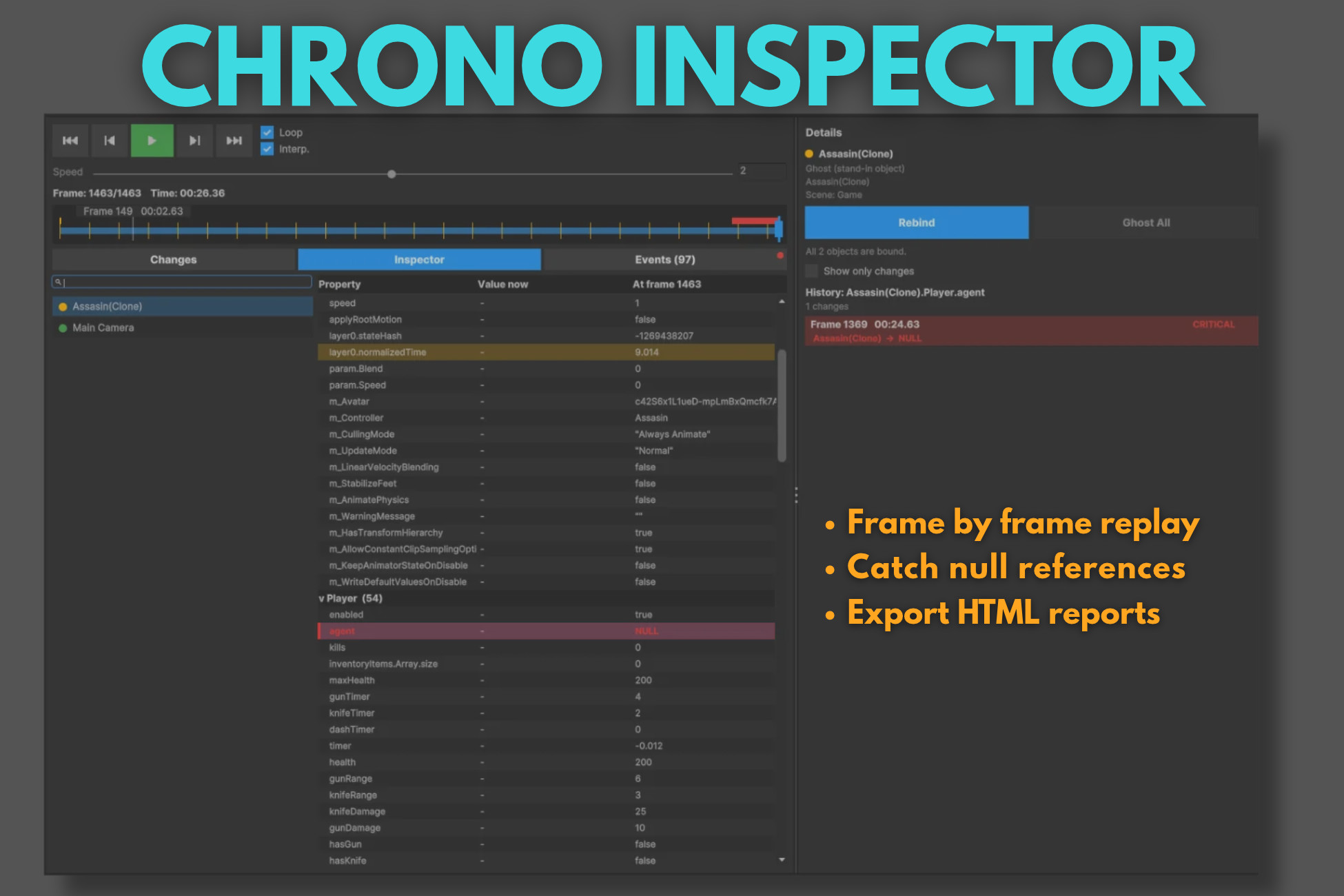
Stop reproducing bugs. Record gameplay, rewind to any frame, inspect object history, track exceptions, analyze events and discover the root cause of issues directly inside the Unity Editor.
Instead of repeatedly trying to recreate a bug, Chrono Inspector lets you return to the exact moment it happened and inspect what occurred before, during and after the problem.
Why Chrono Inspector?
Bugs rarely happen while you're watching.
Null references, missing objects, AI issues, unexpected state changes, physics problems, and gameplay bugs often occur seconds before you notice them.
Chrono Inspector records gameplay and allows you to:
• Rewind to any recorded frame
• Inspect object state changes over time
• View custom gameplay events
• Track exceptions and runtime issues
• Investigate null references and missing objects
• Replay bugs without reproducing them manually
Features
• Frame-by-frame replay system
• Time travel debugging workflow
• Timeline navigation with checkpoints
• Playback speed controls
• Changes tab for state history
• Inspector tab for object inspection
• Events tab for gameplay events and exceptions
• Automatic script variable tracking
• Critical issue detection
• Null reference investigation
• Exception timeline
• Ghost visualization for destroyed objects
• Scene View and Game View ghost rendering
• Rebind system
• Custom Replay Events
• Lightweight HTML reports
• Search and filtering tools
• Opt-in observation system
• Customizable tracking preferences
Selective Object Tracking
Chrono Inspector only records the objects you choose.
Simply add the ObservedObject component to the GameObjects you want to track and configure:
• Track Transform
• Track Components
• Track Custom Scripts
• Track Children
This keeps recordings focused and avoids unnecessary noise from unrelated scene objects.
Critical Change Detection
Chrono Inspector automatically highlights high-risk changes.
Examples:
• References becoming NULL
• Destroyed objects
• Destroyed components
• Missing references
• Critical tracked values
Perfect For
• Gameplay Programming
• AI Debugging
• Combat Systems
• Inventory Systems
• Quest Systems
• Physics Investigation
• Runtime Diagnostics
• QA Workflows
• Indie Studios
• Professional Development Teams
Supported Unity Versions
Unity 2022.3 LTS or newer.
Stop Guessing. Start Replaying.
Time Travel Debugger for Unity
Find Bugs Exactly Where They Happened.
Stop reproducing bugs. Record gameplay, rewind to any frame, inspect object history, track exceptions, analyze events and discover the root cause of issues directly inside the Unity Editor.
Instead of repeatedly trying to recreate a bug, Chrono Inspector lets you return to the exact moment it happened and inspect what occurred before, during and after the problem.
Why Chrono Inspector?
Bugs rarely happen while you're watching.
Null references, missing objects, AI issues, unexpected state changes, physics problems, and gameplay bugs often occur seconds before you notice them.
Chrono Inspector records gameplay and allows you to:
• Rewind to any recorded frame
• Inspect object state changes over time
• View custom gameplay events
• Track exceptions and runtime issues
• Investigate null references and missing objects
• Replay bugs without reproducing them manually
Features
• Frame-by-frame replay system
• Time travel debugging workflow
• Timeline navigation with checkpoints
• Playback speed controls
• Changes tab for state history
• Inspector tab for object inspection
• Events tab for gameplay events and exceptions
• Automatic script variable tracking
• Critical issue detection
• Null reference investigation
• Exception timeline
• Ghost visualization for destroyed objects
• Scene View and Game View ghost rendering
• Rebind system
• Custom Replay Events
• Lightweight HTML reports
• Search and filtering tools
• Opt-in observation system
• Customizable tracking preferences
Selective Object Tracking
Chrono Inspector only records the objects you choose.
Simply add the ObservedObject component to the GameObjects you want to track and configure:
• Track Transform
• Track Components
• Track Custom Scripts
• Track Children
This keeps recordings focused and avoids unnecessary noise from unrelated scene objects.
Critical Change Detection
Chrono Inspector automatically highlights high-risk changes.
Examples:
• References becoming NULL
• Destroyed objects
• Destroyed components
• Missing references
• Critical tracked values
Perfect For
• Gameplay Programming
• AI Debugging
• Combat Systems
• Inventory Systems
• Quest Systems
• Physics Investigation
• Runtime Diagnostics
• QA Workflows
• Indie Studios
• Professional Development Teams
Supported Unity Versions
Unity 2022.3 LTS or newer.
Stop Guessing. Start Replaying.