Price history
Recorded standalone sale prices and the latest available store price, in USD. Historical dots use the sale start date and its recorded offer price. Prices can change during a sale; this is not a daily price log. Bundle prices and upcoming offers are excluded. History covers up to the 100 most recent recorded offers.
Lowest recorded standalone price in this history: $14.99. The latest store price is $14.99, matching the lowest recorded price shown here.
View 2 recorded prices
| Sale start / price check | Price | Observation |
|---|---|---|
| $14.99 | Latest store price | |
| $14.99 | Unity First Price 2026-08-11 2026-08-11 |
Sale and bundle history
The 1 most recent recorded offers including this asset. Past offers may no longer be available. Bundle prices cover a package, not this asset alone.
About AudioDatabase
- Tools, Systems & Learning > Development Tools & Automation
AudioDatabase is a complete, production-ready audio management system for Unity that centralizes all your game audio control.
Core Features
Centralized Management
Single AudioManager singleton controls all audio
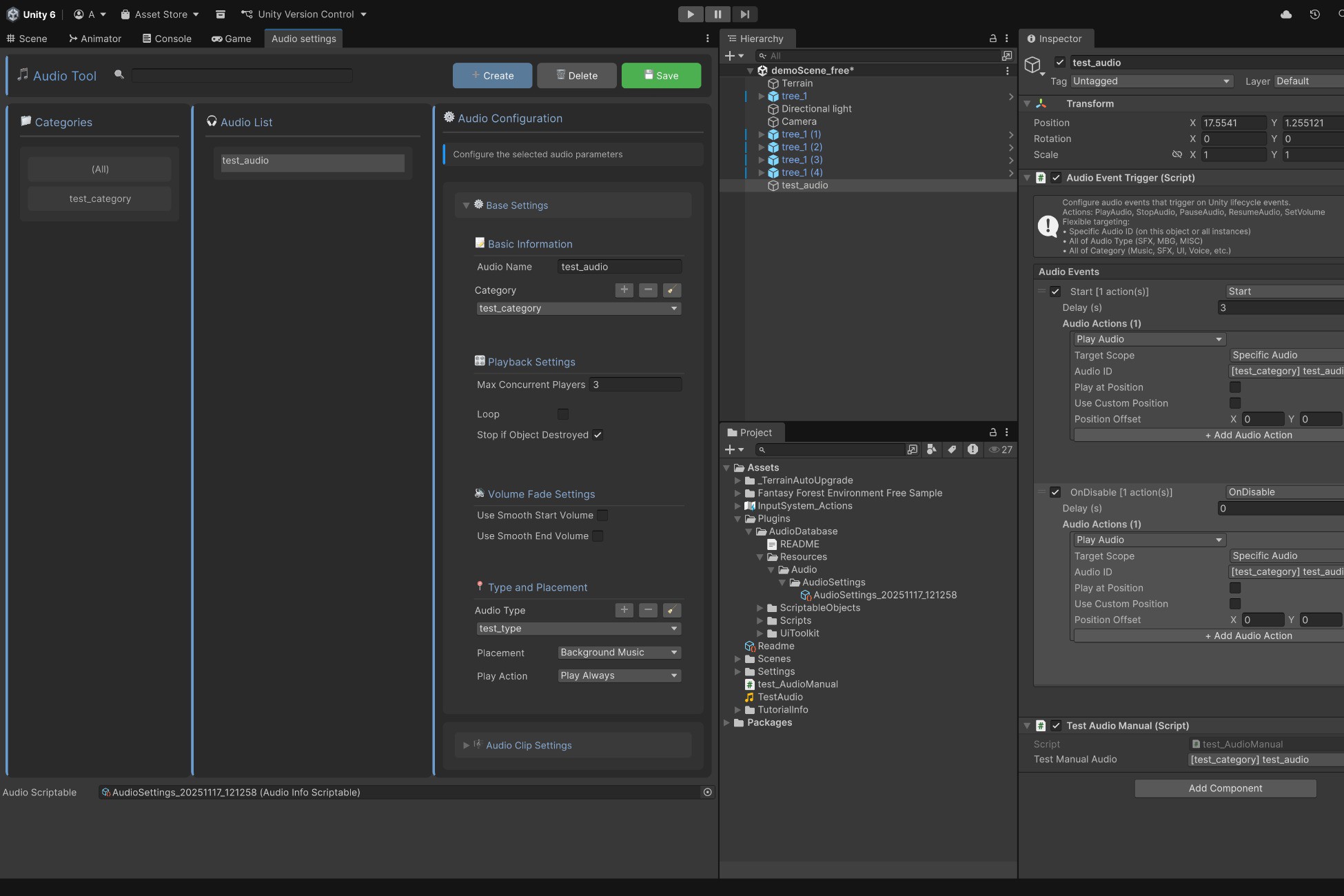
Modern UI Toolkit editor with search and filtering
Organize audio by custom Categories (Music, SFX, UI, Voice) and Types (SFX, BGM, MISC)
Performance Optimized
Automatic object pooling eliminates GC allocations during playback
Handles 50+ concurrent sources on mobile, 200+ on PC
Built for performance-critical applications
Advanced Volume Control
Hierarchical volume multipliers (Category × Type × Clip)
Real-time adjustments during gameplay
Smooth fade in/out with AnimationCurves
Per-category and per-type pitch control
Flexible Configuration
Multiple audio clip variants with weighted random selection
Concurrent playback limits prevent audio spam
Full 3D spatial audio support (doppler, reverb, rolloff, spread)
Loop settings with automatic fade
Event System
Component-based AudioEventTrigger for no-code audio
Trigger on lifecycle events (Awake, Start, OnDestroy, etc.)
Physics events (OnCollisionEnter, OnTriggerEnter - 2D/3D)
Mouse events (OnMouseDown, OnMouseEnter, OnMouseExit)
Custom named events
Actions: Play, Stop, Pause, Resume, SetVolume with scoping
Quick Start
Open Tools > Audio > Config AudioDataBase
Click "Create", name your audio, assign AudioClip
Click "Save"
Use in code: AudioManager.Instance.Play(gameObject, audioID);
What's Included
AudioManager singleton
UI Toolkit editor window
AudioEventTrigger component
Custom property drawers
Audio type and category configs
Complete API for play/stop/pause/resume
Comprehensive documentation with examples
Zero external dependencies. Works out of the box.
Core Features
Centralized Management
Single AudioManager singleton controls all audio
Modern UI Toolkit editor with search and filtering
Organize audio by custom Categories (Music, SFX, UI, Voice) and Types (SFX, BGM, MISC)
Performance Optimized
Automatic object pooling eliminates GC allocations during playback
Handles 50+ concurrent sources on mobile, 200+ on PC
Built for performance-critical applications
Advanced Volume Control
Hierarchical volume multipliers (Category × Type × Clip)
Real-time adjustments during gameplay
Smooth fade in/out with AnimationCurves
Per-category and per-type pitch control
Flexible Configuration
Multiple audio clip variants with weighted random selection
Concurrent playback limits prevent audio spam
Full 3D spatial audio support (doppler, reverb, rolloff, spread)
Loop settings with automatic fade
Event System
Component-based AudioEventTrigger for no-code audio
Trigger on lifecycle events (Awake, Start, OnDestroy, etc.)
Physics events (OnCollisionEnter, OnTriggerEnter - 2D/3D)
Mouse events (OnMouseDown, OnMouseEnter, OnMouseExit)
Custom named events
Actions: Play, Stop, Pause, Resume, SetVolume with scoping
Quick Start
Open Tools > Audio > Config AudioDataBase
Click "Create", name your audio, assign AudioClip
Click "Save"
Use in code: AudioManager.Instance.Play(gameObject, audioID);
What's Included
AudioManager singleton
UI Toolkit editor window
AudioEventTrigger component
Custom property drawers
Audio type and category configs
Complete API for play/stop/pause/resume
Comprehensive documentation with examples
Zero external dependencies. Works out of the box.