About Audio Forge Pro for unity
- Tools, Systems & Learning > Development Tools & Automation
A professional audio workstation built directly into the Unity Editor.
Stop switching between Unity and an external DAW every time an AudioClip needs editing.
Audio Forge Pro gives you a focused audio production workflow inside Unity. Edit waveforms, clean recordings, shape sound with parametric EQ, inspect frequency content, remove background noise, batch-process clips, and export production-ready WAV files — without leaving your project.
No external DAW. No unnecessary re-importing. No broken AudioClip references.
Waveform Editor
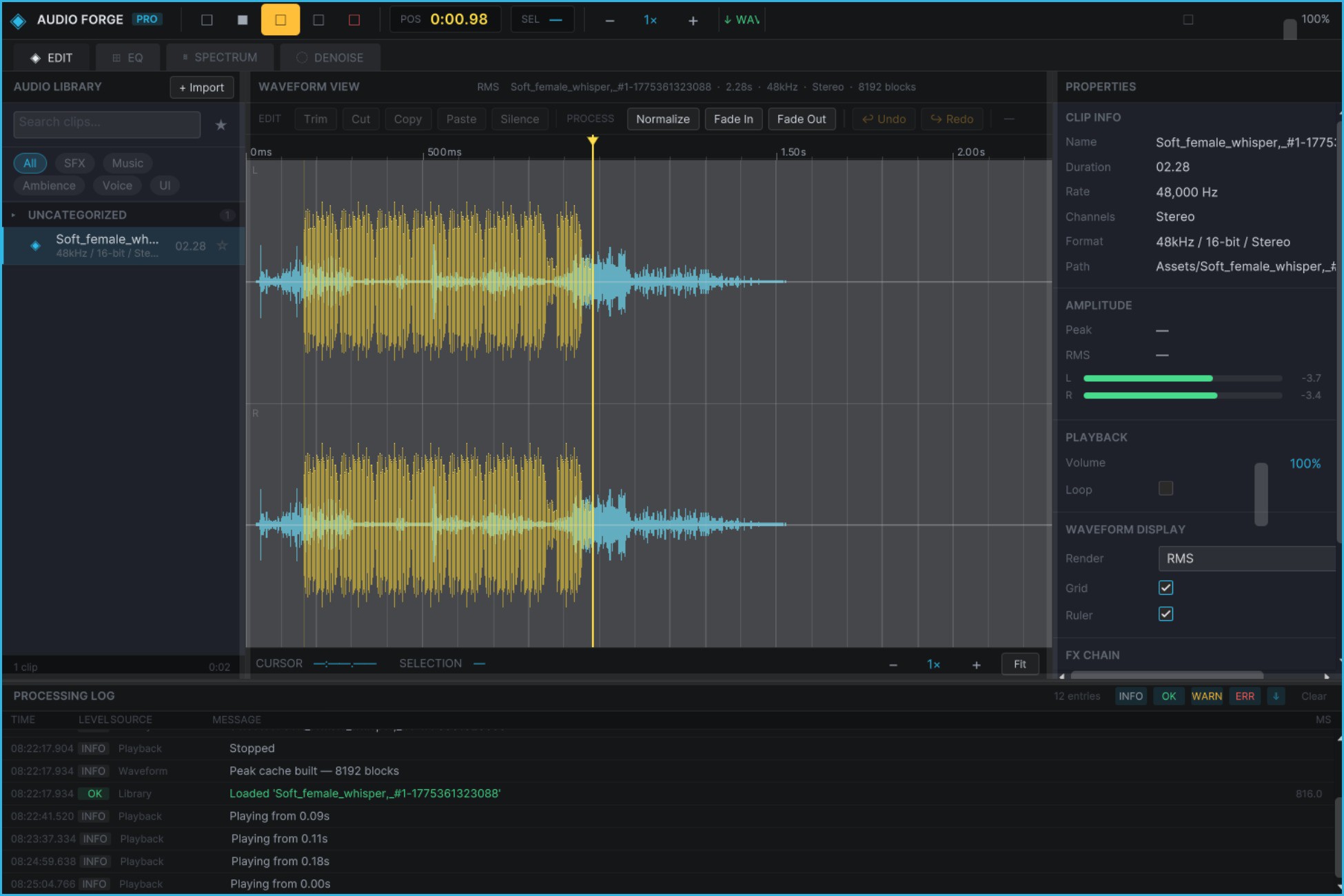
Edit AudioClips directly inside the Unity Editor with a responsive dual-channel waveform view.
Cut, Copy & Paste with full undo support
Trim clips to the selected region
Silence any selected section
Normalize to 0 dBFS or a custom target
Fade In / Fade Out with adjustable selections
20-level undo/redo history
Click to position the playhead
Scroll to zoom through the waveform
Right-click drag to select regions
Real-time oscilloscope overlay during playback
Waveforms are rendered using baked Texture2D data, keeping waveform visualization lightweight during editing.
8-Band Parametric EQ
Shape the character of your audio with an interactive 8-band parametric equalizer.
Drag frequency-response handles directly on the curve to adjust bands visually. Right-drag to control Q/bandwidth.
Each band supports:
Peak · Low Shelf · High Shelf · Low Pass · High Pass · Notch · All Pass
Includes 12 factory presets:
Flat
Vocal Presence
Bass Boost
Air
Room Correction
Telephone
Warm
Punchy
High-Pass 80Hz
Low-Pass 8kHz
Remove Mud
Game SFX
Apply to Clip performs offline biquad processing directly on the clip's PCM data. An undo snapshot is created before processing so you can safely experiment.
Real-Time Spectrum Analyzer
See exactly what is happening in your audio while it plays.
Audio Forge Pro provides live FFT analysis with automatic switching between the active AudioSource and the full AudioListener mix.
Logarithmic frequency scale: 20 Hz – 20 kHz
dB scale: −90 to 0 dBFS
Bars, Line and Filled display modes
Peak hold with decay
Cursor readout for frequency and dB
FFT sizes from 64 to 8192
Six window functions, including Blackman-Harris
Use it to identify excessive low end, harsh frequencies, unwanted peaks, and other problems without leaving Unity.
Spectral Noise Reduction
Clean recordings without sending them through another application.
Select a section containing only the unwanted background noise and capture it as a noise profile. Audio Forge Pro then uses spectral subtraction to reduce that noise across the clip or selected region.
Three controls give you direct control over the result:
Strength — controls the amount of noise reduction
Spectral Floor — prevents excessive signal removal
Smoothing — reduces musical-noise artifacts between frames
Noise reduction is fully integrated with the undo system, so destructive processing remains reversible.
WAV Export
Export processed audio directly from the Unity Editor.
Export an entire clip or only the current selection with:
16-bit PCM
32-bit Float
Stereo or mono mix-down
Optional normalization
Export beside the source AudioClip
Custom output folder
Save dialog
Optional automatic re-import into the Unity Project
Audio Library
Keep your project's audio assets organized inside a persistent searchable library.
Track AudioClips using:
Categories
Tags
Favorites
Metadata
Search and filtering
The library persists across Unity domain reloads and assembly recompiles.
Import selected AudioClips from the Project window with a single action.
Batch Processing
Process multiple AudioClips without repeating the same operation manually.
Build a processing pipeline and apply it to the active clip or an entire selection of library assets.
Monitor processing through the integrated queue panel and handle large batches from one workspace.
Designed for Game Audio Workflows
Audio Forge Pro is built around a simple principle:
If the audio belongs in your Unity project, you shouldn't have to leave Unity to prepare it.
Use it for:
Game SFX
Voice recordings
Dialogue cleanup
UI sounds
Ambience
Music preparation
Prototype audio
Rapid iteration
Batch asset processing
Technical Details
Unity: 2021.3 LTS or newer
Recommended: Unity 2022.3 / 2023.x
Architecture: Editor-only
Runtime build impact: None
Dependencies: None
Native plugins: None
Third-party packages: None
Source included: 52 C# source files
Assembly Definitions: RuntimeLabs.AudioForge.Runtime + RuntimeLabs.AudioForge.Editor
Platforms: All Unity Editor-supported platforms
Keyboard shortcuts: Ctrl+X, Ctrl+C, Ctrl+V, Ctrl+Z, Ctrl+Y, Space, Ctrl+1–4, Ctrl+E and more
What's Included
Waveform Rendering
WaveformPeakCache
WaveformTextureBuilder
RealtimeWaveformCapture
PCM Editing
AudioEditBuffer
AudioEditOperations
AudioEditSnapshot
Parametric EQ
ParametricEqPanel
EqFrequencyResponseRenderer
AudioMixerEqBridge
Spectrum Analysis
SpectrumCapture
SpectrumRenderer
SpectrumAnalyserPanel
Noise Reduction
NoiseProfile
SpectralSubtractor
NoiseReductionPanel
WAV Export
WavExportOperation
WavExportPanel
WavExportSettings
Audio Library
AudioLibraryDatabase
AudioClipEntry
AudioLibraryPanel
Batch Processing
AudioProcessingManager
ProcessingQueuePanel
Audio Production Without Leaving Unity
Edit. Analyze. Clean. Process. Export.
All from one workspace, directly inside the Unity Editor.
Stop switching between Unity and an external DAW every time an AudioClip needs editing.
Audio Forge Pro gives you a focused audio production workflow inside Unity. Edit waveforms, clean recordings, shape sound with parametric EQ, inspect frequency content, remove background noise, batch-process clips, and export production-ready WAV files — without leaving your project.
No external DAW. No unnecessary re-importing. No broken AudioClip references.
Waveform Editor
Edit AudioClips directly inside the Unity Editor with a responsive dual-channel waveform view.
Cut, Copy & Paste with full undo support
Trim clips to the selected region
Silence any selected section
Normalize to 0 dBFS or a custom target
Fade In / Fade Out with adjustable selections
20-level undo/redo history
Click to position the playhead
Scroll to zoom through the waveform
Right-click drag to select regions
Real-time oscilloscope overlay during playback
Waveforms are rendered using baked Texture2D data, keeping waveform visualization lightweight during editing.
8-Band Parametric EQ
Shape the character of your audio with an interactive 8-band parametric equalizer.
Drag frequency-response handles directly on the curve to adjust bands visually. Right-drag to control Q/bandwidth.
Each band supports:
Peak · Low Shelf · High Shelf · Low Pass · High Pass · Notch · All Pass
Includes 12 factory presets:
Flat
Vocal Presence
Bass Boost
Air
Room Correction
Telephone
Warm
Punchy
High-Pass 80Hz
Low-Pass 8kHz
Remove Mud
Game SFX
Apply to Clip performs offline biquad processing directly on the clip's PCM data. An undo snapshot is created before processing so you can safely experiment.
Real-Time Spectrum Analyzer
See exactly what is happening in your audio while it plays.
Audio Forge Pro provides live FFT analysis with automatic switching between the active AudioSource and the full AudioListener mix.
Logarithmic frequency scale: 20 Hz – 20 kHz
dB scale: −90 to 0 dBFS
Bars, Line and Filled display modes
Peak hold with decay
Cursor readout for frequency and dB
FFT sizes from 64 to 8192
Six window functions, including Blackman-Harris
Use it to identify excessive low end, harsh frequencies, unwanted peaks, and other problems without leaving Unity.
Spectral Noise Reduction
Clean recordings without sending them through another application.
Select a section containing only the unwanted background noise and capture it as a noise profile. Audio Forge Pro then uses spectral subtraction to reduce that noise across the clip or selected region.
Three controls give you direct control over the result:
Strength — controls the amount of noise reduction
Spectral Floor — prevents excessive signal removal
Smoothing — reduces musical-noise artifacts between frames
Noise reduction is fully integrated with the undo system, so destructive processing remains reversible.
WAV Export
Export processed audio directly from the Unity Editor.
Export an entire clip or only the current selection with:
16-bit PCM
32-bit Float
Stereo or mono mix-down
Optional normalization
Export beside the source AudioClip
Custom output folder
Save dialog
Optional automatic re-import into the Unity Project
Audio Library
Keep your project's audio assets organized inside a persistent searchable library.
Track AudioClips using:
Categories
Tags
Favorites
Metadata
Search and filtering
The library persists across Unity domain reloads and assembly recompiles.
Import selected AudioClips from the Project window with a single action.
Batch Processing
Process multiple AudioClips without repeating the same operation manually.
Build a processing pipeline and apply it to the active clip or an entire selection of library assets.
Monitor processing through the integrated queue panel and handle large batches from one workspace.
Designed for Game Audio Workflows
Audio Forge Pro is built around a simple principle:
If the audio belongs in your Unity project, you shouldn't have to leave Unity to prepare it.
Use it for:
Game SFX
Voice recordings
Dialogue cleanup
UI sounds
Ambience
Music preparation
Prototype audio
Rapid iteration
Batch asset processing
Technical Details
Unity: 2021.3 LTS or newer
Recommended: Unity 2022.3 / 2023.x
Architecture: Editor-only
Runtime build impact: None
Dependencies: None
Native plugins: None
Third-party packages: None
Source included: 52 C# source files
Assembly Definitions: RuntimeLabs.AudioForge.Runtime + RuntimeLabs.AudioForge.Editor
Platforms: All Unity Editor-supported platforms
Keyboard shortcuts: Ctrl+X, Ctrl+C, Ctrl+V, Ctrl+Z, Ctrl+Y, Space, Ctrl+1–4, Ctrl+E and more
What's Included
Waveform Rendering
WaveformPeakCache
WaveformTextureBuilder
RealtimeWaveformCapture
PCM Editing
AudioEditBuffer
AudioEditOperations
AudioEditSnapshot
Parametric EQ
ParametricEqPanel
EqFrequencyResponseRenderer
AudioMixerEqBridge
Spectrum Analysis
SpectrumCapture
SpectrumRenderer
SpectrumAnalyserPanel
Noise Reduction
NoiseProfile
SpectralSubtractor
NoiseReductionPanel
WAV Export
WavExportOperation
WavExportPanel
WavExportSettings
Audio Library
AudioLibraryDatabase
AudioClipEntry
AudioLibraryPanel
Batch Processing
AudioProcessingManager
ProcessingQueuePanel
Audio Production Without Leaving Unity
Edit. Analyze. Clean. Process. Export.
All from one workspace, directly inside the Unity Editor.